
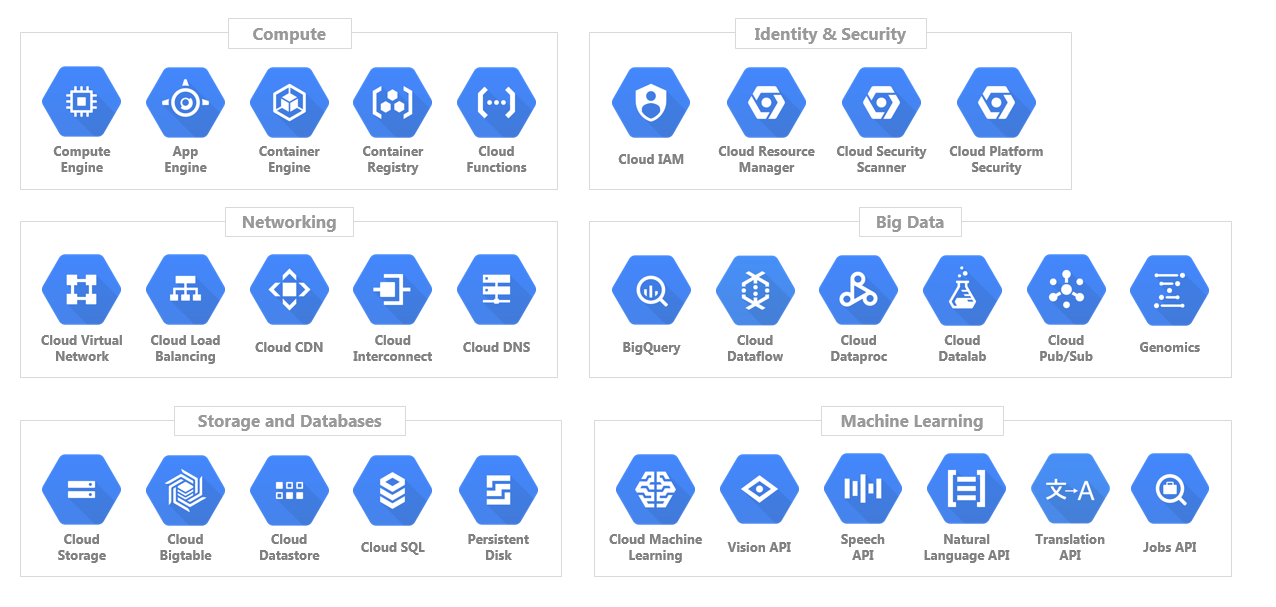
Google Cloud Platform, usually shortened to GCP or Google Cloud, includes hundreds of services. That is useful once you know what you are building, but it can be hard to navigate when you are just trying to choose the right starting point.
This page is a practical map of the main Google Cloud service families. It is not trying to list every product. The goal is to help you decide which service to look at first for common workloads: virtual machines, containers, storage, databases, analytics, messaging, AI, security, and operations.
TL;DR
- Use Compute Engine when you need full virtual-machine control.
- Use Cloud Run when you want to run containers without managing servers or Kubernetes.
- Use GKE when you need managed Kubernetes.
- Use Cloud Storage for objects, files, backups, static assets, and data landing zones.
- Use Cloud SQL for managed MySQL, PostgreSQL, or SQL Server.
- Use BigQuery for analytics and large-scale SQL reporting.
- Use Pub/Sub for event-driven systems and messaging.
- Use Vertex AI when you need managed AI and machine-learning workflows.
Source check – 1 June 2026: Google’s products at a glance page groups current services across AI and ML, application hosting, compute, data analytics, databases, networking, observability, security, storage, and cross-product tools. Check the official product page and launch stage before using a service for production. Google’s service-specific terms explain that pre-GA offerings such as Preview, Alpha, Beta, Early Access, or Experimental features may not have the same support, SLA, or stability expectations as GA services.
On This Page
- Which Google Cloud service should I use?
- How Google Cloud is organised
- Compute and application hosting
- Storage and databases
- Networking and security
- Data, analytics, and messaging
- AI and machine learning
- Operations and developer tools
- Beginner learning path
Which Google Cloud Service Should I Use?
If you are new to Google Cloud, start with the outcome you need rather than the product catalogue. This table gives you the most useful first service to evaluate for common situations.
| Need | Start with | Why |
|---|---|---|
| Run a traditional server or lift-and-shift workload | Compute Engine | It gives you full virtual-machine control over operating system, disk, network, and runtime. |
| Run a container without managing servers | Cloud Run | It is the simplest first choice for containerised web apps, APIs, jobs, and event-driven services. |
| Run Kubernetes | Google Kubernetes Engine (GKE) | It gives you managed Kubernetes while still exposing the Kubernetes model. |
| Store files, static assets, backups, or raw data | Cloud Storage | It is durable object storage and is often the first storage service a new project needs. |
| Use a familiar relational database | Cloud SQL | It provides managed MySQL, PostgreSQL, and SQL Server. |
| Build a global relational application | Spanner | It is designed for globally distributed relational workloads that need strong consistency. |
| Use a document database for web or mobile apps | Firestore | It is a managed NoSQL document database with mobile and web application use cases. |
| Analyze large datasets with SQL | BigQuery | It is Google’s managed analytics warehouse and is often the fastest route to reporting at scale. |
| Connect services with events | Pub/Sub | It decouples publishers and subscribers for event-driven systems. |
| Build streaming or batch data pipelines | Dataflow | It handles managed stream and batch processing without running your own processing cluster. |
| Build, tune, or deploy AI/ML workflows | Vertex AI | It is the main managed platform for model development, deployment, and AI workflows. |
| Monitor production services | Cloud Monitoring and Cloud Logging | They are the core observability tools for metrics, logs, dashboards, and alerts. |
| Control access and permissions | IAM | Identity and Access Management is the permission model that protects Google Cloud resources. |
How Google Cloud Is Organised
Before choosing services, it helps to understand a few Google Cloud building blocks. These concepts appear across almost every product.
| Concept | What it means | Why it matters |
|---|---|---|
| Project | A container for resources, APIs, IAM policies, billing, and quotas. | Most learning and test work should start in a dedicated project. |
| Region and zone | Locations where Google Cloud resources run. | Location affects latency, resilience, availability, and cost. |
| API enablement | Many Google Cloud services must be enabled before use. | If a command fails unexpectedly, check whether the API is enabled for the project. |
| IAM | The permission system for users, groups, service accounts, and resources. | Good IAM prevents accidental over-permissioning and production risk. |
| Billing and quotas | Billing controls spend; quotas limit how much of a resource you can use. | Set budgets and alerts before running experiments that create resources. |
Start here: If you are new to Google Cloud, practise in Cloud Shell, install the Google Cloud SDK, and learn the basics of gcloud commands before building a complex environment.
Compute and Application Hosting
Compute is where your code runs. The main decision is how much infrastructure control you want to keep.
| Service | Use it for | Best first use case | Watch out for |
|---|---|---|---|
| Compute Engine | Virtual machines, custom server builds, lift-and-shift workloads, legacy apps. | Running Linux or Windows servers with full OS control. | You manage patching, hardening, scaling approach, and VM lifecycle decisions. |
| Cloud Run | Serverless containers, APIs, web apps, background jobs, event-driven services. | Deploying a containerised app without managing Kubernetes. | Design for stateless workloads and understand request, scaling, and timeout behaviour. |
| Google Kubernetes Engine (GKE) | Managed Kubernetes clusters for container platforms. | Running workloads that already need Kubernetes primitives such as pods, services, ingress, and operators. | Do not choose Kubernetes just because the app uses containers. Cloud Run may be simpler. |
| App Engine | Managed platform-as-a-service web apps. | Simple web applications where you want Google to manage most runtime concerns. | Runtime and platform constraints matter. Check whether your app fits the supported model. |
| Cloud Run functions | Single-purpose functions triggered by HTTP requests or events. | Small automation handlers, webhooks, and glue code. | Keep functions focused. If the app grows into a service, Cloud Run may be cleaner. |
For most beginners building a new web service, compare Cloud Run and Compute Engine first. Move to GKE when you actually need Kubernetes. If you are ready for Kubernetes, see this TurboGeek guide to creating a GKE cluster.
Storage and Databases
Storage choices depend on the shape of your data. Object storage, block storage, file storage, relational databases, and NoSQL databases solve different problems.
| Service | Use it for | Choose it when |
|---|---|---|
| Cloud Storage | Object storage for files, media, backups, logs, data lakes, and static assets. | You need durable storage for objects rather than a mounted file system or relational database. |
| Persistent Disk / Hyperdisk | Block storage attached to VMs. | You are running Compute Engine workloads that need disk volumes. |
| Filestore | Managed NFS file shares. | Applications need a shared file system interface. |
| Cloud SQL | Managed MySQL, PostgreSQL, and SQL Server. | You want a familiar relational database with managed backups, patching, and replication options. |
| AlloyDB for PostgreSQL | High-performance PostgreSQL-compatible workloads. | You need PostgreSQL compatibility with more advanced performance and scale requirements. |
| Spanner | Global relational workloads with strong consistency. | You need horizontal scale and multi-region consistency that traditional SQL deployments struggle to provide. |
| Firestore | NoSQL document storage. | You are building web or mobile apps around document data and application-driven reads/writes. |
| Bigtable | Wide-column NoSQL data at very high scale. | You have time-series, IoT, personalization, or analytical/operational workloads that need low-latency large-scale access. |
| Memorystore | Managed in-memory caching. | You need Redis, Valkey, or Memcached-style cache behaviour around an application. |
A useful first rule: use Cloud Storage for objects, Cloud SQL for normal relational applications, Firestore for document-style apps, and BigQuery for analytics rather than application transactions.
Networking and Security
Networking connects your services. Security controls who can access them and how they are protected.
| Area | Start with | What it does |
|---|---|---|
| Private networking | Virtual Private Cloud (VPC) | Defines networks, subnets, routes, and firewall rules for cloud resources. |
| Internet traffic distribution | Cloud Load Balancing | Routes traffic across backends and supports high availability patterns. |
| Domain name resolution | Cloud DNS | Managed DNS for public and private zones. |
| Content delivery | Cloud CDN or Media CDN | Caches content closer to users to reduce latency and origin load. |
| Private outbound access | Cloud NAT | Lets private resources reach the internet without public IP addresses. |
| Hybrid connectivity | Cloud VPN or Cloud Interconnect | Connects on-premises networks to Google Cloud. |
| Access control | IAM | Controls who can do what on which resources. |
| Encryption keys | Cloud Key Management Service | Manages cryptographic keys for supported Google Cloud services. |
| Security visibility | Security Command Center | Central view of security findings and posture across Google Cloud. |
| Web and network protection | Google Cloud Armor | Helps protect web applications and services from DDoS and application-layer attacks. |
For early projects, spend time on IAM, billing alerts, firewall rules, and least-privilege service accounts before chasing advanced security tooling. Most production problems start with basic controls being too loose.
Data, Analytics, and Messaging
Google Cloud is strong in analytics and event-driven systems. The important split is between storing application data, moving events, processing streams, and analyzing data.
| Service | Use it for | Good first scenario |
|---|---|---|
| BigQuery | Managed data warehouse and analytics with SQL. | Analyze logs, product data, billing data, marketing data, or application events. |
| Pub/Sub | Asynchronous messaging between systems. | Decouple services so one system can publish an event and many consumers can react. |
| Dataflow | Managed streaming and batch data processing. | Transform incoming events or run ETL pipelines without managing processing servers. |
| Dataproc | Managed Spark and Hadoop ecosystem workloads. | Run existing Spark/Hadoop jobs in Google Cloud. |
| BigQuery Data Transfer Service | Scheduled imports into BigQuery. | Bring data from supported SaaS tools or storage systems into BigQuery. |
| Looker / Looker Studio | Dashboards and business intelligence. | Turn data into reports and reusable business views. |
If you are learning, try this sequence: send events to Pub/Sub, write them into BigQuery, then build a simple dashboard or query workflow. That teaches messaging, analytics, permissions, and cost controls in one small project.
AI and Machine Learning
Google Cloud’s AI services now cover a wide range of use cases, from managed model development to ready-made APIs for text, speech, documents, images, and translation. The key is to start with the smallest service that solves the problem.
| Need | Start with | Why |
|---|---|---|
| Build or deploy ML models | Vertex AI | Managed platform for model development, training, deployment, monitoring, and AI workflows. |
| Use generative AI in Google Cloud workflows | Vertex AI and Gemini-related services | Central place to evaluate Google’s managed model and agent tooling. |
| Analyze documents | Document AI | Purpose-built extraction and processing for document workflows. |
| Analyze images | Cloud Vision API | Pre-trained image analysis without building your own model first. |
| Transcribe speech | Speech-to-Text | Managed speech recognition for audio workflows. |
| Generate speech | Text-to-Speech | Managed voice synthesis from text. |
| Translate content | Cloud Translation | Managed translation API for application workflows. |
| Use AI on warehouse data | BigQuery AI / BigQuery ML | Keeps analysis close to data already stored in BigQuery. |
Do not start by training a custom model unless you need one. For many applications, a managed API, Vertex AI workflow, or BigQuery-based model is faster and easier to operate.
Operations and Developer Tools
These tools help you build, deploy, observe, and manage cloud resources. They are not optional once an environment moves beyond experiments.
| Area | Tools | Use them for |
|---|---|---|
| Browser-based administration | Google Cloud Console | Creating, inspecting, and troubleshooting resources visually. |
| Command line | Google Cloud SDK, gcloud, gsutil, bq | Repeatable administration, scripting, and terminal-driven workflows. |
| Browser terminal | Cloud Shell | Running authenticated commands without setting up a local workstation first. |
| Builds and CI | Cloud Build | Building, testing, and packaging applications. |
| Packages and images | Artifact Registry | Storing container images and language packages. |
| Release orchestration | Cloud Deploy | Managed delivery pipelines for supported deployment targets. |
| Infrastructure as code | Terraform on Google Cloud, Infrastructure Manager, Config Connector | Managing resources as repeatable configuration instead of manual console changes. |
| Monitoring | Cloud Monitoring | Metrics, dashboards, alerts, and uptime checks. |
| Logs | Cloud Logging | Centralised log collection, searching, routing, and retention. |
| Errors and tracing | Error Reporting, Cloud Trace | Debugging application failures and latency across services. |
Existing environments may still contain Deployment Manager templates, but new learners should also look at Terraform on Google Cloud and Infrastructure Manager so they understand current infrastructure-as-code options.
Beginner Learning Path
If you are using this page to plan what to learn first, follow this order. It gives you practical coverage without making you learn every service family at once.
- Create a test project: Set a budget alert and keep experiments away from production.
- Use Cloud Shell: Learn how authenticated command-line access works in the browser.
- Install the Google Cloud SDK: Run basic
gcloudcommands locally. - Create a Cloud Storage bucket: Learn projects, IAM, regions, object storage, and permissions.
- Deploy one small app: Use Cloud Run for a container app or Compute Engine for a VM-based app.
- Add a database: Use Cloud SQL for a normal relational application or Firestore for a document-style app.
- Add logging and monitoring: Create a basic dashboard and alert.
- Try one data service: Use BigQuery for analytics or Pub/Sub for event-driven messaging.
- Move into advanced services: Learn GKE, Vertex AI, Spanner, or Dataflow only when your workload actually needs them.
Related TurboGeek Guides
- What is the Google SDK?
- Effortless Infrastructure Management with Google Cloud Shell
- How to Get Started with gcloud Commands on GCP
- Create a Kubernetes Cluster on GCP: A Step-by-Step Guide
- What Is Google Pub/Sub and How Does It Work?
- GCP BigTable: The NoSQL Powerhouse
- How to Migrate from Datastore to Firestore
- Resource Monitoring with StackDriver: Practical Guide
Conclusion
The easiest way to understand Google Cloud is not to memorise every product. Start with the workload: compute, storage, data, networking, security, AI, or operations. Then choose the smallest managed service that solves the problem.
For most beginners, the first useful services to learn are Cloud Shell, Google Cloud SDK, Cloud Storage, Cloud Run, Compute Engine, Cloud SQL, BigQuery, Pub/Sub, IAM, Cloud Monitoring, and Cloud Logging. Once those make sense, the larger platform becomes much easier to navigate.
Leave a Reply