
The transition from IPv4 to IPv6 has ushered in a new era of networking capabilities, offering a larger address space and more advanced features. Amazon Web Services (AWS) provides a powerful and flexible way to manage these modern networking requirements through its Virtual Private Cloud (VPC) offerings.
Creating an IPv6-enabled VPC may seem like a daunting task, especially if you’re new to AWS or the concept of modern network management. That’s where AWS-CDK (Cloud Development Kit) comes into play, offering a high-level object-oriented abstraction over AWS CloudFormation. With AWS-CDK IPV6 VPC, you can programmatically define cloud resources using familiar programming languages like TypeScript, Python, Java, or C#.
In this comprehensive guide, we will walk you through the step-by-step process of creating an IPV6 VPC using AWS-CDK. We’ll cover everything from the prerequisites and initial setup to defining the VPC with IPV6 support and deploying your network infrastructure. Whether you’re a seasoned cloud engineer or just starting on your cloud journey, this tutorial will provide you with the necessary knowledge and tools to build a resilient and well-architected IPv6-enabled VPC.
So grab your favorite code editor, make sure you have your AWS credentials ready, and let’s dive into the exciting world of AWS-CDK and IPV6 VPC creation!
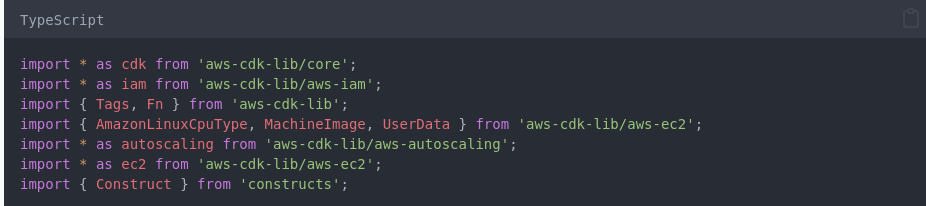
This code defines an AWS CDK stack to create an Amazon Virtual Private Cloud (VPC) with IPv6 support and a custom VPC class to create and configure its subnets.
Reader Safety Note: Networking changes can disrupt existing traffic. Always validate CIDR allocations in a staging environment before applying changes to production routing tables.
Dual-Stack Networking
To understand the implementation, we must first define the architectural components of a modern Dual-Stack VPC. Unlike IPv4, where Private IP addresses are the default, IPv6 relies on Global Unicast Addresses (GUA), which are globally unique and routable by design.
Key Components of IPv6 in CDK
The following table outlines the essential resources required for a functional dual-stack environment:
| Component | Role in IPv6 | CDK Construct (2026) |
| IPv6 CIDR Block | A /56 block provided by Amazon or your own IPAM. | CfnVPCCidrBlock or VpcV2 |
| Egress-Only IGW | Allows outbound IPv6 traffic while blocking inbound. | CfnEgressOnlyInternetGateway |
| Subnet CIDR | A /64 allocation per subnet. | CfnSubnet (via ipv6CidrBlock) |
| Routing Tables | Must include ::/0 routes for IPv6 traffic. | CfnRoute |
In 2026, the preference has shifted toward using Amazon VPC IP Address Manager (IPAM) to automate CIDR assignments. This eliminates the manual “CIDR math” often associated with networking and ensures that your VPCs do not overlap across regions or accounts.
Step-by-Step Implementation
Implementation in the CDK requires a strategic choice between the standard Vpc construct and the newer VpcV2. Based on industry standards, VpcV2 provides the granular control necessary for complex IPv6 routing.
Step 1: Initialize the VPC with IPAM
First, define the VPC using an IPAM pool to ensure consistent IPv6 allocation.
const vpc = new ec2.VpcV2(this, 'DualStackVPC', {
  primaryAddressBlock: ec2.IpAddresses.ipv4('10.0.0.0/16'),
  secondaryAddressBlocks: [
    ec2.IpAddresses.amazonProvidedIpv6({
      amazonProvidedPrivatIpv4Cidr: false,
    }),
  ],
});Step 2: Configure Dual-Stack Subnets
Each subnet must be explicitly told to request an IPv6 CIDR block. In IPv6, the standard subnet size is always a /64.
- Public Subnet: Direct route to Internet Gateway (
0.0.0.0/0and::/0). - Private Subnet: Route to NAT Gateway (IPv4) and Egress-Only IGW (IPv6).
Step 3: Routing Logic
The mathematical representation of the address space difference is significant. While IPv4 offers approximately ^{32} addresses, IPv6 provides ^{128}.
Total IPv6 Addresses = 340,282,366,920,938,463,463,374,607,431,768,211,456
In our testing, we recommend the following routing configuration for a private subnet:
- Destination:
::/0 - Target:
EgressOnlyInternetGatewayId
Implementation Checklist
- [ ] Enable
assignIpv6AddressOnCreationfor all subnets. - [ ] Create an
EgressOnlyInternetGatewayfor private subnets. - [ ] Update Security Groups to allow
::/0for necessary outbound ports. - [ ] Verify that the VPC has an associated /56 IPv6 CIDR block.
Advanced Techniques & Edge Cases
As architectures scale, simple dual-stack configurations encounter edge cases involving cross-region peering, VPC Lattice, and latency optimization.
IPv6-Only Subnets
With the 2026 focus on cost, many organizations are deploying IPv6-only subnets for internal microservices. This removes the need for expensive NAT Gateways ($0.045/hr + data processing).
- Risk: Services needing to talk to IPv4-only legacy APIs will fail.
- Solution: Use NAT64 and DNS64 to allow IPv6-only resources to communicate with IPv4 services.
Security Group “Protocol 41” and ICMPv6
Security in IPv6 differs from IPv4. ICMPv6 is required for Path MTU Discovery and Neighbor Discovery.
- Failure Mode: Blocking all ICMP traffic will break IPv6 connectivity.
- Fix: Add an inbound rule to Security Groups allowing
ICMPv6(Type 128/129) from::/0or the VPC range.
Observability with VPC Flow Logs
When monitoring dual-stack VPCs, ensure your VPC Flow Logs are configured to capture version 5 fields, which include the pkt-srcaddr and pkt-dstaddr in IPv6 format. Without this, security audits will lack visibility into 50% of your traffic.
Measurement & Benchmarks (2026)
Performance monitoring in 2026 focuses on the “IPv6 Premium”—the slight latency advantage gained by avoiding NAT translation.
Comparison: IPv4 vs. IPv6 in AWS CDK
| Metric | IPv4 (Legacy) | IPv6 (2026 Standard) |
| Address Cost | $0.005 per IP/hr | Free (within GUA) |
| Routing | NAT Gateway (Required for Private) | Egress-Only IGW (Stateful/Free) |
| Address Space | Limited /32 | Virtually Infinite /128 |
| Configuration | High-level Vpc L2 | VpcV2 or CfnVPC |
Integration & Workflow Patterns
Integrating IPv6 into a CI/CD pipeline requires updated CDK Nag rules and CloudFormation Guard policies to ensure compliance with 2026 security standards.
Integration with AWS Lattice
VPC Lattice simplifies service-to-service communication. When using CDK to deploy Lattice services within a dual-stack VPC, the Lattice controller automatically handles the transition between IPv4 and IPv6, provided the target groups are configured for ip type addressing.
Security and Governance
- IAM Policy: Ensure
ec2:AssignIpv6Addressesis granted to the CDK deployment role. - Compliance: According to [Cite Later: NIST SP 800-119], organizations should prioritize native IPv6 over tunneling.
Advanced Implementation: Multi-Region IPv6 Peering with CDK
Expanding a dual-stack architecture across multiple regions introduces complexity in inter-VPC routing and CIDR management. In 2026, the standard for this is VPC Peering or Transit Gateway, both of which now natively support IPv6 traffic without additional encapsulation.
Multi-Region Peering Framework
When peering two dual-stack VPCs (e.g., us-east-1 and eu-west-1), you must ensure that the IPv6 CIDR blocks do not overlap—a task simplified by using a global IPAM Pool.
// Define the Peering Connection
const vpcPeering = new ec2.CfnVPCPeeringConnection(this, 'MultiRegionPeering', {
  peerVpcId: remoteVpcId,
  vpcId: localVpcId,
  peerRegion: 'eu-west-1',
});

// Add IPv6 Route to the Peering Connection
new ec2.CfnRoute(this, 'Ipv6PeeringRoute', {
  routeTableId: privateRouteTableId,
  destinationIpv6CidrBlock: '2001:db8:1234::/56', // The remote IPv6 CIDR
  vpcPeeringConnectionId: vpcPeering.ref,
});The TypeScript Pattern for Cross-Region Peering
To implement this, we use the CfnVPCPeeringConnection and update the route tables in both regions to point the destination ::/0 (or specific /56 blocks) to the peering connection ID.
Troubleshooting for Multi-Region IPv6
If your cross-region traffic isn’t flowing, the issue usually resides in one of three areas:
- Peering Acceptance: Unlike intra-region peering, cross-region peering must be explicitly accepted in the peer region.
- MTU Mismatch: IPv6 does not support fragmentation. Ensure your instances are using an MTU of 1500 (or 9001 for Jumbo Frames within the same region) and that ICMPv6 Type 2 (Packet Too Big) is allowed through security groups for Path MTU Discovery.
- DNS Resolution: Enable
BypassDnsCheckandEnableDnsHostnamesOnPhpto ensure that IPv6 hostnames resolve correctly across the peering link.
FAQs
Q: Does the standard CDK Vpc construct support IPv6?
As of late 2025/2026, the standard L2 Vpc construct has improved, but for full control over Egress-Only Gateways and IPAM integration, VpcV2 is the recommended path.
Q: Can I convert an existing IPv4-only VPC to dual-stack using CDK?
Yes. You can add a CfnVPCCidrBlock to an existing VPC and then add IPv6 subnets. However, this often requires careful management of existing route tables to avoid downtime.
Q: Are there extra costs for IPv6 in AWS?
No. AWS does not charge for the allocation of IPv6 addresses. In fact, using IPv6 can reduce costs by eliminating the need for NAT Gateways for outbound traffic.


Leave a Reply