
TL;DR
- VPC peering connects two VPCs so resources can talk over private IPs — same region or cross-region.
- In CDK, the high-level
ec2.CfnVPCPeeringConnectionhandles request + acceptance in one stack when both VPCs are in the same account. - Cross-account peering is a two-step dance: requester stack initiates, accepter stack accepts using the connection ID.
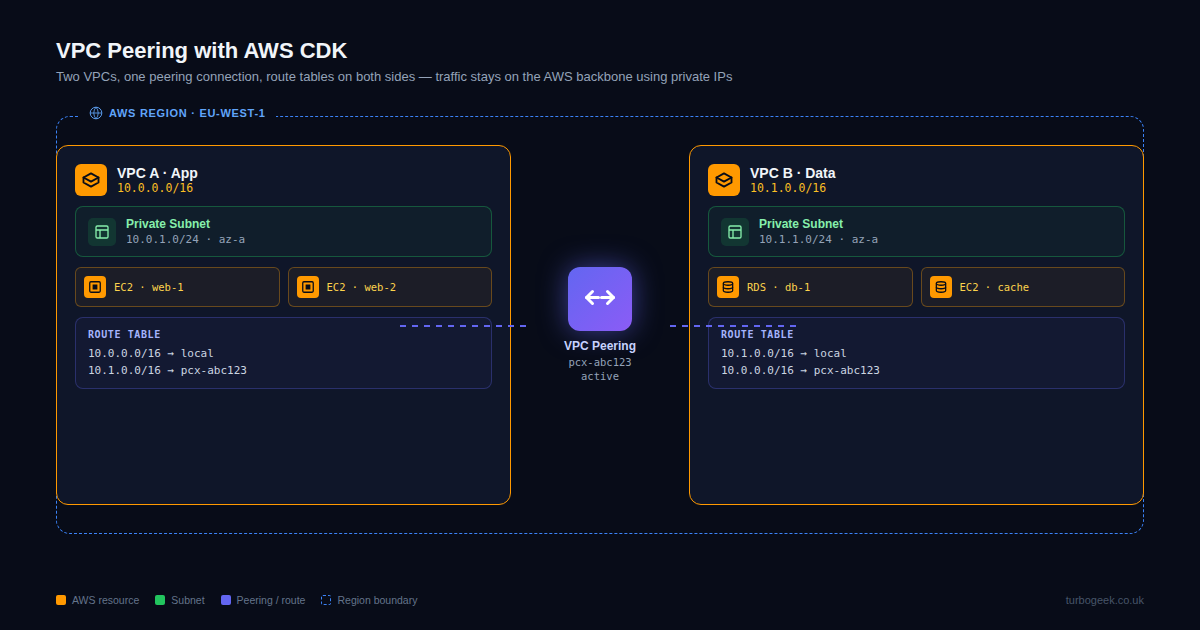
- Don’t forget the route tables — peering creates the connection, but routes have to be added on both sides.
What is implementing VPC peering with AWS CDK?
VPC peering is an AWS networking primitive that connects two Virtual Private Clouds so traffic between them stays on the AWS backbone using private IP addresses. It’s the simplest answer to “these two VPCs need to talk” — no NAT, no public IP, no internet egress required.
VPC peering does not transit. If A is peered with B and B is peered with C, A cannot reach C through B — you’d need either Transit Gateway or a third A↔C peering. Peering is also non-overlapping: the two VPCs’ CIDR ranges must not overlap. Plan your address space first.
Prerequisites
- AWS CDK v2 installed and bootstrapped in the target account/region.
- Two VPCs with non-overlapping CIDR ranges.
- IAM permissions for
ec2:CreateVpcPeeringConnection,ec2:AcceptVpcPeeringConnection, and route-table updates.
How to use this guide
The sections below walk through the practical commands and options. After the main content you’ll find a Verification block (sanity-check it actually worked), a Troubleshooting block (common error messages and what to do), and Related reading for follow-on topics.

Managing infrastructure as code (IaC) is preferred for reproducibility. Below are the two primary methods to implement peering using AWS CDK in TypeScript.
Method 1: The High-Level Construct (Recommended)
This method is concise and uses CDK’s abstraction to handle the heavy lifting.
import * as ec2 from 'aws-cdk-lib/aws-ec2';

// Define your VPCs
const vpc1 = new ec2.Vpc(this, 'Vpc1', {
  maxAzs: 2,
  cidr: '10.0.0.0/16'
});

const vpc2 = new ec2.Vpc(this, 'Vpc2', {
  maxAzs: 2,
  cidr: '10.1.0.0/16' // Ensure CIDRs do not overlap
});

// Create the peering connection
// vpc1 is the 'Requester', vpc2 is the 'Accepter'
const peeringConnection = vpc1.peer(vpc2, {
  peeringConnectionName: 'Vpc1-to-Vpc2-Peering'
});
Method 2: The Low-Level CfnVPCPeeringConnection
Use this if you need granular control over specific CloudFormation properties or are working with existing VPC IDs that aren’t fully managed by your current CDK stack.
TypeScript
import * as ec2 from 'aws-cdk-lib/aws-ec2';

new ec2.CfnVPCPeeringConnection(this, 'CustomPeering', {
  vpcId: 'vpc-xxxxxx',       // Requester VPC ID
  peerVpcId: 'vpc-yyyyyy',   // Accepter VPC ID
  peerRegion: 'us-east-1',   // Optional: if peering across regions
  peerOwnerId: '123456789012' // Optional: if peering across accounts
});
Validating Your Infrastructure with Jest
You need to verify that your code generates the correct resources before deployment.
Why Test Infrastructure Code?
We use unit tests in CDK to ensure:
- Security Compliance:
Verify that no route tables open0.0.0.0/0to your internal peers unintentionally. - Routing Logic:
Confirm that the peering connection actually exists and links the correct VPC IDs. - Refactoring Safety:
Ensure future changes to your stack don’t accidentally delete the peering connection.
The Jest Test Script
Below is a Jest test script using the aws-cdk-lib/assertions module.
This script simulates the CloudFormation template generation and asserts that a Peering Connection exists and that routes are properly configured.
TypeScript
import * as cdk from 'aws-cdk-lib';
import { Template, Match } from 'aws-cdk-lib/assertions';
import * as MyStack from '../lib/my-stack'; // Import your stack definition

test('VPC Peering Connection Created', () => {
  const app = new cdk.App();
  // INSTANTIATE YOUR STACK HERE
  const stack = new MyStack.MyPeeringStack(app, 'MyTestStack');

  // Create a template from the stack
  const template = Template.fromStack(stack);

  // 1. Assert that the Peering Connection resource exists
  template.resourceCountIs('AWS::EC2::VPCPeeringConnection', 1);

  // 2. Assert that the Route Tables have a route to the peering connection
  // We check for a route that points to a "VpcPeeringConnectionId"
  template.hasResourceProperties('AWS::EC2::Route', {
    VpcPeeringConnectionId: {
      Ref: Match.stringLikeRegexp('^VpcPeering.*') // Matches the logical ID
    }
  });

  // 3. Verify the Peering is between the correct VPCs (Optional specific check)
  // This ensures the "PeerVpcId" property is present
  template.hasResourceProperties('AWS::EC2::VPCPeeringConnection', {
     VpcId: Match.anyValue(),
     PeerVpcId: Match.anyValue()
  });
});
VPC Peering vs. Transit Gateway: Which Should You Choose?
While VPC Peering is excellent for simple, point-to-point connections, it scales poorly. As your infrastructure grows, you might face the “mesh” problem.
- Choose VPC Peering if you have fewer than 10 VPCs and need a simple, cost-effective pipe between them.
- Choose AWS Transit Gateway if you are managing dozens of VPCs. Transit Gateway acts as a cloud router, solving the “transitive peering” limitation by allowing all connected VPCs to talk to each other through a central hub.
Verification
Sanity-check the change actually worked:
- Run
cdk diff— confirm only the peering connection and route entries are added. - After deploy, EC2 console → Peering Connections — status should be
active. - From an EC2 instance in VPC A,
pinga private IP in VPC B — should succeed if routes and security groups allow it.
Troubleshooting
Peering created but traffic doesn’t flow — Routes missing. Add an explicit route in each VPC’s route table pointing the peer CIDR to the peering-connection ID.
Cross-account peering stuck on pending-acceptance — The accepter account needs to call AcceptVpcPeeringConnection using the connection ID. In CDK, deploy the accepter stack with the connection ID passed via SSM parameter or stack output.
CIDR overlap rejected — AWS won’t let you peer overlapping ranges. Re-plan the network or use Transit Gateway with NAT-style translation.
Authoritative sources
References: AWS — What is VPC peering, CDK CfnVPCPeeringConnection reference.
Leave a Reply