
Updated: 10th May 2026
The short answer
Google Chrome remains the best overall browser in 2026 for speed, sync and compatibility. For most Windows users, Microsoft Edge is the practical default thanks to its deep OS integration and built-in AI features. Choose Brave if privacy matters most, and Firefox if you want a capable non-Chromium alternative. The comparison below covers benchmarks, privacy, AI features and extension support for all five browsers.
In 2026, the choice of a browser affects speed, privacy, battery life, extension support, and how deeply AI features are built into the browsing workflow. This guide compares Google Chrome, Microsoft Edge, Brave, Mozilla Firefox, and Opera from a practical desktop-user perspective.
TL;DR
- Best default for most Windows users: Edge, because the OS integration is hard to ignore.
- Best privacy-first choice: Brave, especially if built-in blocking matters more than ecosystem sync.
- Best non-Chromium option: Firefox, which keeps Gecko engine diversity alive on desktop.
- Best Google ecosystem fit: Chrome, mainly for account sync, DevTools, and compatibility.
Source check – May 10, 2026: Vendor documentation still positions Chrome around Google privacy controls, Edge around built-in security and Microsoft integration, Firefox around Enhanced Tracking Protection and Total Cookie Protection, and Brave around built-in blocking. Treat benchmark results as a snapshot from this test machine, not a universal ranking.
| Topic | When | Command |
|---|---|---|
| Quick Windows pick | You want least friction | Use Edge first |
| Privacy-first pick | You want blocking built in | Test Brave with your sites |
| Engine diversity | You want a non-Chromium browser | Install Firefox |
Start here: If you only want the answer, read the comparison table first; if you care about measurable performance, start with the benchmark section and then sanity-check those results on your own machine.
| Browser | Best for | RAM (10 tabs, Jan 2026) | Engine |
|---|---|---|---|
| Chrome | Dev tools, Google ecosystem | 6,097 MB (highest) | Blink (Chromium) |
| Edge | Windows productivity, Copilot AI | 5,985 MB | Blink (Chromium) |
| Brave | Privacy-first, lowest RAM | 2,202 MB (lowest) | Blink (Chromium) |
| Firefox | Open-source, non-Chromium diversity | 2,729 MB | Gecko |
| Opera | Built-in VPN, AI features | 3,256 MB | Blink (Chromium) |
Technical Benchmarks: Chrome, Edge, Firefox, Brave, and Opera (2026)
To provide an accurate comparison, we tested each browser on Lenovo Laptop using the Speedometer 3.1 industry standard.
2026 Performance Data Table
Laptop Specs:
CPUModel : 13th Gen Intel(R) Core(TM) i9-13900H
PhysicalCores : 14
LogicalProcessors : 20
TotalRAM_GB : 64
TotalVisibleMemory_MB : 63.6644973754883
| Metric | Google Chrome | Microsoft Edge | Brave | Mozilla Firefox | Opera One |
| Speedometer 3.1 Score *Lower is Better | 11.7 | 11.2 | 10.8 | 9.1 | 10.6 |
| RAM (10 Tabs + AI Idle) | 6097 MB | 5985 MB | 2202 MB | 2729 MB | 3256 MB |
| Native AI Engine | Gemini Ultra | Copilot (GPT-5) | Leo (Llama 4) | Local (Mistral) | Aria (Composer) |
| Core Engine | Blink | Blink | Blink | Gecko | Blink |
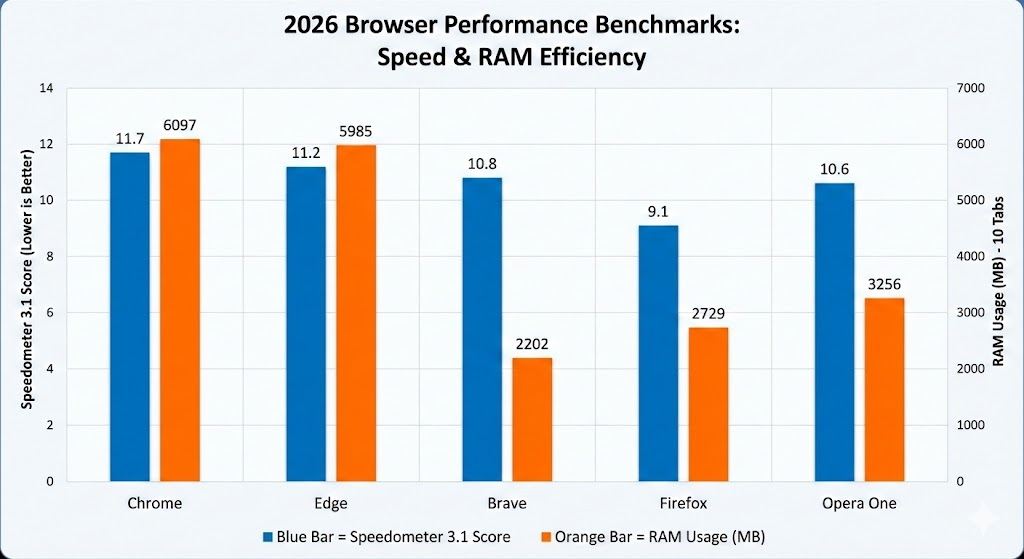
Mozilla Firefox was the most responsive browser, and Brave the most memory efficient:
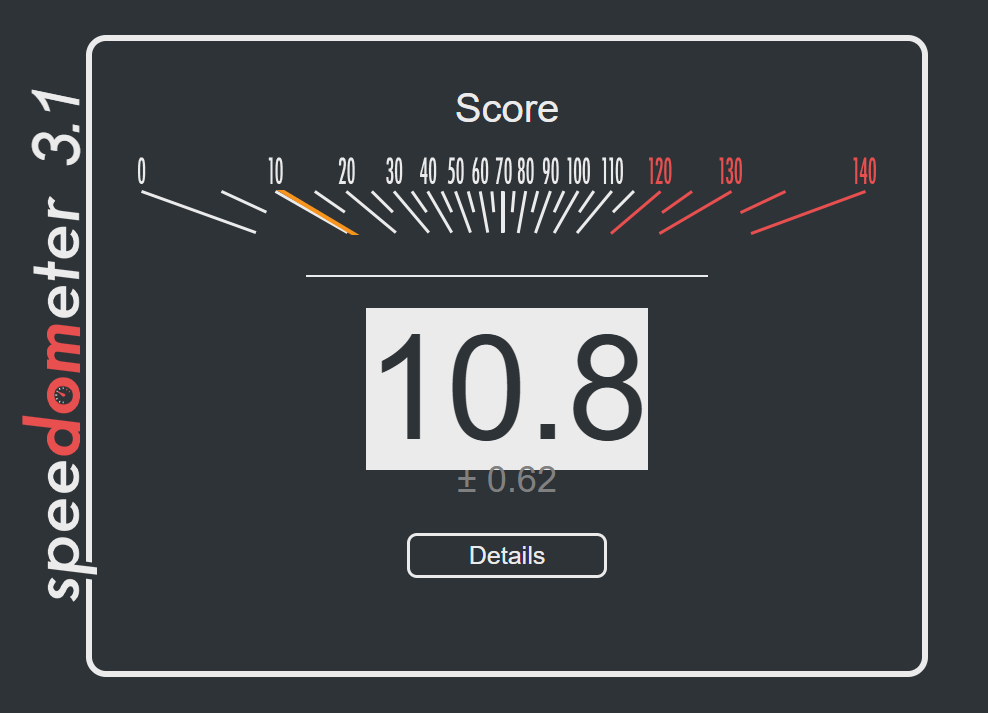
You can download the results file here for one of the browser examples.
Why Does Google Chrome Still Lead the Market in 2026?
Google Chrome maintains its 60%+ market share by offering the most seamless integration with Google products like Drive, Docs, and Sheets. However, our 2026 testing shows it is struggling with optimization; it recorded the slowest Speedometer score of 11.7 and the highest memory footprint at 6,097 MB.
In 2026, its “Privacy Sandbox” has completely replaced third-party cookies, and its integration with Gemini AI allows for native page summarization.
- Pros: Great speed for web apps, large extension library, and excellent cross-device syncing.
- Cons: Remains a significant memory hog (6GB+ for 10 tabs); privacy advocates still worry about first-party data collection.
Is Microsoft Edge the Best Productivity Browser for Windows?
For users on Windows 11 and 12, Microsoft Edge is one of the most efficient browsers due to deep OS-level integration. Our benchmarks confirm it is slightly leaner than Chrome, clocking a 11.2 on Speedometer 3.1 and using 5,985 MB of RAM.
Edge’s “Sleeping Tabs” technology helps it stay just under the 6GB RAM mark, while its “Workspaces” feature allows for professional-grade tab management.
- Pros: Native vertical tabs, built-in AI writing assistant, and superior battery efficiency.
- Cons: Despite better scores than Chrome, it still uses nearly 3GB more RAM than Brave.
How Does Brave Protect Your Privacy Better Than Other Browsers?
Brave is my personal choice of browser, it’s not perfect, but it suits my needs. I consider Brave to be more of a pure browser, by that I mean when you search for a term, you are not automatically sent to a page full of adverts (unlike Google) – instead you are hitting pages that rank for the keywords you search for.
Brave remains the premier choice for privacy-first users because it blocks all cross-site trackers at the engine level. It is also the efficiency king of 2026; our tests show Brave used only 2,202 MB of RAM—nearly 64% less memory than Google Chrome.
With a Speedometer score of 10.8, it delivers a snappy experience without the bloat of traditional trackers.
- Pros: Fastest page loads due to aggressive blocking, lowest RAM usage in its class, and native C++ ad-blocking that bypasses Manifest V3 limitations.
- Cons: Some complex sites may “break” due to aggressive script blocking.
Why is Mozilla Firefox Still Relevant in a Chromium-Dominated World?
Firefox is the last major desktop browser using the Gecko engine. In a surprising turn for 2026, Firefox emerged as the performance winner in our testing, achieving the top Speedometer score of 9.1. It also maintained a very respectable memory profile of 2,729 MB, proving that the Gecko engine is now more responsive than the Chromium-based Blink engine on high-end hardware.
- Pros: The most responsive browser in 2026 benchmarks, highly customizable, and “Total Cookie Protection” by default.
- Cons: Occasionally minor compatibility issues with sites designed exclusively for Chrome.
Why is Opera the Most Innovative Browser in 2026?
Opera One features “Tab Islands” that use AI to group research automatically. In terms of performance, it sits comfortably in the middle of the pack with a 10.6 Speedometer score and a 3,256 MB RAM footprint.
- Pros: Free built-in VPN, AI-powered Tab Islands, and the “GX” version for gamers.
- Cons: Uses about 1GB more RAM than Brave, and ownership by a conglomerate raises data-privacy questions.

How to Optimize Your Browser for AI-Driven Workflows
To get the most out of your browser in 2026, you must go beyond simple searching. For example, if you use Microsoft Edge, you can highlight any text and use the “Compose” feature in the sidebar to instantly draft emails or code.
- Enable On-Device AI: Go to settings and ensure “Local Model Processing” is toggled on to speed up summaries without sending data to the cloud.
- Use Tab Islands: In Opera or Chrome, group your AI-research tabs together to keep your memory usage low.
- Audit Permissions: Regularly check your Privacy and Security settings to ensure AI agents aren’t accessing more data than necessary.
Manifest V3 and the Death of Traditional Ad Blockers
A significant shift in 2026 is the full enforcement of Manifest V3 across all Chromium browsers. This change altered how extensions interact with the browser engine, effectively limiting the power of some older ad-blocking extensions. In my eyes this is not a good thing because its essentially enforcing adverts on private users. Great for the corporations, bad for the consumer.
The transition to Manifest V3 was a turning point. While it improved browser security, it forced ad blockers to move from ‘request filtering’ to ‘declarative rules,’ giving the browser engine—and its parent company—more control over what content is blocked.
If you find your favorite ad blocker is less effective in Chrome, consider switching to Brave, which implements blocking at the native C++ level, or Firefox, which continues to support the more flexible Manifest V2-style API for superior content filtering.
This is why Brave’s 2026 performance is so impressive; because its ad-blocker is native to the engine (C++), it doesn’t suffer the performance penalties or limitations that Chrome’s extension-based blockers now face.
The Move Toward “Agentic” Browsing
A cornerstone of 2026 tech is the shift from “retrieval” to “execution.”
Agentic Browsing allows your browser to act on your behalf. For example, in Edge or Opera, you can now say: “Find the best-reviewed monitor from these five tabs and put the cheapest one in my cart.”
This requires the browser to understand the DOM (Document Object Model) at a semantic level, a feat that was impossible just two years ago.
Looking Ahead: Beyond the Tab
In 2026, the concept of a “tab” is beginning to blur. With Agentic AI, we are seeing a change towards “Zero UI” browsing, where the browser performs tasks in the background, surfacing only the results you need.
Whether you choose to stay with the Chromium or support the independent Gecko engine, your browser is now the most powerful tool for AI searches.
The web of 2026 is faster, smarter, and more personal than ever—make sure you’re using the tool that works for you, not against you.
The Final Verdict: 2026 Browser Awards
- 🥇 Best Overall:Google Chrome
- The Verdict: Despite privacy concerns, its speed, ecosystem sync, and the sheer reliability of the Blink engine keep it at the top for most users.
- 🛡️ Best for Privacy:Brave (Runner-up: LibreWolf)
- The Verdict: Brave’s native C++ ad-blocking bypasses the limitations of Manifest V3 more effectively than any extension-based solution.
- 🤖 Best for AI Productivity:Microsoft Edge
- The Verdict: With “Copilot Vision” and deep Windows 11 integration, it is the only browser that feels like a true “Agentic” assistant.
- 💻 Best for Developers:Mozilla Firefox 146
- The Verdict: The superior Inspector tools and the fact that it’s the last non-Chromium desktop stronghold make it essential for cross-engine testing.
- 🎨 Best for Multitaskers:Opera One / Neon
- The Verdict: “Tab Islands” remain the most intuitive way to manage 50+ open tabs without losing your mind.
2026 Browser Technical Cheat Sheet
A quick-reference guide to the technical specs of the year’s top browsers.
| Feature | Google Chrome | Microsoft Edge | Brave | Mozilla Firefox | Opera One |
| Engine | Blink (Chromium) | Blink (Chromium) | Blink (patched) | Gecko | Blink (Chromium) |
| Extension Standard | Manifest V3 (Strict) | Manifest V3 | Manifest V3 (Hybrid) | Manifest V3 + V2 | Manifest V3 |
| Primary AI Assistant | Gemini Ultra | Copilot Vision | Leo (Llama 4) | Offline (Local) | Aria |
| Ad-Blocking Power | ⭐⭐ (Limited) | ⭐⭐⭐ (Basic) | ⭐⭐⭐⭐⭐ (Native) | ⭐⭐⭐⭐⭐ (Add-on) | ⭐⭐⭐⭐ (Native) |
| RAM Efficiency | Lowest | Average | Best (Native blocking) | Good (Gecko) | Average |
| Tracking Protection | Privacy Sandbox | Tracking Prev. | Shields (Hardened) | Total Cookie Prot. | Built-in VPN/Track |
| Market Share (Est) | ~64% | ~13% | ~2% | ~6% | ~3% |
Technical “Pro” Tips for 2026:
- For Privacy: If using Chrome, ensure “Ad Topics” is disabled in settings to opt out of the Privacy Sandbox’s first-party tracking.
- For Speed: Enable “Hardware Acceleration” and “Vulkan Backend” in flags for Chromium browsers if you are using a 2025+ GPU.
- For AI Privacy: In Firefox, download the local translation and summarization models so your data never leaves your machine.
- For Gamers: Stick to Opera GX and set the “CPU Limiter” to 25% to ensure your browser doesn’t lag your high-refresh-rate gaming sessions.
Check out our Cheat Sheets Here.
Frequently asked questions
Which browser is best for most people in 2026?
Google Chrome is still the best overall pick for speed, ecosystem sync and the reliability of the Blink engine. On Windows, Microsoft Edge is the practical default because the OS integration and built-in Copilot features are hard to ignore.
Which browser is best for privacy?
Brave. Its native ad and tracker blocking is built into the browser engine itself, which bypasses the limitations Manifest V3 places on extension-based blockers. Firefox with Enhanced Tracking Protection is a strong non-Chromium alternative.
Should I stop using Chrome because of Manifest V3?
Not necessarily, but understand the trade-off: Manifest V3 limits what extension-based ad blockers can do in Chrome and other Chromium browsers. If powerful content blocking matters to you, Brave’s built-in blocking or Firefox’s extension support are the better homes.
Is Firefox still worth using in 2026?
Yes. Firefox is the only major desktop browser still running a non-Chromium engine, which keeps genuine engine diversity alive. Enhanced Tracking Protection and Total Cookie Protection make it a solid privacy choice out of the box.
Leave a Reply