
VMware in 2026: Costs, Alternatives, and Migration Guide
Broadcom’s acquisition of VMware has moved past the initial shock phase into a stark reality for IT departments. In 2026, the virtualization industry is in its most fractured state in 30 years. What was once a reliable partnership has become a source of financial risk and operational uncertainty. While the core technology remains stable, the business model has shifted toward a narrow focus on top-tier global accounts, leaving mid-market and smaller enterprises to face massive price hikes and forced bundles.
Based on current market trends, organizations are no longer asking if they should diversify, but how fast they can move. This article breaks down the 2026 state of VMware, the new licensing, and the step-by-step path to reclaiming infrastructure independence.
Quick Answer
In 2026, VMware has shifted entirely to a subscription-based, core-heavy pricing model under Broadcom. Costs have risen 300% to 1,500% for many. To manage this, teams are adopting “dual-hypervisor” strategies—keeping critical workloads on VMware while migrating others to Nutanix AHV, Proxmox, or Microsoft Hyper-V to lower costs.
Why Costs Skyrocket
| Change | Impact |
| Socket to Core | High-density servers (e.g., 64 cores) now require 4x more licenses than before. |
| Subscription Shift | Annual costs jump from “Maintenance Only” (~22%) to “Full Rent” (100%). |
| The 72-Core Floor | Small/Edge sites pay for capacity they don’t physically have. |
| Loss of Discounts | Broadcom has removed most “historical” or academic discounts for non-strategic accounts. |
The New Virtualization Reality
The virtualization market has split into two worlds. On one side, Broadcom is doubling down on VMware Cloud Foundation (VCF) 9.0, positioning it as the premier platform for AI-heavy enterprise workloads. On the other, a massive wave of migration is building as contracts signed during the 2023-2024 acquisition period come up for renewal.
| Factor | 2023 Standard | 2026 Reality |
| Licensing | Perpetual (Own it) | Subscription Only (Rent it) |
| Bundling | 160+ standalone products | 2 Main bundles (VCF or VVF) |
| Support | Broad partner network | Invitation-only, restricted partners |
| Focus | All business sizes | Fortune 500 & Global accounts |
| Audit Risk | Moderate | High (Oracle-style enforcement) |
The primary driver of this shift is Broadcom’s “Efficiency Playbook.” By cutting 160 products down to a few bundles, they have reduced their own overhead but forced customers to pay for features they may never use. For many, the “vTax” has become a “vWall.”
Decoding the 2026 Licensing Model
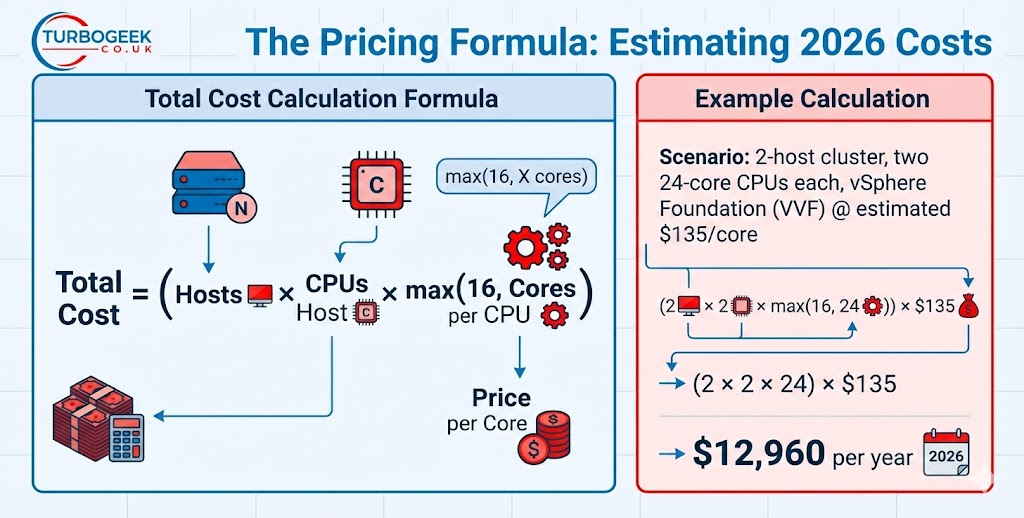
The complexity of VMware licensing has been replaced by a “core-based” mandate. You no longer license the physical server (CPU); you license the capacity of that server, with strict minimums that punish older or low-density hardware.
Key Rules of the 2026 Model:
- Subscription-Only: Perpetual licenses are dead. If your support contract (SnS) expires, you must move to a subscription or lose support and the right to use the software in some cases.
- The 16-Core Minimum: Every physical CPU is billed for at least 16 cores. If you run a 4-core or 8-core processor, you still pay for 16.
- vSAN Capacity: Storage is now billed per TiB of raw capacity.
- Late Penalties: There is no “grace period.” Renewing late often triggers a 20% surcharge or a total loss of grandfathered pricing.
What is the “Core Trap”?
The “Core Trap” refers to VMware’s 16-core minimum per CPU. Organizations using older hardware with low core counts face immediate 50-100% price jumps because they are forced to pay for compute power they don’t have. Upgrading hardware is often the only way to improve cost efficiency.
The Migration Decision
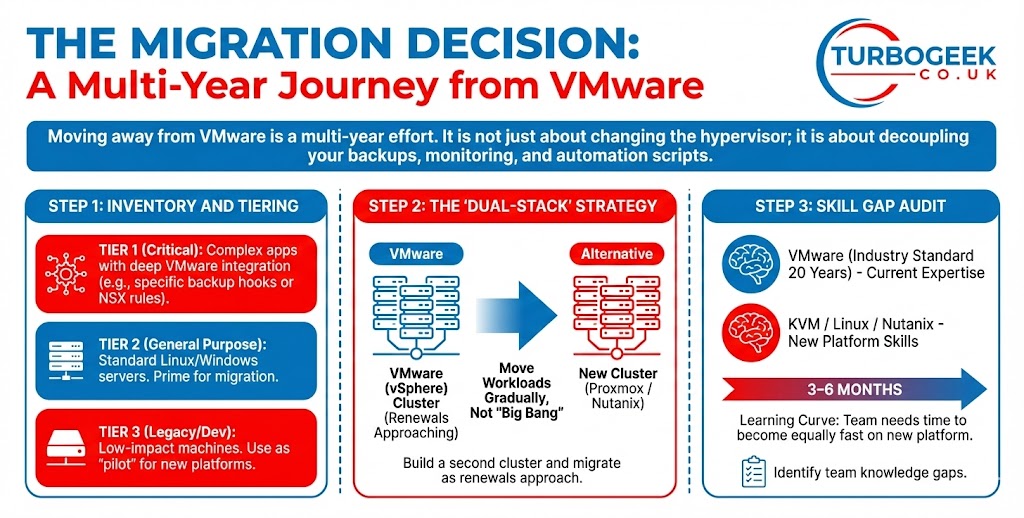
Moving away from VMware is a multi-year effort. It is not just about changing the hypervisor; it is about decoupling your backups, monitoring, and automation scripts.
Step 1: Inventory and Tiering
Before deciding to stay or leave, group your workloads:
- Tier 1 (Critical): Complex apps with deep VMware integration (e.g., specific backup hooks or NSX rules).
- Tier 2 (General Purpose): Standard Linux/Windows servers. These are prime for migration.
- Tier 3 (Legacy/Dev): Low-impact machines. Use these as a “pilot” for new platforms.
Step 2: The “Dual-Stack” Strategy
Most successful teams in 2026 are not doing a “big bang” migration. Instead, they build a second cluster using an alternative (like Proxmox or Nutanix) and move workloads over as VMware renewals approach.
Step 3: Skill Gap Audit
Identify who on your team knows KVM, Linux, or Nutanix. VMware has been the industry standard for 20 years; your team will need 3–6 months to become as fast on a new platform as they were on vSphere.
Alternative Platforms: Pros and Cons
By 2026, several competitors have matured to handle enterprise-grade traffic.
1. Nutanix AHV
The most common choice for large enterprises.
- Pros: Management is highly simplified (Prism); migration tools like Nutanix Move are reliable.
- Cons: Requires a specific hardware approach (HCI); can still be expensive compared to open source.
2. Proxmox VE
The 2026 “dark horse” with over 1.5 million host deployments.
- Pros: Open source (Debian-based); no licensing fees; built-in backup and ZFS support.
- Cons: Lacks the “polished” enterprise support of VMware; requires more Linux expertise.
3. Microsoft Hyper-V / Azure Stack HCI
Best for Windows-heavy shops.
- Pros: Included with Windows Server; smooth integration with Azure.
- Cons: Management tools (SCVMM) can feel dated; Linux support is good but not native.
Calculating Migration ROI
A migration must pay for itself within 24–36 months. You must account for “Parallel Run” costs—the period where you pay for both your old VMware license and your new platform.
Migration costs include:
- New hardware (if the new platform isn’t compatible).
- Staff training hours.
- Professional services or migration software.
- Potential downtime or risk of outages.
| Cost Component | VMware (Stay) | Alternative (Move) |
| Licensing | High (Recurring) | Low/Medium |
| Hardware | Existing | Possible New Build |
| Training | $0 | $5,000–$20,000 |
| Risk | Vendor Lock-in | Operational Learning Curve |
Workflow and Integration
In 2026, security and governance are the biggest hurdles in migration.
Security and Compliance
Most modern alternatives now support Zero Trust models and micro-segmentation. However, if you rely on VMware NSX for your security rules, moving those to a new platform requires a complete rewrite of your network policy. Use a generic firewall manager to bridge the gap during transition.
Accessibility and Governance
Ensure your new platform supports:
- RBAC (Role-Based Access Control): Can you limit who can delete a VM?
- API Support: Will your current Terraform or Ansible scripts work?
- Backup Integration: Does Veeam or your chosen provider support the new hypervisor? (Veeam currently supports VMware, Hyper-V, Nutanix AHV, and Proxmox).
Frequently Asked Questions
Can I keep my perpetual VMware licenses?
You can keep using them, but you cannot buy more, and once your support contract (SnS) ends, you will not receive security patches. In 2026, running unpatched hypervisors is a massive security risk.
What is the fastest way to migrate?
Using a “block-level” migration tool like Nutanix Move or Proxmox’s built-in import wizard. These tools copy the data while the VM is running, reducing downtime to a few minutes.
Is vSphere Essentials Plus still available?
No. It has been replaced by the more expensive vSphere Standard or Foundation bundles. Small clusters now face the highest percentage of price increases.
What happens if I don’t renew my subscription?
Most Broadcom contracts state that the software will cease to function or you will lose access to the management console (vCenter). Late renewals also incur significant financial penalties.
Ready to build your exit strategy?


Recent Comments