

What should you know about Linux at a glance?
- Linux is a free, open-source operating system that can replace or sit alongside Windows and macOS.
- It’s fast, stable, and secure, making it the backbone of servers, supercomputers, and millions of desktops.
- Linux runs on a huge range of hardware — from older laptops to cutting-edge workstations.
- You can customise almost everything: the desktop, the apps, the workflow, even the OS itself.
- Most users can rely on free, high-quality software instead of paid licenses and subscriptions.
- A massive global community (plus commercial vendors) provides documentation, forums, tutorials, and real-world help.
- You can try Linux safely with a USB stick or dual-boot before committing fully.
Linux has a bit of a reputation: some people think it’s only for hardcore programmers or server admins. The reality in 2025 is very different. Modern Linux distributions are polished, user-friendly, and perfect for everyday tasks like browsing, office work, development, and even gaming.
In this guide, we’ll break down what Linux actually is, why it’s such a big deal, and how it can breathe new life into your current PC.
What is Linux?
If you’re reading this, you’ve probably heard of Linux before. Maybe you’ve heard that it’s a free operating system or that it’s only for programmers and computer nerds. But what exactly is Linux, and why should you use it? In this article, we’ll explore the history of Linux, its open-source philosophy, its security features, compatibility with hardware, customization and flexibility, low cost, and community support. By the end, you’ll better understand what Linux is and why it might be the right choice for you.
What does “Linux” actually mean in everyday language?
Linux is a free, open-source operating system — the software layer that sits between your hardware and your apps, like Windows or macOS.
Technically, “Linux” is the kernel (the core part that manages memory, processes, and hardware), but in everyday use people say “Linux” to mean a complete operating system built around that kernel. These complete systems are called distributions (or “distros”) such as Ubuntu, Linux Mint, Fedora, and others.
When you install a Linux distro, you typically get:
- The Linux kernel
- A graphical desktop environment (your windows, menus, panels, etc.)
- A software manager for installing apps
- A bunch of preinstalled tools: web browser, office suite, media player, and more
So from a user’s perspective, Linux is a full desktop OS that can replace or sit alongside Windows or macOS on the same machine.
History of Linux
It was first created by Linus Torvalds in 1991 as a hobby project. At the time, Torvalds was a computer science student studying at the University of Helsinki in Finland. He wanted to create an operating system that could run on his personal computer based on the Intel 80386 microprocessor. Over time, Torvalds and a community of developers grew Linux into a full-fledged operating system.

Today, it is one of the most popular operating systems in the world, powering everything from smartphones and tablets to servers and supercomputers. Its popularity is due in part to its open-source philosophy.
One of the most significant milestones in its history was the creation of the Linux Foundation in 2007. The Foundation is a non-profit organization that supports the growth of Linux and other open-source software. It provides resources, funding, and support for the community, helping to ensure that it remains a free, open, and accessible operating system for everyone.
Why does open source make Linux so powerful?
Linux is built on an open-source philosophy, which means its source code is freely available to inspect, modify, and share.
This has some huge advantages compared to closed systems:
- Community-driven improvements
Anyone with the skills can contribute to Linux. Bugs are found and fixed faster, features are added based on real-world needs, and innovation comes from thousands of contributors, not just one company. - Transparency and trust
Because the code is visible, security researchers and developers can audit it. There’s no need to blindly trust a vendor — you can verify what the OS is doing. - No vendor lock-in
You’re not tied to a single company’s ecosystem. If you don’t like one distribution, you can switch to another without losing access to your data or apps. - Freedom by design
Linux is typically licensed under the GNU General Public License (GPL). This guarantees that you can use, modify, and distribute the software, with the condition that improvements are also shared back with the community.
The result is a platform that’s constantly evolving, not because a marketing department decided it needed a new version, but because real users and developers are shaping it every day.
Is Linux really more secure than other desktop operating systems?
Linux is widely regarded as more secure by default than many consumer operating systems, especially when properly configured and kept up to date.
Here’s why:
- Strong permissions model
Linux is designed so that everyday tasks don’t require administrator (root) access. This limits what malware can do if it somehow runs on your system. - Rapid security patches
Because the code is open and there’s a large developer community, vulnerabilities are often discovered and patched quickly. Updates can be installed through your distribution’s package manager in a few clicks. - Built-in security tools
Most distributions include a firewall, encryption tools, and access control mechanisms out of the box. Many also provide enhanced security frameworks such as SELinux or AppArmor. - Smaller malware target
Malware authors usually aim for platforms with the largest, least technical user base. Desktop Linux, while growing, is still a relatively small target compared to Windows, and users tend to be more update-aware.
Linux isn’t magically immune to threats — no system is — but its design and culture make it a strong choice for security-conscious users.
Compatibility with Hardware
One of the common misconceptions is that it is difficult to install and configure. While this may have been true in the past, today’s Linux distributions are often easier to install and use than proprietary operating systems like Windows.
Linux’s compatibility with hardware is also much better than it used to be. In the past, finding drivers for your hardware could be challenging, but today most hardware manufacturers provide Linux drivers for their products. Additionally, many distributions come with built-in drivers for popular hardware, making it easy to get up and running quickly.
Another advantage of Linux’s compatibility with hardware is that it is often more resource-efficient than other operating systems. This means that Linux can run on older hardware that might struggle to run Windows or macOS. If you have an older computer that you want to breathe new life into, Linux might be the perfect choice.
How customizable and flexible is Linux?
Short answer: incredibly.
With Linux you can customise:
- The look and feel
Choose from desktop environments like GNOME, KDE Plasma, XFCE, Cinnamon, and more. Each offers different styles, layouts, and features. You can tweak themes, icons, fonts, panels, and shortcuts to build the perfect workspace. - The software stack
Install only the tools you need via the software centre or command line. You’re not forced into a bundle of unwanted apps or bloatware. - Your workflow
From advanced tiling window managers to simple, traditional desktops, Linux lets you design a workflow that fits you, not the other way around. - The operating system itself
If you’re a power user, you can go as far as building your own custom Linux setup. But you don’t have to — most distros are very friendly to beginners.
Because everything is built on open standards and open code, Linux adapts to you, not the other way around.
How much money can you save by switching to Linux?
Linux can be an absolute budget-saver, especially over the long term.
- No OS licence fees
Most Linux distributions are completely free to download and use. You’re not paying for per-device licenses or expensive upgrades. - Free everyday applications
Linux distros usually ship with:- A web browser (e.g. Firefox)
- A full office suite (e.g. LibreOffice)
- Email client
- Media player
- Image editor and utilities
- Affordable enterprise options
For businesses that want commercial support, paid distributions like Red Hat Enterprise Linux or SUSE Linux Enterprise are typically more cost-effective over time than comparable proprietary server OS licences. - Scale without extra licences
Want to install Linux on multiple machines? Go ahead. You’re not being charged per seat or per installation.
Whether you’re a home user or managing a small business, Linux helps you cut software costs without cutting quality.
What kind of support can you expect as a Linux user?
One of Linux’s biggest strengths is its community support.
Because Linux is open source and used worldwide, there’s a huge network of:
- Online forums and Q&A sites
- Subreddits and social media groups
- Mailing lists and chat rooms
- Distribution-specific documentation and wikis
If you run into a problem, someone has almost certainly seen it before and written about the fix. Many distributions also include built-in help tools and welcome guides.
For organisations that need guaranteed response times, several companies offer paid professional support, training, and consulting on top of Linux.
Between the global community and commercial options, Linux gives you more than enough support to feel confident using it every day.
Popular Applications on Linux
One of the common concerns about using Linux is that it doesn’t have as many applications as other operating systems like Windows and macOS. While this may have been true in the past, today, thousands of applications are available for Linux, covering everything from web browsing and email to office suites, multimedia, and gaming.
Some of the most popular applications available on Linux include:
- Firefox: One of the most popular web browsers in the world, Firefox is available on Linux and offers a fast, secure, and customizable browsing experience.
- LibreOffice: A free and open-source office suite with a word processor, spreadsheet program, presentation tool, and more.
- GIMP: A powerful image editing program often compared to Adobe Photoshop.
- VLC: A versatile media player that can handle almost any audio or video format.
- Steam: The popular gaming platform is available on Linux, and many popular games are compatible with the operating system.
Additionally, many popular applications like Google Chrome, Dropbox, and Skype are also available on Linux, ensuring that you can use the software you need on the operating system of your choice.
Which Linux distribution is best for beginners?
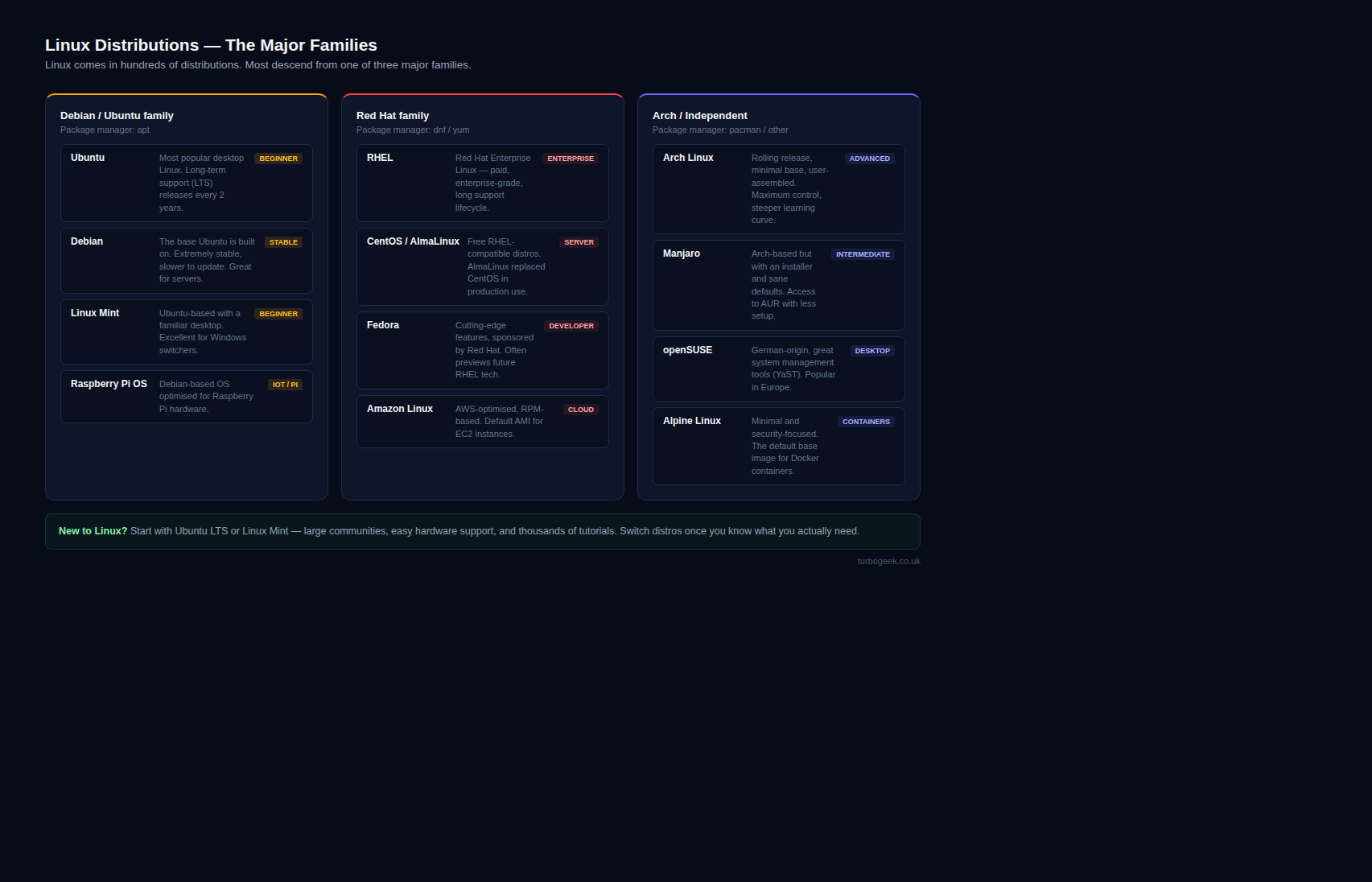
There’s no single “best” Linux distribution, but there are a few that are especially welcoming to newcomers:
- Ubuntu – Very popular, lots of documentation, huge community, and wide hardware support.
- Linux Mint – A familiar, Windows-like desktop with a focus on simplicity and stability.
- Pop!_OS – Great for creators and gamers, with a polished experience out of the box.
- Fedora Workstation – A bit more cutting-edge, ideal if you like having newer software.
All of these offer graphical installers, friendly desktop environments, and easy access to app stores. If you’re unsure where to start, begin with Ubuntu or Linux Mint.
We compare these and more in our guide to the best beginner-friendly Linux distros.
How can you try or switch to Linux without risk?
You don’t have to wipe your PC to see if Linux is right for you. There are safe, low-risk ways to experiment:
- Live USB session
- Download a Linux ISO image, write it to a USB stick, and boot from it.
- You can use Linux without installing anything on your hard drive.
- Dual-boot with Windows
- Install Linux alongside Windows so you can choose which OS to load at startup.
- This is perfect if you still need certain Windows apps or games.
- For a walkthrough, follow our step-by-step dual-boot guide for Windows and Linux.
- Virtual machine
- Use tools like VirtualBox or VMware to run Linux inside a window on your current OS.
- Great for testing, learning Linux commands, or trying out new distros.
Whichever route you choose, always back up your important data first. Once you’re comfortable, you can decide whether to keep dual-booting or switch entirely.
And when you’re ready for quick tips and tricks, dive into our Tech Quicky Linux tutorials.
What does Linux actually look like in use?
Here’s a simple example of what a modern Linux desktop might look like:

You can theme Linux to look like Windows, macOS, or something completely unique — the choice is yours.
Is Linux the right OS for you?
If you want an operating system that is fast, secure, customisable, and free, Linux absolutely deserves a place on your shortlist.
- It respects your freedom and privacy.
- It keeps older hardware useful for years longer.
- It offers a huge range of professional-grade apps at zero cost.
- It’s backed by a global community and industry giants alike.
You don’t have to make a blind leap — boot from a live USB, spin up a virtual machine, or set up a dual-boot and test it on your own terms.
Unlock your PC’s potential: try Linux this weekend and see how different your computer can feel.
In conclusion, Linux is a powerful, flexible, customizable operating system ideal for various computing needs. Its open-source philosophy, robust security features, compatibility with hardware, and low cost make it an attractive choice for both personal and business users. Additionally, Linux’s community support ensures that someone can always help you with any problems you encounter. If you’re looking for an alternative to proprietary operating systems like Windows and macOS, Linux might be the perfect choice.
Want to learn more Linux facts? Check out the rest of our Tech Quicky content!!
Leave a Reply