
Curated technical field guide
Find the right Windows guide faster.
Practical Windows guidance across Server, Windows 10 and 11, PowerShell and the admin toolchain. Find a recovery path, deployment guide or command you can use today.
New in Windows
Latest guides
The newest practical articles in this part of TurboGeek.
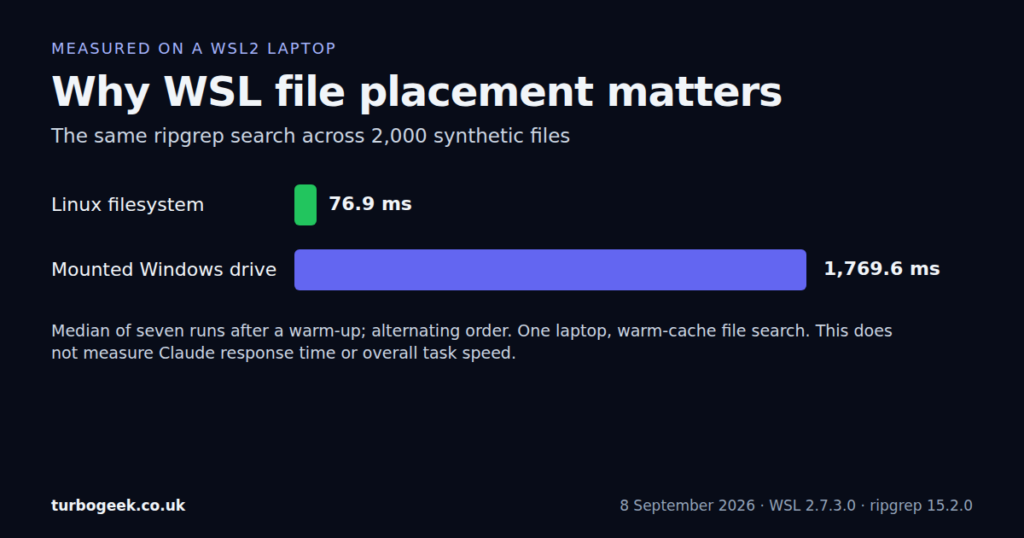
Claude Code Slow on WSL2? Diagnose Filesystem, Search, and Terminal Problems
Diagnose slow Claude Code on WSL2 with a measured file-search test, filesystem checks and steps to separate terminal, context and network delays.


Editor’s starting points
Essential guides
Evergreen references selected to give you a reliable route into the topic.
How to Boot Windows into Safe Mode (Windows 11/10 Guide)
Safe Mode is one of the most useful Windows recovery tools because it starts the operating system with a minimal…
How to Configure WSL2 on Windows
As you can probably tell from my blog, I normally use Linux as my daily driver. However, for the company…
How to Install and Configure Windows Server 2025
Window Server 2025 is here. You can download a preview from Microsoft right now. Click here to register for the…
How to Reinstall Windows 11 on a PC
NB: This is the ReInstall Windows article. If you are looking for our install-from-scratch procedure, check out this page. Click…
Start with the work in front of you
Browse by task
Focused reading paths built from the site’s real categories and tags.
Windows 10 and 11
Installation, workstation setup, recovery and everyday fixes.
Windows Server and AD
Server builds, domain services and the long enterprise tail.
PowerShell and automation
Repeatable administration for users, systems and services.
Troubleshooting and recovery
Safe Mode, boot issues and practical workstation recovery.
Actively maintained
Recently updated
Guides that received a meaningful revision after their original publication.