
TL;DR
- The GitHub UI doesn’t support bulk deletion — use the
ghCLI with the API. - List runs with
gh api repos/OWNER/REPO/actions/runs --paginate, delete withgh api -X DELETE. - Workflow-run history isn’t free — old failed runs clutter the UI and consume queryable storage.
- Always pilot on one workflow first; deletions are not reversible.
What is deleting GitHub Actions workflow runs?
GitHub Actions stores every workflow execution as a “run” with logs, artefacts and timing data. Over time this history grows — especially if you migrated from another CI, iterated heavily on workflows, or had a flaky pipeline. The UI lets you delete runs one at a time, which is fine for a handful and impossible for thousands.
The gh CLI exposes the GitHub REST API directly with authentication already handled. Combined with shell looping or jq filtering, it lets you bulk-delete runs by status (failed only), age (older than 30 days), or workflow (only workflow X). This is the same approach GitHub support recommends for cleanup.
Prerequisites
ghCLI installed (cli.github.com) and authenticated viagh auth login.- Repository
actions:writescope — owner or maintainer role on the repo. - Optional:
jqfor filtering JSON output.
How to use this guide
The sections below walk through the practical commands and options. After the main content you’ll find a Verification block (sanity-check it actually worked), a Troubleshooting block (common error messages and what to do), and Related reading for follow-on topics.
GitHub’s Actions UI is great for day-to-day viewing, but it’s not designed for bulk cleanup. If you’ve just enabled Actions on an older repository, migrated from Bitbucket, or iterated on workflows in a test-heavy phase, your run history can become cluttered fast.
This guide shows how to delete workflow runs using gh api (GitHub CLI), explains what’s happening under the hood, and then adds safer patterns you’ll actually want in production (dry-run, completed-only, keep-last-N).
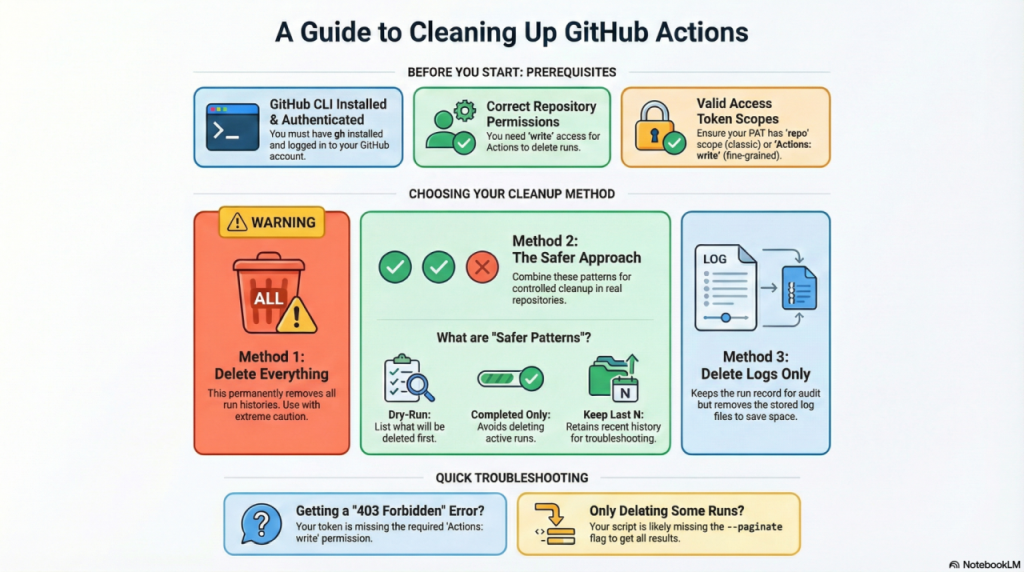
To delete all GitHub Actions workflow runs, use the GitHub CLI to list run IDs and pipe them to the delete API. The one-liner below removes every completed run for a given workflow.
What you’re deleting (and how GitHub exposes it)
A workflow run is a single execution of a workflow file (for example, one push to main might create one run). GitHub exposes workflow runs via the REST API, including endpoints to list runs and delete runs.
Prerequisites (don’t skip these)
You’ll need:
- GitHub CLI installed and authenticated (interactive login or a token)
- Repository access
- Listing runs requires read access; deleting runs requires write-level Actions permission
- If you’re using a token:
- Classic PATs typically need
reposcope for private repos - Fine-grained PATs need Actions: write to delete runs
- Classic PATs typically need
Also worth knowing: gh api is a thin wrapper over the GitHub REST API; --paginate tells it to keep following pages automatically
The Delete Everything Command
Warning: USE WITH CAUTION!
Remember to update the ORG and REPO values with your own values.
REPO="ORG/REPO"

# Optional: count runs first
gh api --paginate "/repos/$REPO/actions/runs?per_page=100" --jq '.workflow_runs[].id' | wc -l

# Delete everything
gh api --paginate "/repos/$REPO/actions/runs?per_page=100" --jq '.workflow_runs[].id' \
| while read -r RUN_ID; do
    echo "Deleting run $RUN_ID"
    gh api -X DELETE "/repos/$REPO/actions/runs/$RUN_ID" >/dev/null
  done
What each line is doing
GET /repos/{owner}/{repo}/actions/runsreturns a list of runs for the repository. GitHub Docs--jq '.workflow_runs[].id'extracts the run IDs from the API response.- The loop calls
DELETE /repos/{owner}/{repo}/actions/runs/{run_id}for each ID to remove the run. GitHub Docs --paginateensures you don’t stop at the first page of results. GitHub CLI+1
⚠️ Permanent action: Deleting runs is not a “hide” operation. Treat it like data deletion and apply your org’s retention/audit expectations first.
A safer TurboGeek version (recommended for real repos)
In practice, “delete everything” is rarely what you want. Most teams want one of these:
- Confirm what will be deleted (dry-run)
- Delete only completed runs (avoid nuking in-progress executions)
- Keep the most recent N runs for quick troubleshooting
1) Dry-run: list what you’re about to delete
Remember to update the ORG and REPO values with your own values.
REPO="ORG/REPO"

gh api --paginate "/repos/$REPO/actions/runs?per_page=100" \
  --jq '.workflow_runs[] | "\(.id) \(.status) \(.created_at) \(.name)"' \
| head -n 50
This prints the first 50 items so you can sanity-check repo, workflow names, and timestamps before deletion.
2) Delete completed runs only (and keep the newest 20)
Remember to update the ORG and REPO values with your own values.
REPO="ORG/REPO"
KEEP=20

gh api --paginate "/repos/$REPO/actions/runs?per_page=100" \
  --jq '.workflow_runs[] | select(.status=="completed") | .id' \
| tail -n +$((KEEP+1)) \
| while read -r RUN_ID; do
    echo "Deleting run $RUN_ID"
    gh api -X DELETE "/repos/$REPO/actions/runs/$RUN_ID" >/dev/null
  done
This pattern reduces the chance you delete something still executing, while leaving a “recent history” window.
Alternative: delete logs but keep the run record
Sometimes you want to keep the run entry (who ran what, when) while deleting the stored logs.
GitHub provides a dedicated endpoint for that: DELETE /repos/{owner}/{repo}/actions/runs/{run_id}/logs. GitHub Docs
Here’s the log-cleaner equivalent:
Remember to update the ORG and REPO values with your own values.
REPO="ORG/REPO"

gh api --paginate "/repos/$REPO/actions/runs?per_page=100" --jq '.workflow_runs[].id' \
| while read -r RUN_ID; do
    echo "Deleting logs for run $RUN_ID"
    gh api -X DELETE "/repos/$REPO/actions/runs/$RUN_ID/logs" >/dev/null
doneTroubleshooting checklist
403 Forbidden
Your token/user doesn’t have permission to delete workflow runs. Deleting runs requires Actions write permission.
Only deletes some runs
Pagination matters. --paginate is the correct fix, because GitHub paginates large result sets.
If you’re still seeing odd behaviour, dump IDs to a file first, then delete from the file (two-phase deletion avoids “moving target” issues while paging).
500 Internal Error when deleting logs
GitHub documents 500 as a possible response for deleting workflow logs. If you hit it intermittently, retry logic is sensible.
FAQ
Does deleting runs delete workflow YAML files?
No. You are deleting run history objects, not the workflow definitions. Workflow definitions live in .github/workflows/*.yml.
What’s the difference between deleting runs and deleting logs?
Deleting runs removes the run records entirely (DELETE .../actions/runs/{run_id}).
Deleting logs removes the stored logs for a run but leaves the run record (DELETE .../actions/runs/{run_id}/logs)
Verification
Sanity-check the change actually worked:
- Run
gh api repos/OWNER/REPO/actions/runs --jq '.total_count'— should drop after deletes. - Confirm in the UI: Actions tab, the runs list reflects the cleanup.
- Check repo storage usage (Settings → Billing) — workflow-run logs free up over the next 24h.
Troubleshooting
HTTP 403 on delete — Token lacks actions:write. Run gh auth refresh -s actions to add the scope, or use a PAT with the right permissions.
Pagination only returns the first 30 runs — Add --paginate to gh api and pipe through jq -r '.workflow_runs[].id'.
Accidentally deleted runs you needed — Workflow-run deletion is irreversible. Always test the filter (replace DELETE with GET) first to preview the run IDs you’d touch.
Authoritative sources
References: GitHub REST — Delete a workflow run, gh api manual.
Leave a Reply