
What is Claude Code?
TL;DR — What is Claude Code?
- Not autocomplete — it is a CLI agent that reads your whole codebase and executes tasks autonomously
- Real tasks — refactors across files, writes and runs tests, explains unfamiliar codebases
- Simple to start — one install command, natural language in your terminal
- Different from everything else — full repo context, multi-file edits, executes real commands
Claude Code. You have probably seen the name in a newsletter, a Reddit thread, or a colleague’s Slack message. Maybe you wrote it off as another AI hype cycle — another tool promising to change the way you write code. I did the same thing. Then I actually tried it.
Not What You Think
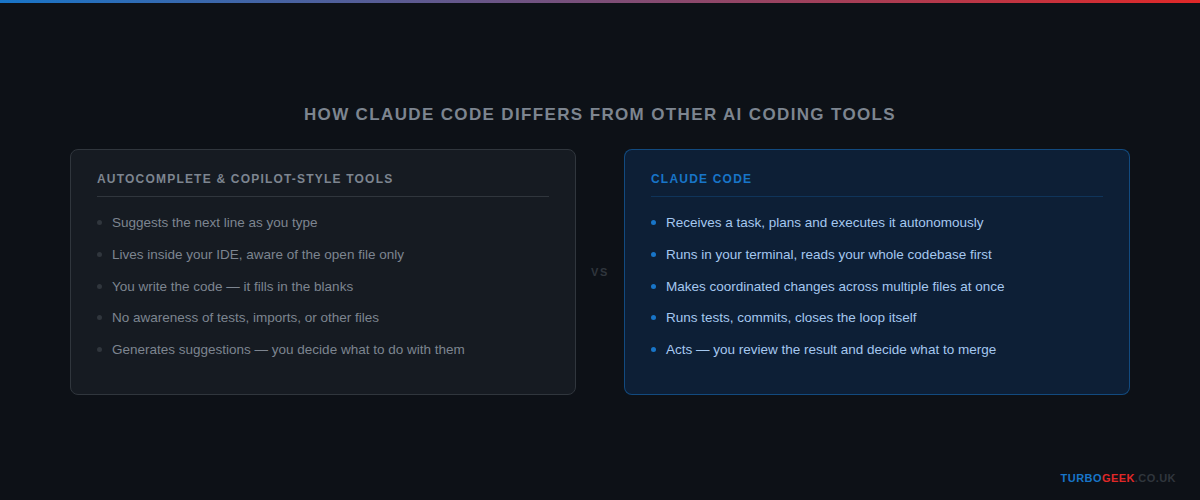
Most developers hear “AI coding tool” and picture GitHub Copilot — autocomplete that suggests the next line while you type. Claude Code is not that. It is not a plugin. It does not live inside your IDE. You do not use it while you are coding — it codes while you watch.
Claude Code is a command-line agent. You open your terminal, run claude, describe what you want, and it reads your codebase, plans the changes, writes code across multiple files, runs commands, and reports back. It works the way a developer works — not the way a search engine works.
What It Does in Practice
Here are three things I use it for regularly — not features from a marketing page, but actual tasks I hand off every week.
Refactoring across a whole codebase
I asked it to rename a function and update every call site across a 40-file TypeScript project. It found 23 references that a find-and-replace would have missed, updated the tests, and committed the change with a clear message explaining what changed and why.
What struck me was how many of those 23 references were in files I had forgotten existed. A manual search-and-replace would have left silent bugs scattered through the codebase — the kind you only find three months later when something breaks in production.
Writing and running tests
I gave it a function and asked it to write tests for edge cases I had not thought of. It wrote the tests, ran them, found that two were failing because of a bug in the original function — not the tests — fixed the bug, and showed me the diff. I reviewed and merged.
That last part is the one that still surprises me. The tests were right. The original function was wrong. Claude Code caught a real bug I had shipped — and fixed it as part of the same session.
Getting up to speed on an unfamiliar codebase
I was dropped into a project I had never seen before. I asked Claude Code to explain what each module does and how they connect. In two minutes I had a mental model that would have taken me an hour to build by reading the source.
That changed how I approach onboarding onto any codebase. Before a PR review on unfamiliar code, I now drop into Claude Code first — it gives me enough context to ask useful questions rather than approving changes I do not fully understand.
How You Use It
Installation is one command:
Then navigate to your project and run:
From there, you type in plain English. The session keeps context — you can ask follow-up questions, change direction, and reference files by name. It reads what it needs and asks if something is unclear.
A session looks like this:
You do not need to configure a project before you start. Claude Code reads your directory and figures out the context — the language, the framework, the test runner. Ask it to run the tests and it will find the test command itself. Ask it to commit and it will stage the right files, write a message that explains the change, and commit.
The first session feels strange. You describe a task in a few sentences and Claude Code starts executing — reading files, making changes, running commands — and you watch. After a week, it feels normal. After a month, working without it feels slow.
What Makes It Different
There are a lot of AI coding tools. Here is why Claude Code sits in a different category:
- Full repository context — it reads all your files, not just the one you have open. It understands how your codebase is structured before it touches anything.
- Multi-file edits — one instruction can change code across many files simultaneously. Renames, refactors, dependency updates — all in one operation.
- Runs real commands — it does not just suggest code. It runs tests, executes builds, makes git commits. It closes the loop itself.
- Skills — loadable behaviour modules that change how Claude approaches tasks. TDD, systematic debugging, code review — each skill enforces a specific workflow discipline. More on those in the 7 Claude Code Skills post.
- Session memory — it builds on previous steps without losing context. You can have a multi-hour working session and it remembers everything.
The combination of those five properties is what makes Claude Code different from an autocomplete tool. Autocomplete reacts to what you are typing. Claude Code acts on what you are trying to accomplish. You describe a goal — “add pagination to the user list endpoint” — and it reads the codebase, identifies what needs to change, changes it across however many files are involved, and runs the tests to verify. You review the diff, ask questions, and merge.
That shift — from reacting to acting — is the one that changes how you work. Copilot is a faster keyboard. Claude Code is a junior developer who is always available, never bored, and never gets tired of writing tests.
The difference from tools that give you suggestions you have to act on is exactly this: Claude Code acts, and you review. The work moves forward while you are in the loop, not blocked waiting for you to type every line yourself.
Related: How to Write the Perfect AGENTS.md file — once you are using Claude Code regularly, AGENTS.md is how you give it persistent instructions about your project. Worth reading alongside this series.
Now you know what Claude Code actually is. The next question every developer asks — and they are right to ask it — is whether you can actually trust it with your code. That is what the next post covers.


Recent Comments