
GitHub CLI Secrets: Automate Branch Protection Rulesets
Key Takeaways
- Shift to Rulesets: Move away from “classic” branch protection to the API-first Branch Rulesets for scalable, conflict-free security configurations.
- Infrastructure as Code (IaC): Treat repository settings as code. Utilize JSON payloads and the GitHub CLI to manage your security posture through version control.
- Verify Before Commit: Implement API checks (
gh api repos/.../rules/branches/main) to validate that protection rules are active before pushing code. - Automate Access Control: Script team permissions using the CLI to prevent human error and ensure the correct “maintain” vs. “write” privileges.
Why Automate Repository Setup?
If you are a DevOps engineer or a team lead, creating a new repository often feels like a tedious administrative tax. You spin up the project, but then face a checklist of repetitive UI clicks: navigating to settings, finding the branches tab, configuring pull request requirements, and meticulously adding team permissions.
While critical for security, this manual process is a liability. A single forgotten checkbox or a typo in a team name can silently compromise your workflow, leaving your main branch vulnerable.
Is there a way to define your security posture as code and apply it instantly?
Yes. The solution lies in the GitHub Command Line Interface (gh). By using the gh api command, you can script the entire process, turning a manual chore into a bulletproof, repeatable automated workflow. Below, we explore the three specific techniques to modernize your repository management.
Why Should You Use Rulesets Instead of Classic Protection?
Rulesets are the modern, API-first standard for GitHub protection that eliminates “double enforcement” conflicts and allows for centralized management, unlike Classic Protection, which is UI-bound and difficult to scale.
The first step to automation is abandoning the “classic branch protection” settings found at /settings/branches. Instead, you should utilize Branch Rulesets.
Rulesets differ significantly because they are treated as a first-class API resource. This allows you to manage them like any other piece of Infrastructure as Code (IaC). When you mix classic protection with rulesets, you risk confusing behavior where rules overlap or conflict. For clean automation, stick strictly to rulesets.
The Script: The following gh api command creates a comprehensive ruleset in a single call. It mandates Pull Requests, Code Owner reviews, and blocks force pushes.
Make sure you set the $REPO and $ORG Vars
ORG="MY_ORG"
REPO="MY_REPO"
APPROVALS=1 # Increase to 2 for high-security repos

gh api \
  --method POST \
  -H "Accept: application/vnd.github+json" \
  -H "X-GitHub-Api-Version: 2022-11-28" \
  "repos/$ORG/$REPO/rulesets" \
  --input - <<EOF
{
  "name": "Protect main/master (PR + CODEOWNERS + last-push approval)",
  "target": "branch",
  "enforcement": "active",
  "conditions": {
    "ref_name": {
      "include": ["refs/heads/main", "refs/heads/master"],
      "exclude": []
    }
  },
  "rules": [
    {
      "type": "pull_request",
      "parameters": {
        "dismiss_stale_reviews_on_push": false,
        "require_code_owner_review": true,
        "require_last_push_approval": true,
        "required_approving_review_count": $APPROVALS,
        "required_review_thread_resolution": true
      }
    },
    { "type": "non_fast_forward" },
    { "type": "deletion" }
  ]
}
EOFExpert Note: Notice the use of <<EOF without quotes. This allows the shell to substitute the $APPROVALS variable directly into the JSON payload, making this script dynamic and reusable across different repository tiers.
You Should see Output Like this:
{
  "id": 123456789,
  "name": "Protect main/master (PR + CODEOWNERS + last-push approval)",
  "target": "branch",
  "source_type": "Repository",
  "source": "my_org/my_repo",
  "enforcement": "active",
  "conditions": {
    "ref_name": {
      "exclude": [],
      "include": [
        "refs/heads/main",
        "refs/heads/master"
      ]
    }
  },
  "rules": [
    {
      "type": "pull_request",
      "parameters": {
        "required_approving_review_count": 1,
        "dismiss_stale_reviews_on_push": false,
        "required_reviewers": [],
        "require_code_owner_review": true,
        "require_last_push_approval": true,
        "required_review_thread_resolution": true,
        "allowed_merge_methods": [
          "merge",
          "squash",
          "rebase"
        ]
      }
    },
    {
      "type": "non_fast_forward"
    },
    {
      "type": "deletion"
    }
  ],
  "node_id": "my_node_id",
  "created_at": "2025-12-18T14:11:48.775+00:00",
  "updated_at": "2025-12-18T14:11:48.816+00:00",
  "bypass_actors": [],
  "current_user_can_bypass": "never",
  "_links": {
    "self": {
      "href": "https://api.github.com/repos/my_org/my_repo/rulesets/11233741"
    },
    "html": {
      "href": "https://github.com/my_org/my_repo/rules/11233741"
    }
  }
}How Do You Verify Rules Are Active Before Pushing Code?
You can verify active rules by querying the repos/$ORG/$REPO/rules/branches/main endpoint, which returns the computed rule set for a branch even if that branch does not yet exist.
One of the biggest risks in automation is the “fire and forget” mentality. You run a script and assume it worked, only to find out later that a syntax error left your repo unprotected.
To prevent this, you must programmatically verify your state. GitHub provides specific endpoints to check the effective rules on a branch.
To check specific rules for the main branch:
# Returns the aggregated rules active for 'main'
gh api "repos/$ORG/$REPO/rules/branches/main"To list all rulesets configured on the repository:
# detailed list of rulesets with ID, name, and status
gh api "repos/$ORG/$REPO/rulesets" --jq '.[] | {id, name, enforcement}'By adding these checks to your CI scripts, you create a “closed-loop” system. If the API check fails or returns an empty list, your script should error out immediately, preventing any code from being pushed to an insecure repository.
How Can You Automate Team Permissions Reliably?
Use the gh api PUT method to explicitly assign permission levels (like push or maintain) to team slugs, ensuring consistent access control without manual UI errors.
Branch protection is useless if the wrong people have administrative access to bypass it. Managing team access via the UI is prone to “fat-finger” errors—selecting the wrong team or the wrong permission level.
Scripting this ensures that the team slug (e.g., my-engineering-managers) is standardized and version-controlled.
Update you Team Names below
# Grant 'Write' permission (push capability) to the developers
gh api -X PUT \
  -H "Accept: application/vnd.github+json" \
  -H "X-GitHub-Api-Version: 2022-11-28" \
  "orgs/$ORG/teams/my-team/repos/$ORG/$REPO" \
  -f permission=push

# Grant 'Maintain' permission to managers (allows repository configuration)
gh api -X PUT \
  -H "Accept: application/vnd.github+json" \
  -H "X-GitHub-Api-Version: 2022-11-28" \
  "orgs/$ORG/teams/my-engineering-managers/repos/$ORG/$REPO" \
-f permission=maintainFull Script you can use!
Make sure you check the instructions further down.
#!/bin/bash

# ==============================================================================
# GitHub Repository Security Automation Script
# Purpose: Applies Branch Rulesets, verifies protection, and assigns team access.
# Usage: ./setup_repo.sh <ORGANIZATION> <REPOSITORY_NAME>
# ==============================================================================

# --- CONFIGURATION ---
# UPDATE THESE VARIABLES WITH YOUR ACTUAL TEAM SLUGS
TEAM_WRITERS="your-developer-team-slug"   # e.g., 'frontend-devs'
TEAM_MAINTAINERS="your-manager-team-slug" # e.g., 'tech-leads'

# --- INPUT VALIDATION ---
if [ "$#" -ne 2 ]; then
    echo "Usage: $0 <ORGANIZATION> <REPOSITORY_NAME>"
    echo "Example: $0 my-company new-service-api"
    exit 1
fi

ORG=$1
REPO=$2
APPROVAL_COUNT=1 # Number of required approvals

# Check if gh is installed
if ! command -v gh &> /dev/null; then
    echo "❌ Error: GitHub CLI (gh) is not installed or not in PATH."
    exit 1
fi

echo "🚀 Starting security setup for $ORG/$REPO..."

# ==============================================================================
# STEP 1: APPLY BRANCH RULESET
# ==============================================================================
echo "🔹 Applying Branch Ruleset (PRs, Code Owners, No Force Push)..."

gh api \
  --method POST \
  -H "Accept: application/vnd.github+json" \
  -H "X-GitHub-Api-Version: 2022-11-28" \
  "repos/$ORG/$REPO/rulesets" \
  --silent \
  --input - <<EOF
{
  "name": "Production Standards (Automated)",
  "target": "branch",
  "enforcement": "active",
  "conditions": {
    "ref_name": {
      "include": ["refs/heads/main", "refs/heads/master"],
      "exclude": []
    }
  },
  "rules": [
    {
      "type": "pull_request",
      "parameters": {
        "dismiss_stale_reviews_on_push": false,
        "require_code_owner_review": true,
        "require_last_push_approval": true,
        "required_approving_review_count": $APPROVAL_COUNT,
        "required_review_thread_resolution": true
      }
    },
    { "type": "non_fast_forward" },
    { "type": "deletion" }
  ]
}
EOF

if [ $? -eq 0 ]; then
    echo "   ✅ Ruleset created successfully."
else
    echo "   ❌ Failed to create ruleset. Please check your permissions."
    exit 1
fi

# ==============================================================================
# STEP 2: VERIFY PROTECTION STATUS
# ==============================================================================
echo "🔹 Verifying active rules for 'main' branch..."

# Retrieve the number of active rules for main
RULE_COUNT=$(gh api "repos/$ORG/$REPO/rules/branches/main" --jq '. | length')

if [ "$RULE_COUNT" -gt 0 ]; then
    echo "   ✅ Verification Passed: $RULE_COUNT active rules detected on 'main'."
else
    echo "   ❌ Verification Failed: No rules detected. The ruleset may not be active."
    exit 1
fi

# ==============================================================================
# STEP 3: ASSIGN TEAM PERMISSIONS
# ==============================================================================
echo "🔹 Assigning Team Permissions..."

# Grant Write (Push) Access
gh api -X PUT \
  -H "Accept: application/vnd.github+json" \
  -H "X-GitHub-Api-Version: 2022-11-28" \
  --silent \
  "orgs/$ORG/teams/$TEAM_WRITERS/repos/$ORG/$REPO" \
  -f permission=push

if [ $? -eq 0 ]; then
    echo "   ✅ Added team '$TEAM_WRITERS' with 'push' access."
else
    echo "   ⚠️ Warning: Could not add '$TEAM_WRITERS'. Check if team slug exists."
fi

# Grant Maintain Access (Repo Config)
gh api -X PUT \
  -H "Accept: application/vnd.github+json" \
  -H "X-GitHub-Api-Version: 2022-11-28" \
  --silent \
  "orgs/$ORG/teams/$TEAM_MAINTAINERS/repos/$ORG/$REPO" \
  -f permission=maintain

if [ $? -eq 0 ]; then
    echo "   ✅ Added team '$TEAM_MAINTAINERS' with 'maintain' access."
else
    echo "   ⚠️ Warning: Could not add '$TEAM_MAINTAINERS'. Check if team slug exists."
fi

# ==============================================================================
# FINAL SUMMARY
# ==============================================================================
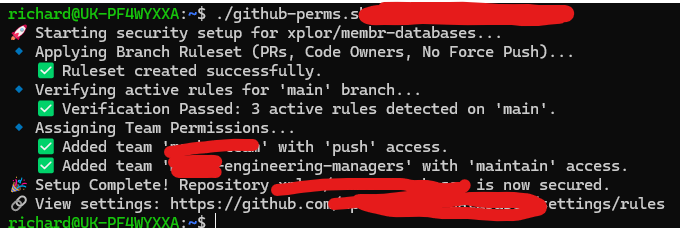
echo "🎉 Setup Complete! Repository $ORG/$REPO is now secured."
echo "🔗 View settings: https://github.com/$ORG/$REPO/settings/rules"How to use this script:
- Save the file: Create a file named
setup_repo.shand paste the code above into it. - Make it executable: Run the command:
chmod +x setup_repo.sh- Update Team Names: Open the file in a text editor and change
your-developer-team-slugandyour-manager-team-slugto match the actual team names in your GitHub Organization. - Run it:
./setup_repo.sh my-org-name my-new-repoYou should see output like this:




Recent Comments