

Most users in AWS have multiple VPCs in their environment, sometimes spanning more than one account, so it’s not very common to have all of your resources in a single VPC in a single account. A VPC is an isolated network, and resources can only communicate from inside each VPC. So, what do you do when you want your AWS resources to communicate with each other? That’s where a VPC Peering Connection comes into play – and best of all, you can create and manage it with CDK!
Key Takeaways
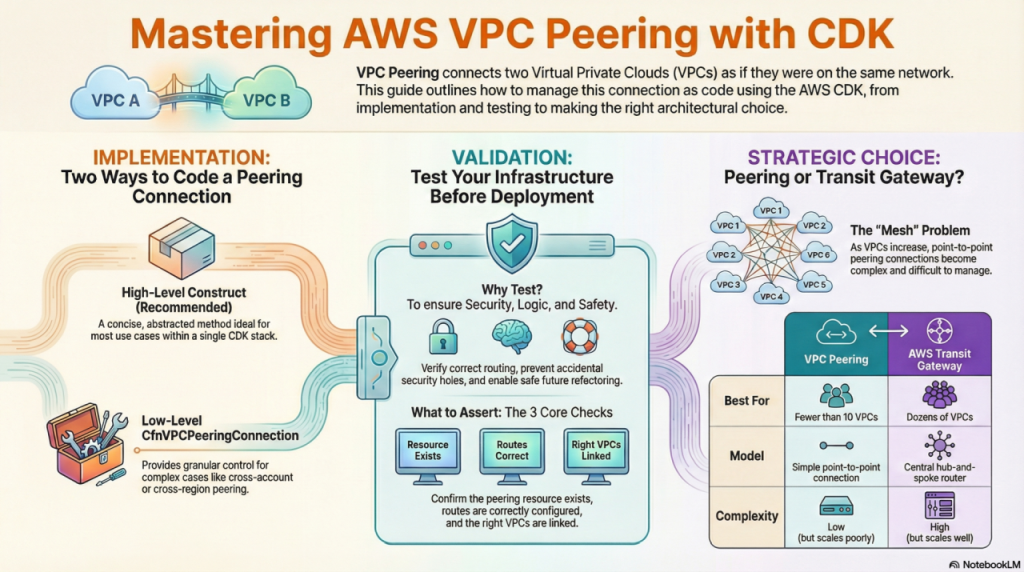
- Isolation by Default: AWS VPCs are isolated networks; peering is the standard method to allow direct, private IP communication between them.
- No Transitive Peering: Peering connects only two VPCs directly. If VPC A peers with B, and B peers with C, A cannot talk to C (unless you use a Transit Gateway).
- Route Tables are Critical: Creating the connection is only step one; you must manually update route tables in both VPCs to direct traffic across the peer.
- CDK Simplifies Management: Using AWS CDK (TypeScript) allows you to define peering relationships programmatically, ensuring consistency across environments.
What is a VPC?
An Amazon Virtual Private Cloud (VPC) is a secure and isolated section of the AWS cloud where you can launch AWS resources. It acts as your virtual network, providing control over your environment. With VPC, you can define your IP address range, create subnets, and configure routing tables. This allows you to customize network settings, ensuring private and controlled space for your applications in the AWS infrastructure.
What Is AWS VPC Peering?
AWS VPC Peering is a networking connection that allows two distinct Virtual Private Clouds (VPCs) to communicate with each other as if they were within the same network. Traffic between peered VPCs stays entirely on the global AWS backbone, meaning it never traverses the public internet. This ensures high throughput, low latency, and improved security for data transfer.
Why Should You Use VPC Peering?
You should use VPC peering when you need low-latency, secure communication between resources in different network environments. Common scenarios include:
- Shared Services: Centralizing authentication, logging, or security appliances in one “Management VPC” that services other “Workload VPCs.”
- Data Sharing: Allowing a web application in one VPC to securely access a database cluster hosted in a separate VPC.
- Disaster Recovery: replicating data between a primary VPC and a recovery VPC in a different AWS Region.
VPC Peering Connection
Before setting up a peer, you must ensure your network architecture supports it. The most critical constraint is CIDR Block Overlapping. You cannot create a peering connection between two VPCs that have matching or overlapping IPv4 CIDR blocks.
Additionally, keep in mind:
- No Transitive Peering: As mentioned in the takeaways, peering is a 1:1 relationship.
- Cross-Account Support: You can peer VPCs in different AWS accounts and different AWS Regions.
- Security Groups: You must still reference the peer’s security group or IP range in your firewall rules to allow traffic.
Use Cases for VPC Peering
VPC peering is valuable in various scenarios, including:
- Shared Services: Centralize services like security appliances (firewalls, intrusion detection systems) in one VPC and share them with other VPCs.
- Data Sharing: Enable applications in different VPCs to access and share data securely.
- Application Migration: Migrate applications between VPCs with minimal downtime by establishing peering connections.
- Disaster Recovery: Set up VPCs in different regions for disaster recovery and use peering for replication or failover.
How to Create a VPC Peering Connection
Imagine two AWS accounts (Account A and Account B), each with a VPC containing two subnets.
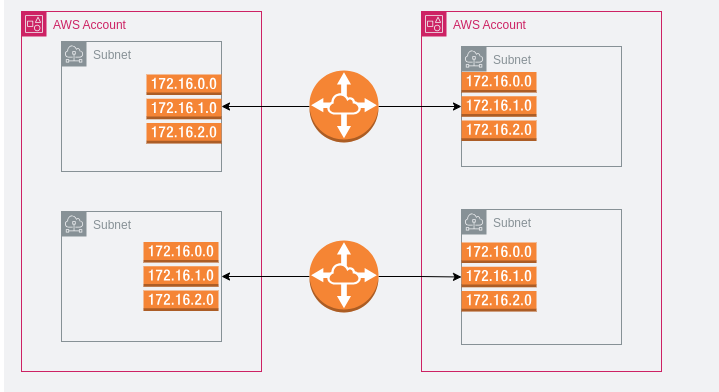
This is a very basic VPC Peering connection setup. We have 2 AWS accounts; each has a single VPC. Inside the VPC are two subnets. You can see the route table on each side of the VPC Peering Connection. If you are familiar with networking concepts, VPC Peering is basically setting up a WAN link between your VPCs. We don’t care how AWS route the traffic inside the Peered connection, that is their job not ours.
How Do You Create a VPC Peering Connection via Console?
Setting up peering manually involves a “handshake” process: one side requests, and the other accepts.
Step 1 – Create A VPC Peering Connection Request
In Account A (Requester Account):
- Log in to the AWS Management Console (Requester Account).
- Navigate to the VPC Dashboard > Peering Connections.
- Click Create Peering Connection.
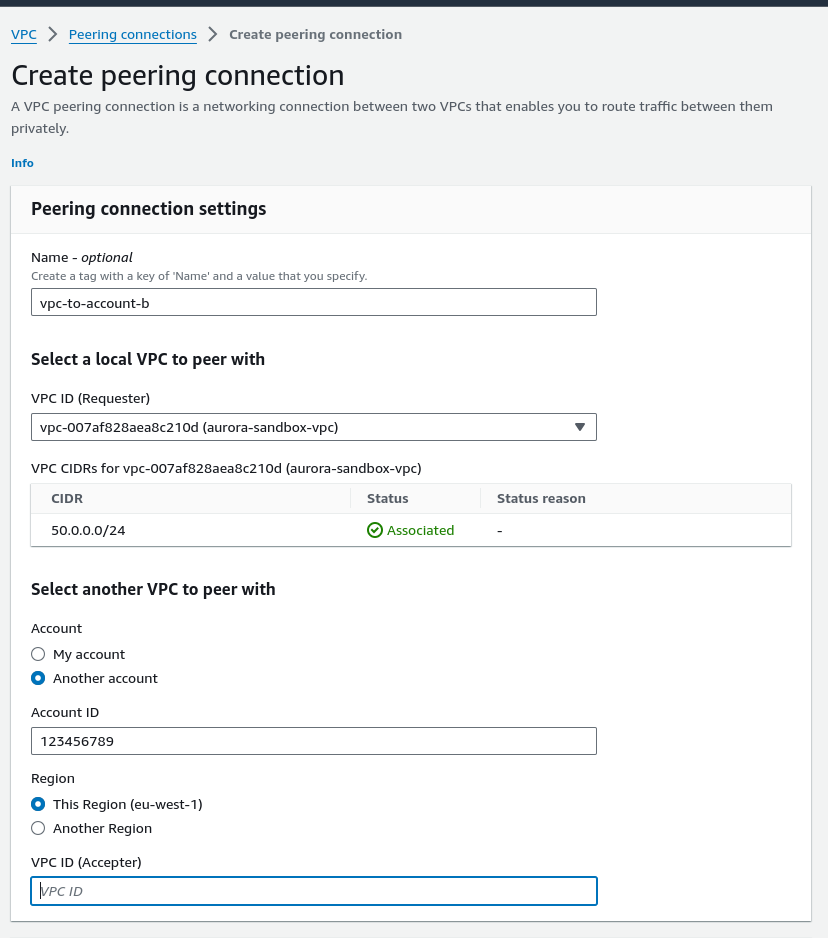
Configure the Settings:
- Name: Enter a recognizable tag (e.g.,
vpc-peering-prod-to-dev). - Local VPC: Select your requester VPC.
- Select Another VPC: Choose “My Account” or “Another Account” (requires Account ID).
Click Create.
Step 2 – Accept the VPC Request
Log in to the Accepter Account (if different).
- Navigate to VPC Dashboard > Peering Connections.
- Locate the request with the status
Pending Acceptance. - Select it, click Actions, and choose Accept Request.
Step 3: Update Route Tables (Crucial Step)
The connection is active, but traffic cannot flow yet. You must tell the VPCs how to reach each other.
- Go to Route Tables in the VPC Dashboard.
- Select the route table associated with your Requester VPC.
- Add a route:
- Destination: The CIDR block of the Accepter VPC.
- Target: Select the “Peering Connection” you just created.
- Repeat this process for the Accepter VPC, pointing the route back to the Requester’s CIDR.
Verification:
- Confirm Peering Status:
- Check the peering connection status in both Account A and Account B. It should be “Active.”
- Test Connectivity:
- Deploy resources in both VPCs.
- Ensure that security groups and network ACLs allow the necessary traffic.
- Test connectivity between resources in different VPCs using private IP addresses.
How Do You Implement VPC Peering with AWS CDK?
Managing infrastructure as code (IaC) is preferred for reproducibility. Below are the two primary methods to implement peering using AWS CDK in TypeScript.
Method 1: The High-Level Construct (Recommended)
This method is concise and leverages CDK’s abstraction to handle the heavy lifting.
import * as ec2 from 'aws-cdk-lib/aws-ec2';

// Define your VPCs
const vpc1 = new ec2.Vpc(this, 'Vpc1', {
  maxAzs: 2,
  cidr: '10.0.0.0/16'
});

const vpc2 = new ec2.Vpc(this, 'Vpc2', {
  maxAzs: 2,
  cidr: '10.1.0.0/16' // Ensure CIDRs do not overlap
});

// Create the peering connection
// vpc1 is the 'Requester', vpc2 is the 'Accepter'
const peeringConnection = vpc1.peer(vpc2, {
  peeringConnectionName: 'Vpc1-to-Vpc2-Peering'
});
Method 2: The Low-Level CfnVPCPeeringConnection
Use this if you need granular control over specific CloudFormation properties or are working with existing VPC IDs that aren’t fully managed by your current CDK stack.
import * as ec2 from 'aws-cdk-lib/aws-ec2';

new ec2.CfnVPCPeeringConnection(this, 'CustomPeering', {
  vpcId: 'vpc-xxxxxx',       // Requester VPC ID
  peerVpcId: 'vpc-yyyyyy',   // Accepter VPC ID
  peerRegion: 'us-east-1',   // Optional: if peering across regions
  peerOwnerId: '123456789012' // Optional: if peering across accounts
});
Note: Even with CDK, you must ensure your Route Tables are updated. The high-level
vpc1.peer(vpc2)method attempts to update route tables automatically, but complex routing configurations may require explicitec2.CfnRoutedefinitions.
VPC Peering vs. Transit Gateway: Which Should You Choose?
While VPC Peering is excellent for simple, point-to-point connections, it scales poorly. As your infrastructure grows, you might face the “mesh” problem.
- Choose VPC Peering if you have fewer than 10 VPCs and need a simple, cost-effective pipe between them.
- Choose AWS Transit Gateway if you are managing dozens of VPCs. Transit Gateway acts as a cloud router, solving the “transitive peering” limitation by allowing all connected VPCs to talk to each other through a central hub.
Leave a Reply