

TL;DR
- Cloud Datastore is being superseded by Firestore in Datastore mode — same data model, new engine.
- Existing Datastore projects automatically upgrade in-place when you opt in; no app code changes needed for Datastore-mode.
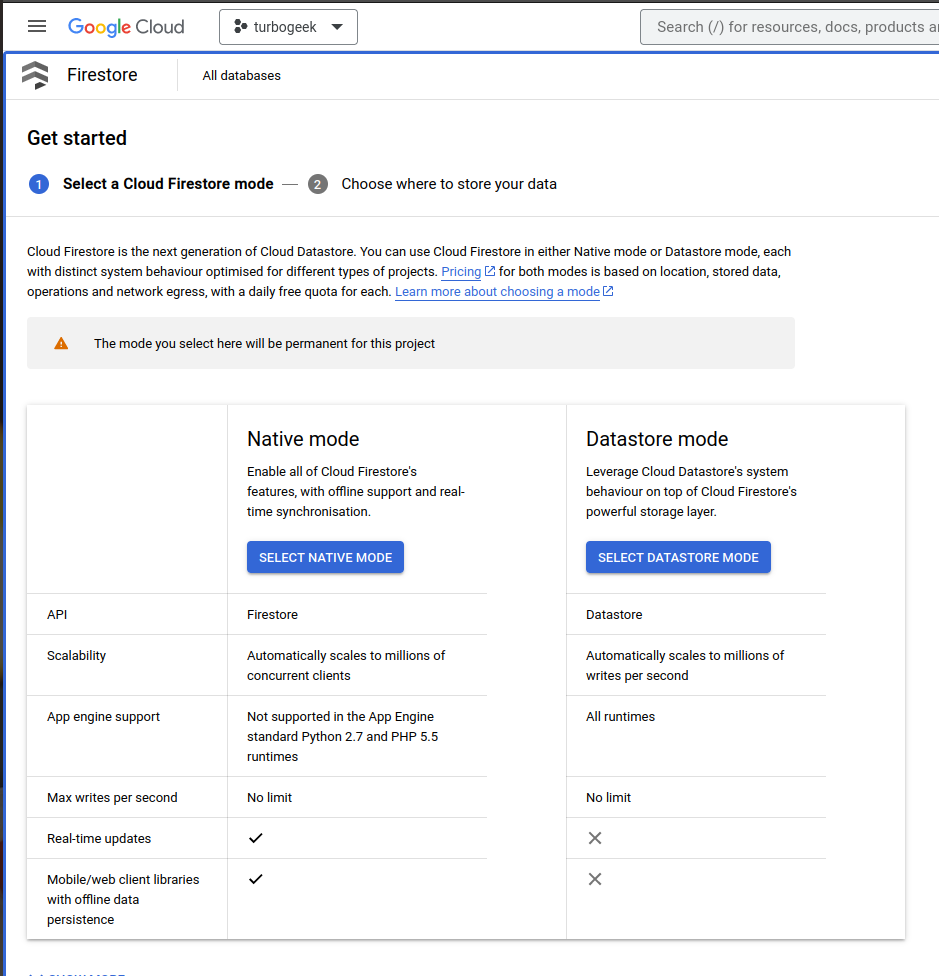
- Firestore Native mode is a different product (different SDK, real-time listeners) — don’t confuse the two.
- Migrate via the GCP console: Firestore → Switch to Firestore in Datastore mode. The cutover is one-way.
What is migrating from Datastore to Firestore?
Google Cloud Datastore was Google’s original NoSQL document store, originally available as part of Google App Engine. Firestore is Google’s next-generation NoSQL database — same logical document/collection model but rebuilt with stronger consistency, real-time listeners and tighter integration with the wider GCP stack. Google has merged the two: existing Datastore users now run on Firestore in Datastore mode, which preserves the original API while gaining the new engine.
There are two distinct Firestore modes. Datastore mode is API-compatible with Cloud Datastore — your existing application code continues to work. Native mode is the modern Firestore product with a different SDK, multi-region replication and real-time listener support. Migrating from Datastore to Datastore-mode Firestore is straightforward; migrating to Native mode is a rewrite.
Prerequisites
- A Google Cloud project with an existing Cloud Datastore database.
- Project Owner or Datastore Admin IAM role.
- A maintenance window — the upgrade is in-place but Google recommends a brief read-only period to avoid edge-case writes during cutover.
How to use this guide
The sections below walk through the practical commands and options. After the main content you’ll find a Verification block (sanity-check it actually worked), a Troubleshooting block (common error messages and what to do), and Related reading for follow-on topics.
Google Cloud Datastore has long been a reliable database platform, accessible directly from applications through API calls. However, Google is gradually phasing out Cloud Datastore in favor of its next-generation counterpart, Google Cloud Firestore. This article aims to guide you through each service’s key differences, advantages, and limitations to help you make an informed decision.
Understanding Google Cloud Datastore
Cloud Datastore offers robust data replication across multiple data centers, ensuring that query performance scales with the size of the result set. In simpler terms, the system remains efficient regardless of the volume of data it handles.
The platform has evolved into a strongly consistent product, offering both regional and multi-regional replication configurations.
When to Opt for Cloud Datastore?
Here are some scenarios where Cloud Datastore shines:
- Schema Flexibility: The database schema can be easily modified.
- Adaptability: The system is highly adaptable to various use cases.
- Scalability: It can scale down to zero, making it cost-effective.
- Affordability: The first 1GB of data storage is free.
- Transaction Support: It is a fully transactional database.
Comparative Overview: Cloud Datastore vs. Cloud Firestore vs. Relational Databases
| Concept | Cloud Datastore | Cloud Firestore | Relational Database |
|---|---|---|---|
| Category of Object | Kind | Collection Group | Table |
| One Object | Entity | Document | Row |
| Individual Data | Property | Field | Column |
| Unique ID | Key | Document ID | Primary Key |
Scaling Capabilities of Cloud Datastore
Cloud Datastore is engineered to automatically scale to accommodate large data sets. This ensures that applications maintain high-performance levels even under increasing traffic loads.
- Write Scalability: Datastore automatically distributes data to maintain optimal performance.
- Read Scalability: The system supports only those queries that scale with the size of the result set, ensuring consistent performance regardless of the data volume.
Limitations and Restrictions
While Cloud Datastore offers many advantages, it does have some limitations compared to traditional SQL-based relational databases:
- Query Constraints: Due to the reliance on pre-built indexes, the types of queries that can be executed are more restrictive.
- Lack of Join Operations: Cloud Datastore does not support join operations or inequality filtering on multiple properties.
Choosing between Google Cloud Datastore and Firestore involves weighing the pros and cons of each service. While Cloud Datastore offers strong consistency and scalability, Firestore represents the next step in Google’s database technology, offering its own set of unique features and advantages.
Verification
Sanity-check the change actually worked:
- GCP Console → Firestore — confirm the database now displays as “Firestore in Datastore mode”.
- Run an application read query — should succeed without code changes.
- Run an application write query — should succeed; check Firestore monitoring for latency parity with the prior Datastore baseline.
Troubleshooting
Upgrade option is greyed out in the console — Some legacy projects need to enable the Firestore API explicitly: gcloud services enable firestore.googleapis.com.
App fails post-migration — Datastore-mode Firestore is API-compatible at the wire level, but check SDK version — older client libraries may need updating to a release that knows it’s talking to Firestore-on-Datastore-mode.
I want Native mode features instead — Native mode requires a new database; Datastore-mode databases cannot be in-place converted. Plan a parallel deployment with batch export / import.
Authoritative sources
Authoritative references: GCP — Upgrade Datastore to Firestore, Choose between Native and Datastore mode.
Leave a Reply