

I kept running into the same problem with Claude Code: how do I give an AI agent enough AWS access to do useful work without casually handing it the keys to every account?
For an investigation, I wanted a read-only role. For Terraform or deployment work, I needed a DevOps role. Admin should be a deliberate exception. The permissions already existed in AWS IAM Identity Center, but finding the right account-and-role combination, maintaining the local profiles, signing in, and checking I had selected the right one became a constant headache.
That frustration is why I built aws-sso-login. It discovers the AWS accounts and roles already assigned to you, turns them into predictable AWS CLI profiles, and gives you a simple way to choose the right access level before starting Claude Code or another agentic tool.
TL;DR
- The headache: I was repeatedly hunting for the correct AWS account, SSO role, and local profile before letting Claude Code touch anything.
- The solution:
aws-sso-logindiscovers my real IAM Identity Center assignments and creates the profiles for me. - The workflow: choose read-only, DevOps, or another profile, verify the identity, then launch the agent with that profile.
- The security model: AWS still controls every permission. The tool neither grants access nor stores long-lived credentials.
- The honest limitation: a profile is a useful default, not a hard sandbox. Use an isolated OS or container context when the agent must be technically unable to see other AWS profiles.
Quick reference
| Topic | When | Command |
|---|---|---|
| Discover assigned access | First setup or a new workstation | aws-sso-login setup |
| Review profiles | Before starting an agent | aws-sso-login list |
| Verify the boundary | Before every agent session | AWS_PROFILE=production-readonly aws sts get-caller-identity |
| Start Claude Code | After verifying the account and role | AWS_PROFILE=production-readonly claude |
| Diagnose configuration | If a profile is incomplete | aws-sso-login doctor --all |
Start here: your organisation must already use AWS IAM Identity Center and assign you one or more accounts and permission sets. If that part is new, begin with my introduction to IAM Identity Center. This tool organises access you already have; it does not create new AWS permissions.
The problem was not AWS login
aws sso login already signs me in. My problem happened one step earlier: deciding exactly what Claude Code should be allowed to do for the task in front of it.
When I ask an agent to investigate a production issue, it may need to inspect CloudWatch, describe infrastructure, or read an S3 configuration object. It does not need permission to delete a stack. When I ask it to apply Terraform in a development account, read-only access is too restrictive, but full administrator access is still excessive.
Without a clean profile workflow, the tempting shortcut is to use whichever session is already authenticated. That is convenient right up until the wrong command runs in the wrong account. An AI coding assistant can work very quickly; that makes a clear AWS-side permission boundary more important, not less.
Use AWS permissions as the real boundary
I treat each account-and-role combination as a tool for a particular kind of job. Your permission-set names will be different, but the pattern looks like this:
| Agent task | Example profile | Access level |
|---|---|---|
| Investigate production | production-readonly | Read logs and describe resources; no changes |
| Build or deploy in development | development-devops | Change only the services needed by the delivery workflow |
| Perform a rare privileged fix | production-admin | Elevated access, launched deliberately and supervised closely |
The role behind the profile is what matters. Claude Code’s approval prompts can help you review commands, but they are not an AWS security control. IAM policies, permission sets, service control policies, and session duration determine what AWS will actually accept.
My default is simple: start with the least privilege that can plausibly complete the task. If that is not enough, stop the agent session, choose the next appropriate role, verify it, and relaunch. Elevation becomes a visible decision instead of something that quietly happens halfway through a long session.
What aws-sso-login changes
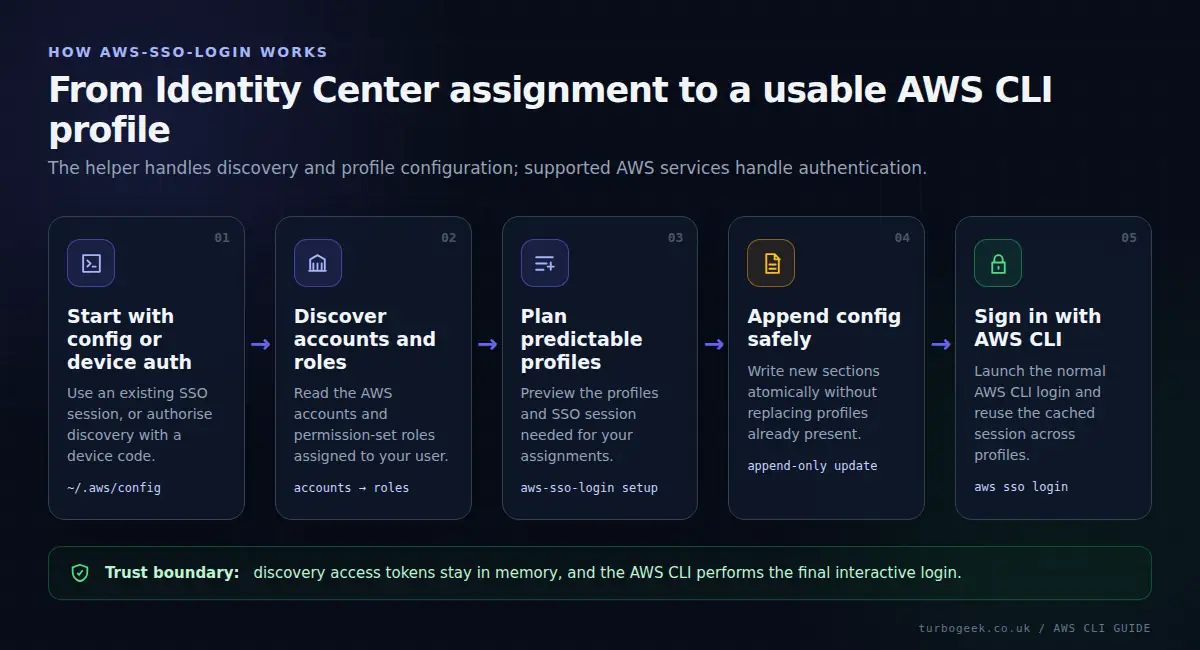
aws-sso-login is a small layer around AWS’s supported IAM Identity Center and AWS CLI workflows. It removes the repetitive local configuration work:
- Discovers the accounts and roles IAM Identity Center says you may use.
- Lets you choose which assignments should become local AWS CLI profiles.
- Previews every new session and profile before writing anything.
- Creates predictable profile names and handles name collisions consistently.
- Lists profiles with their account, role, SSO session, and configuration status.
- Delegates the final login to AWS CLI v2, including browser and device-code flows.
- Checks local configuration with a built-in
doctorcommand.
It does not create permission sets, assign roles, bypass MFA, or turn a read-only role into an administrator. AWS remains the source of truth throughout.
How it adapts to your configuration
The tool does not ship with assumptions such as “every company calls its privileged role Admin” or “production always lives in account 123456789012”. It builds from the configuration and assignments that apply to the person running it.
If you already have AWS profiles
It reads the standard shared AWS config at ~/.aws/config, or the path in AWS_CONFIG_FILE. It understands modern [sso-session ...] profiles and older profiles with inline SSO settings. Equivalent account-and-role assignments are reused instead of duplicated.
If the machine is not configured yet
You provide the AWS Start URL or Issuer URL and the Region that hosts IAM Identity Center. A blank workstation cannot safely infer your organisation’s portal. The setup flow then uses AWS device authorisation with the narrow sso:account:access scope to ask AWS which accounts and roles are assigned to you.
Before it writes
You select the assignments and review a table showing the proposed profile, account, role, and action. Existing sections are never overwritten. If a generated name clashes, the tool adds deterministic account and numeric suffixes rather than guessing.
Install and configure it
You need Python 3.10 or newer and AWS CLI v2 on Linux, macOS, or WSL. Native Windows PowerShell and Command Prompt are not supported in the first release. If you need the AWS CLI first, use my AWS CLI installation guide.
Install the current release directly from the public GitHub repository with pipx:
pipx install git+https://github.com/TurboBailey1980/aws-sso-login.gitStart the discovery and configuration flow:
aws-sso-login setupFollow the AWS authorisation prompt, choose the account-and-role assignments you want, and approve the preview. Then inspect the result:
aws-sso-login list
aws-sso-login doctor --allThe project is not on PyPI yet, so installing from GitHub is intentional. For a controlled environment, inspect the source and pin the Git commit you have reviewed.
Give Claude Code one profile for the task
Suppose Claude Code needs to investigate production without changing it. I sign in to the read-only profile, verify the AWS identity, and only then start Claude Code:
aws-sso-login login production-readonly
AWS_PROFILE=production-readonly aws sts get-caller-identity
AWS_PROFILE=production-readonly claudeProcesses launched by Claude Code inherit AWS_PROFILE, so AWS CLI commands and most SDK-based tooling use that profile by default. The identity check is worth keeping: it prints the account and assumed-role ARN, which catches an incorrect profile before the agent begins exploring.
For a development deployment, I repeat the decision with the DevOps profile rather than silently broadening the existing session:
aws-sso-login login development-devops
AWS_PROFILE=development-devops aws sts get-caller-identity
AWS_PROFILE=development-devops claudeThe example profile names are placeholders. Use the names returned by aws-sso-login list; they are built from your account names and roles.
How secure is it?
The short answer is: it is designed to be conservative with credentials and configuration, but it cannot make an overpowered AWS role safe. Security still starts with the permission set you choose.
It uses short-lived AWS sessions
The normal login command delegates to AWS CLI v2 and IAM Identity Center. You are not pasting long-lived IAM access keys into a project, prompt, or shell script. The AWS CLI manages its own SSO cache and role credentials.
The separate discovery token used during first-time setup stays in process memory and is discarded when setup finishes. aws-sso-login does not print or save access tokens, client registration secrets, or refresh credentials.
It is careful with your AWS config
The tool preserves your existing text and comments and appends only new sections. When it changes an existing config, it creates a backup. It uses an atomic file replacement, keeps existing permissions, gives new configs and backups mode 0600, and aborts if the file changes unexpectedly during setup. Duplicate sections must be fixed before it will write.
It has a deliberately small privacy footprint
There is no telemetry and the application creates no logs. Account IDs, account names, roles, and portal details remain local except where AWS needs them for authentication. The account email address returned during discovery is ignored.
The list --json command intentionally outputs local profile metadata. If you redirect it to a file, protect that file as you would ~/.aws/config.
A selected profile is not a hard sandbox
This is the caveat I would rather state plainly: AWS_PROFILE chooses the default profile, but an agent with normal access to your home directory may be able to see other profile names and explicitly pass --profile. If a powerful profile and usable SSO session are available in the same environment, do not assume the environment variable makes them unreachable.
For everyday supervised work, careful profile selection plus least-privilege IAM is a practical pattern. When you need a firm technical boundary, run the agent in a separate OS account or isolated container that can see only the intended AWS configuration and cache, or use your organisation’s approved credential broker or dedicated workload identity. Keep administrator access out of that environment entirely.
AWS CloudTrail, short Identity Center session durations, and organisation-level guardrails add useful defence in depth. None of them replaces reviewing what the agent intends to change.
Useful commands once it is configured
Most days I only need the selector, a targeted login, and the identity check. The other modes help when several profiles share a session or when I am working over SSH:
aws-sso-login
aws-sso-login login production-readonly
aws-sso-login login --session example-sso
aws-sso-login login --last
aws-sso-login login --all --device-code
aws-sso-login doctor --all--device-code is useful in WSL, SSH sessions, and other terminals where opening a local browser is awkward. You can approve the displayed code on another device while AWS still handles the authentication.
Where this tool fits—and where it does not
aws-sso-login is useful for developers, platform engineers, and operators who use agentic tools locally across several IAM Identity Center accounts or roles. It is especially helpful when setting up a new workstation or when assignments change regularly.
It is not a credential service for unattended automation. CI/CD jobs and applications should use workload identities such as OIDC or AWS roles designed for machines. It also does not manage long-lived IAM user keys. If you are comparing credential models, my AWS Vault versus IAM Identity Center guide explains the distinction.
Frequently asked questions
Does aws-sso-login decide what Claude Code can do?
No. It helps you discover, configure, select, and authenticate the profile. The IAM Identity Center permission set and your AWS policies decide what calls are allowed.
Does it work with my existing AWS configuration?
Yes. It reads modern SSO session profiles and legacy inline SSO profiles, respects AWS_CONFIG_FILE, reuses equivalent assignments, and does not overwrite existing sections.
Does it store my AWS credentials?
No. AWS CLI v2 manages the normal SSO session and cached credentials. The tool’s one-time discovery token is held in memory only and discarded at the end of setup.
Can an agent switch to another configured profile?
Potentially, yes, if that profile and its authentication material are visible in the same operating-system context. Use OS or container isolation when profile switching must be impossible, and expose only the minimum AWS access required.
Is AWS SSO different from IAM Identity Center?
AWS Single Sign-On was renamed AWS IAM Identity Center. The AWS CLI command is still aws sso login, so both names remain common.
The result: less friction, more deliberate access
I did not build aws-sso-login because typing aws sso login was too difficult. I built it because repeatedly matching an AI agent to the correct account and permission level was error-prone, tedious, and too important to leave to memory.
Now the workflow is explicit: discover what AWS has assigned, create the profiles safely, choose the least-privileged role for the job, verify the identity, and start the agent. If that is the problem you are facing too, review aws-sso-login on GitHub, install it with pipx, and try it first with a read-only role.
Leave a Reply