AI & IT in 2026 — Full Series
- 1. Where Businesses Are Actually Investing in AI in 2026
- 2. How AI Is Reshaping the Developer’s Daily Workflow
- 3. Platform Engineering in the Age of AI
- 4. The Security Risks Businesses Aren’t Talking About
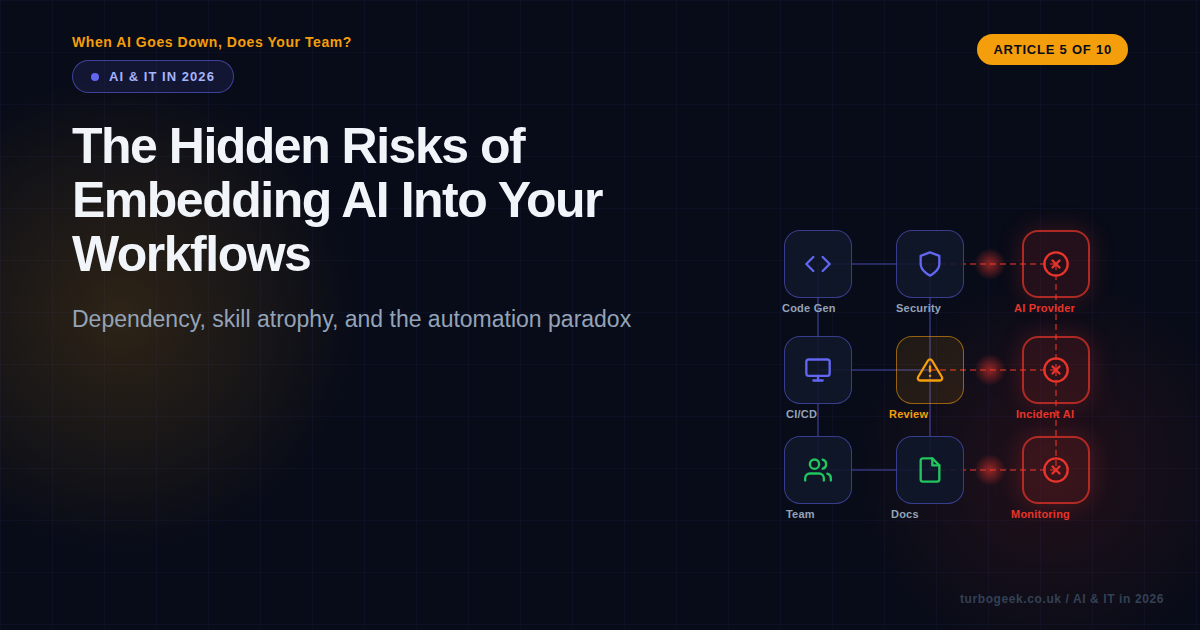
- 5. The Hidden Risks of Embedding AI Into Your Workflows
- 6. AI and the IT Job Market: What’s Really Happening
- 7. What Happens to Engineers Who Refuse to Use AI
- 8. Is AI a Paradigm Shift? Lessons from Cloud and Virtualisation
- 9. The AI-Augmented IT Team: What 2027 Looks Like
- 10. Your Move: A Practical Framework for IT Professionals
TL;DR
- Dependency risk — a single AI provider outage can halt entire workflows that used to run manually
- Skill atrophy — teams slowly lose the ability to do what they have delegated to AI
- The automation paradox — the more reliable AI becomes, the worse humans get at catching its failures
- Mitigation — scheduled manual practice, fallback runbooks, rotation of AI-free tasks, and honest dependency audits
New to this series? Start with Article 1: Where Businesses Are Actually Investing in AI for the full picture of how AI is reshaping IT in 2026.
| Topic | The Risk | Key Question |
|---|---|---|
| Dependency | Single points of failure in AI providers | Can your team still ship if the AI goes down? |
| Skill Atrophy | Gradual loss of manual competence | Could your devs write that code without AI today? |
| Automation Paradox | Reliability breeds poor oversight | Who checks the checker? |
| Mitigation | Retreating vs embedding thoughtfully | How do you keep humans sharp? |
We Embedded AI Everywhere. What Could Go Wrong?
In the space of eighteen months, AI went from a curiosity that developers played with on the side to a load-bearing pillar of how teams build, test, ship, and monitor software. Code generation, automated pull request reviews, AI-driven incident triage, deployment risk scoring — the list keeps growing. And for good reason: it works. Productivity is up, cycle times are down, and the tools genuinely make people’s lives easier.
But here is the question nobody wants to ask in a planning meeting: what happens when it stops working?
Not permanently. Not some dramatic “AI rebellion” scenario. Just a Tuesday morning when your AI provider has a four-hour outage, and you discover that half your team cannot remember how to do what they were doing eighteen months ago without it. Or worse: a quiet Wednesday afternoon when the AI makes a subtle mistake, and nobody catches it because they stopped checking months ago.
This article is about the risks that come not from AI being bad, but from AI being good — so good that we stop paying attention to what we have given up along the way.
Dependency Risk: Single Points of Failure
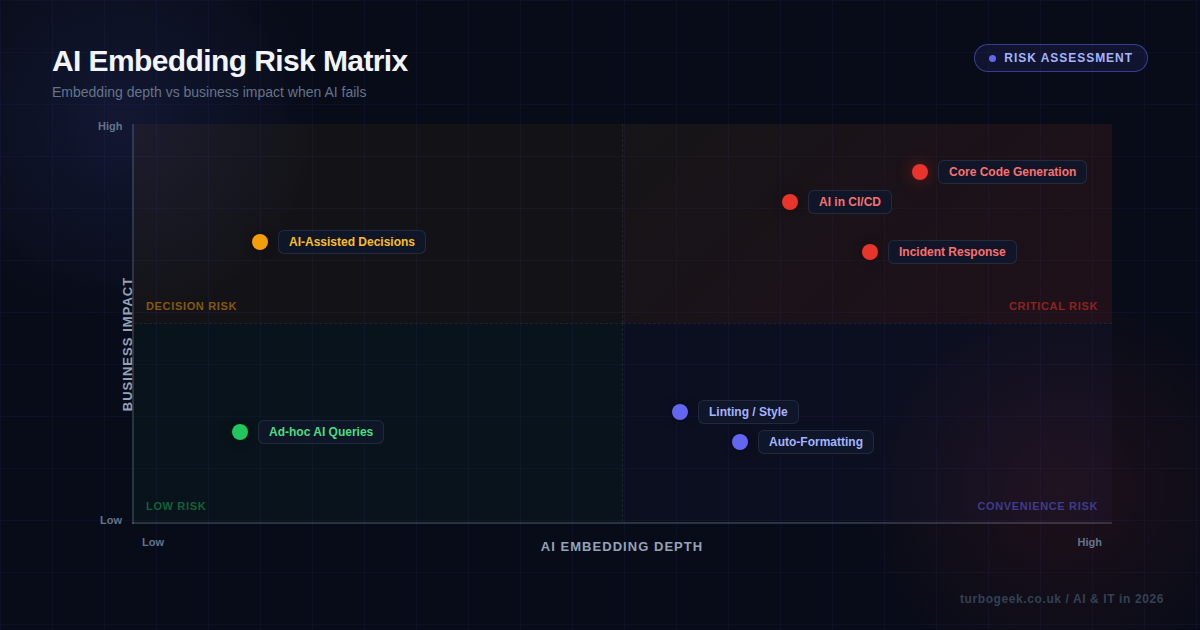
Most organisations that have adopted AI tooling have done so through a small number of providers. Your code generation comes from one vendor. Your CI/CD intelligence runs through another. Your incident response bot relies on a third. Each one works brilliantly — right up until it does not.
In March 2026, a major AI provider experienced an extended outage that lasted most of a working day. The engineering teams I spoke to afterwards told a consistent story: the first hour was inconvenient, the second hour was frustrating, and by hour three, people were genuinely struggling. Not because they had forgotten how to code, but because their entire workflow — from generating boilerplate to running reviews to deploying safely — had AI woven through every step.
This is classic dependency risk, and it is the same pattern we saw with cloud providers a decade ago. When everything runs through a single point, that point becomes critical infrastructure. The difference with AI is that the dependency is often invisible. Nobody writes “AI provider availability” on their risk register because it does not feel like infrastructure. It feels like a productivity tool. But when your productivity tool is the reason your team can maintain its current velocity, losing it is not a minor inconvenience — it is an operational crisis.
The practical questions are uncomfortable but necessary:
- If your AI code generation provider goes down for 24 hours, what is your team’s output?
- If your AI-powered review tooling is unavailable, do you have a manual review process that people actually know how to follow?
- If your AI incident triage system is offline during an actual incident, does anyone remember the old runbooks?
For most teams I have spoken to, the honest answer to at least one of these questions is “we would manage, but it would not be pretty.” That is worth paying attention to.
Skill Atrophy: The Slow Erosion
Dependency risk is the dramatic version of the problem — the acute crisis when the tool disappears. Skill atrophy is the chronic version, and in many ways it is more dangerous because it happens so gradually that nobody notices until it is too late.
Think about what AI handles for a typical developer in 2026. It writes boilerplate code. It suggests implementations for common patterns. It catches bugs during review. It generates test cases. It drafts documentation. Each of these tasks is something that developers used to do manually, building and maintaining skills through repetition.
When you stop practising something, you get worse at it. This is not controversial — it is basic cognitive science. The question is whether it matters. And the answer depends on what you are delegating.
Delegating boilerplate generation? The skill loss there is minimal and the productivity gain is enormous. Nobody needs to maintain their ability to write CRUD endpoints from scratch when a tool can do it reliably. But delegating architectural reasoning, security review, or debugging of complex distributed systems? That is where skill atrophy becomes genuinely dangerous, because those are precisely the skills you need when AI is not available or when AI gets it wrong.
I have noticed a pattern in teams that adopted AI tooling early: their junior developers are significantly faster than previous cohorts at producing working code, but noticeably weaker at explaining why the code works or what would happen if a particular component failed. They have learned to work with AI but have not built the foundational understanding that comes from struggling through problems manually.
This is not the juniors’ fault. It is a systemic issue. If the tools handle the hard thinking, there is less incentive — and less opportunity — to develop that thinking independently. The result is a team that is highly productive under normal conditions but fragile when conditions change.
Related: Article 2 explores how the developer role is changing shape in response to AI tooling — including what skills are becoming more important, not less.
The Automation Paradox
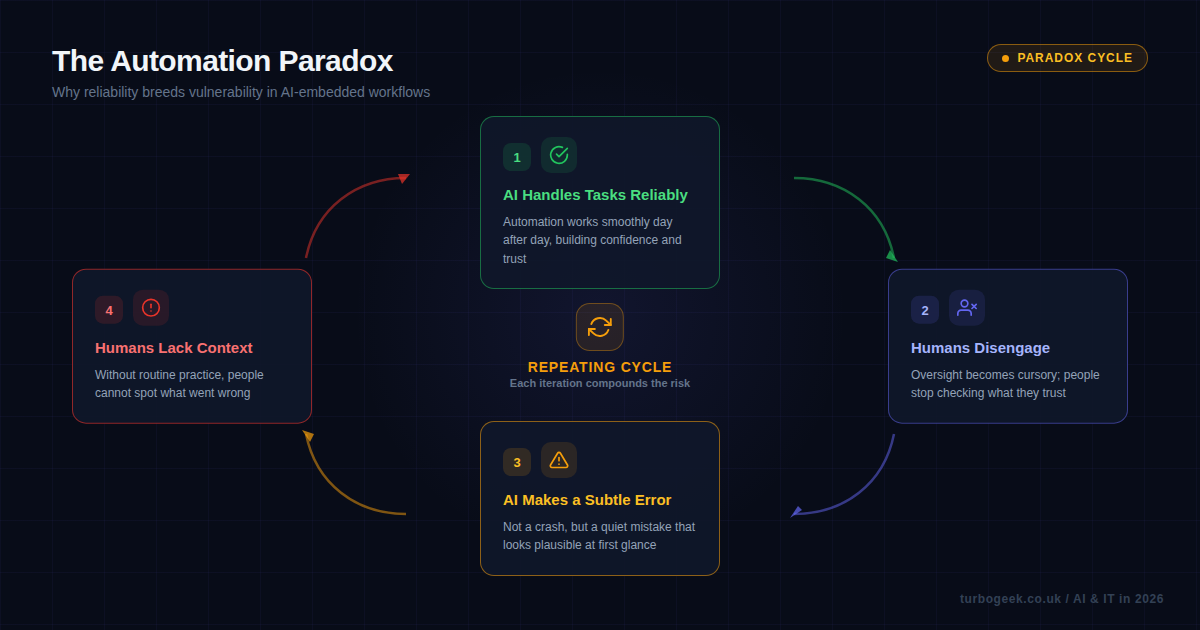
This brings us to what researchers call the automation paradox, and it is the most counterintuitive risk of the three. Put simply: the better AI gets at a task, the worse humans become at overseeing it.
The logic is straightforward. When AI performs a task reliably 99% of the time, humans learn to trust it. They stop checking its output carefully. They skim where they used to scrutinise. And when that 1% failure arrives — often as a subtle, plausible-looking error rather than an obvious crash — nobody catches it.
This is not a new concept. Aviation has dealt with automation complacency for decades: the more reliable autopilot systems become, the harder it is for pilots to maintain situational awareness and respond effectively when the automation fails. The same dynamic is now playing out in software engineering.
Consider a practical example. Your AI code review tool catches 95% of bugs that human reviewers would catch, and it does so consistently, every single pull request, without getting tired or distracted. After a few months of this reliability, human reviewers start treating the AI’s “approved” status as a green light. They glance at the diff rather than reading it. They approve quickly because the AI already checked it.
Now the AI misses something — a subtle race condition, an edge case in error handling, a security vulnerability that does not match its training patterns. The human reviewer, who has been in skim mode for months, misses it too. Not because they are incompetent, but because the system has trained them to disengage.
The cycle looks like this:
- AI handles routine tasks reliably
- Humans disengage from routine oversight
- AI makes a subtle error
- Humans lack the context and attention to catch it
And then back to step one, because the error goes unnoticed, confidence in the AI remains high, and the cycle continues with an even lower baseline of human attention.
This is not a reason to abandon AI tooling. It is a reason to design your processes around the reality that human oversight degrades over time when it is rarely needed.
Mitigating Without Retreating
The wrong response to these risks is to pull back from AI adoption. The productivity gains are real, and organisations that refuse to use these tools will fall behind. But the right response is to embed AI thoughtfully, with deliberate mechanisms to keep humans capable and engaged.
Here are the approaches I have seen work in practice:
1. Scheduled AI-Free Practice
Some teams now run regular “unplugged” sessions — a few hours per sprint where AI tooling is deliberately turned off and developers work through problems manually. It feels slow and slightly painful, which is exactly the point. You are maintaining muscle memory for the skills that matter most when AI is unavailable.
The key is to make this targeted rather than blanket. Focus on the high-value skills: debugging complex issues, writing security-sensitive code, performing thorough code reviews. Nobody needs to practise writing boilerplate without AI.
2. Fallback Runbooks
Document what your team would do if each AI tool disappeared tomorrow. Not as a theoretical exercise, but as a practical, step-by-step runbook that people actually test. Run quarterly “AI outage drills” the same way you run disaster recovery exercises. When the real outage comes — and it will — the runbook means the difference between a frustrating day and a crisis.
3. Rotation of Oversight Duties
Rather than having the same people nominally overseeing AI output every day (and gradually checking less), rotate the responsibility. Fresh eyes catch more. Better yet, designate specific reviews as “deep review” sessions where the human reviewer is explicitly expected to find something the AI missed, even if it means spending extra time.
4. Dependency Audits
Map every AI tool in your workflow and classify each one: is it a convenience (nice to have), a productivity multiplier (significant impact if lost), or a critical dependency (workflow stops without it)? For anything in the critical category, you need a tested fallback. For productivity multipliers, you need at least a documented manual process.
This is the same thinking that good operations teams apply to any third-party dependency. AI tools should not get a free pass just because they feel like internal productivity aids rather than external infrastructure.
5. Multi-Provider Strategy
Where possible, avoid putting all your AI eggs in one basket. Use different providers for different parts of your workflow. If your code generation uses one vendor and your review tooling uses another, a single provider outage does not take down everything. This is not always practical — switching costs are real — but it is worth considering for your most critical workflows.
Related: Article 4 covers the security dimensions of AI dependency, including supply chain risks when AI providers are compromised.
Embed Thoughtfully, Not Blindly
None of this is an argument against using AI in your workflows. I use AI tooling extensively, and I would not go back. The productivity improvements are genuine and substantial. But I have also seen enough teams discover their hidden dependencies the hard way to know that the risks are real.
The organisations that will navigate this well are the ones that treat AI embedding as an infrastructure decision, not just a tooling decision. They ask the hard questions early: where are we creating single points of failure? Where are we losing skills we might need? Where has our oversight become performative rather than real?
The goal is not to resist AI adoption. It is to adopt it with your eyes open, maintaining the human capabilities and fallback processes that keep you resilient when — not if — something goes wrong.
Because the question is not whether your AI tools will fail. They will. The question is whether your team can still function when they do.
Next in the series: Article 6 — AI and the IT Job Market: What’s Really Happening looks at how AI adoption is reshaping roles, creating new positions, and changing what employers actually hire for.
What is your team’s AI dependency story? Have you tested what happens when the tools go down? I would genuinely like to hear about it — drop me a message or find me on LinkedIn.
Leave a Reply