
TL;DR
yumis the legacy package manager (CentOS 7);dnfis the modern replacement (CentOS 8+, RHEL 8+, Rocky, Alma).- Update everything:
sudo dnf upgrade -y. Update one package:sudo dnf upgrade nginx. - Reboot is needed when the kernel was updated —
needs-restarting -rtells you. - CentOS Linux 6, 7, and 8 are all EOL. New systems should be on Rocky Linux, AlmaLinux, Oracle Linux, or a supported RHEL release for ongoing security updates.
Source check – May 10, 2026: Red Hat’s upgrade guidance confirms RHEL 6 users need to upgrade for full support and security fixes, CentOS 6 moved to vault repositories after its November 30, 2020 EOL, and the CentOS vault should be treated as a temporary recovery source rather than a supported production update channel.
| Topic | When | Command or source |
|---|---|---|
| Modern RHEL-family update | RHEL/Rocky/Alma 8+ | sudo dnf upgrade -y |
| CentOS 6 recovery | Temporary legacy repair only | CentOS 6.10 vault |
| Migration planning | Before changing repos | RHEL migration guide |
Start here: If you only need package-management syntax, use the modern dnf path below. If the server is CentOS 6, treat the vault fix as a short recovery window and plan a migration before exposing the host to production traffic.
What is updating CentOS with yum / dnf?
yum (Yellowdog Updater, Modified) was the package manager for RHEL-family Linux from RHEL 5 through 7. dnf (Dandified YUM) replaced it in RHEL 8 with a faster solver and cleaner internals. The user-facing commands are mostly identical; dnf aliases yum on modern systems for backward compatibility.
CentOS Linux 7 reached end of life on 30 June 2024. CentOS Linux 8 ended much earlier (December 2021). Anyone still on either is running unpatched and should plan a migration to Rocky Linux, AlmaLinux, or Oracle Linux. The package-manager commands are identical across all three.
Prerequisites
- RHEL-family Linux: CentOS 7, RHEL/Rocky/Alma 8/9, or Oracle Linux.
- Root or sudo access.
- Network access to the configured repositories.
How to use this guide
The sections below walk through the practical commands and options. After the main content you’ll find a Verification block (sanity-check it actually worked), a Troubleshooting block (common error messages and what to do), and Related reading for follow-on topics.
Last reviewed: May 10, 2026. CentOS 6 vault commands remain useful for emergency recovery, but unsupported systems should be migrated rather than patched indefinitely.
Let’s be honest: in 2026 you should not be running CentOS 6 or RHEL 6 for normal production workloads. However, I fully appreciate you may have inherited an outdated legacy system that needs one final maintenance window before it can be migrated.
Important: If you are unable to SSH to a RHEL6 or CENTOS6 server follow this procedure here.
To update CentOS using yum, run sudo yum update -y. For CentOS 8+ / RHEL 8+ which use dnf, run sudo dnf update -y. Example: sudo yum update -y && sudo reboot
Why is my CentOS 6 Yum update failing?
If you are seeing errors like :
YumRepo Error: All mirror URLs are not using ftp, http[s] or file
Cannot retrieve repository metadataThis is because CentOS 6 reached its official End-of-Life (EOL) on November 30, 2020. The official mirrors have been removed from the main servers. To fix this, you must redirect your system to the CentOS Vault, which hosts the archived versions of the final 6.10 release.
Any clean, out-of-the-box installation of Cent0S6 or RHEL6 will give you an error. You must take action to fix the problem.
Example Error
If you ever need to install CentOS 6 or RHEL6, you will not be able to install updates via Yum because it has reached the end of its life.
yum update -y
##########################
Setting up Upgrade Process
YumRepo Error: All mirror URLs are not using ftp, http[s] or file.
Eg. Invalid release/repo/arch combination/
removing mirrorlist with no valid mirrors: /var/cache/yum/x86_64/6/base/mirrorlist.txt
Error: Cannot retrieve repository metadata (repomd.xml) for repository: base.
Please verify its path and try againHowever, there is a handy workaround for this.
Step 1 – Access and Edit the Base Repository
To get started, you need to modify your primary repository configuration. I recommend using vi, but nano works just as well for those who prefer it.
vi /etc/yum.repos.d/CentOS-Base.repoStep 2a – Redirect to the Vault Mirrors
Clear the existing content in CentOS-Base.repo and replace it with the following configuration. We are pointing the baseurl to vault.epel.cloud, which remains a reliable archive as of late 2025.
[C6.10-base]
name=CentOS-6.10 - Base
baseurl=http://vault.epel.cloud/6.10/os/$basearch/
gpgcheck=1
gpgkey=file:///etc/pki/rpm-gpg/RPM-GPG-KEY-CentOS-6
enabled=1
metadata_expire=never

[C6.10-updates]
name=CentOS-6.10 - Updates
baseurl=http://vault.epel.cloud/6.10/updates/$basearch/
gpgcheck=1
gpgkey=file:///etc/pki/rpm-gpg/RPM-GPG-KEY-CentOS-6
enabled=1
metadata_expire=never

[C6.10-extras]
name=CentOS-6.10 - Extras
baseurl=http://vault.epel.cloud/6.10/extras/$basearch/
gpgcheck=1
gpgkey=file:///etc/pki/rpm-gpg/RPM-GPG-KEY-CentOS-6
enabled=1
metadata_expire=never

[C6.10-contrib]
name=CentOS-6.10 - Contrib
baseurl=http://vault.epel.cloud/6.10/contrib/$basearch/
gpgcheck=1
gpgkey=file:///etc/pki/rpm-gpg/RPM-GPG-KEY-CentOS-6
enabled=0
metadata_expire=never

[C6.10-centosplus]
name=CentOS-6.10 - CentOSPlus
baseurl=http://vault.epel.cloud/6.10/centosplus/$basearch/
gpgcheck=1
gpgkey=file:///etc/pki/rpm-gpg/RPM-GPG-KEY-CentOS-6
enabled=0
metadata_expire=neverIf you have dozens of legacy CentOS 6 VMs, manually editing files is inefficient. You can use this sed command to automate the redirection from the broken mirror.centos.org to the vault.centos.org archive.
# Automated fix for CentOS-Base.repo
sed -i 's/mirrorlist/#mirrorlist/g' /etc/yum.repos.d/CentOS-Base.repo
sed -i 's/#baseurl=http:\/\/mirror.centos.org\/centos\/$releasever/baseurl=http:\/\/vault.centos.org\/6.10/g' /etc/yum.repos.d/CentOS-Base.repoStep 3: Fix GCC and C++ Repositories (SCLo)
If your legacy application requires modern development tools (like newer versions of GCC), you’ll need to fix the Software Collections (SCLo) repos.
Create the RH SCLo repo:
vi /etc/yum.repos.d/CentOS-SCLo-scl-rh.repoPaste this content:
[centos-sclo-rh]
name=CentOS-6 - SCLo rh
baseurl=http://vault.epel.cloud/centos/6/sclo/$basearch/rh/
gpgcheck=1
enabled=1
gpgkey=file:///etc/pki/rpm-gpg/RPM-GPG-KEY-CentOS-SIG-SCLo

[centos-sclo-rh-testing]
name=CentOS-6 - SCLo rh Testing
baseurl=http://buildlogs.centos.org/centos/6/sclo/$basearch/rh/
gpgcheck=0
enabled=0
gpgkey=file:///etc/pki/rpm-gpg/RPM-GPG-KEY-CentOS-SIG-SCLo

[centos-sclo-rh-source]
name=CentOS-6 - SCLo rh Sources
baseurl=http://vault.epel.cloud/centos/6/sclo/Source/rh/
gpgcheck=1
enabled=0
gpgkey=file:///etc/pki/rpm-gpg/RPM-GPG-KEY-CentOS-SIG-SCLo

[centos-sclo-rh-debuginfo]
name=CentOS-6 - SCLo rh Debuginfo
baseurl=http://debuginfo.centos.org/centos/6/sclo/$basearch/
gpgcheck=1
enabled=0
gpgkey=file:///etc/pki/rpm-gpg/RPM-GPG-KEY-CentOS-SIG-SCLoCreate the SCLo Sclo repo:
Next, create another repo and add the contents below:
vi /etc/yum.repos.d/CentOS-SCLo-scl.repoPaste this content:
[centos-sclo-sclo]
name=CentOS-6 - SCLo sclo
baseurl=http://vault.epel.cloud/centos/6/sclo/$basearch/sclo/
gpgcheck=1
enabled=1
gpgkey=file:///etc/pki/rpm-gpg/RPM-GPG-KEY-CentOS-SIG-SCLo

[centos-sclo-sclo-testing]
name=CentOS-6 - SCLo sclo Testing
baseurl=http://buildlogs.centos.org/centos/6/sclo/$basearch/sclo/
gpgcheck=0
enabled=0
gpgkey=file:///etc/pki/rpm-gpg/RPM-GPG-KEY-CentOS-SIG-SCLo

[centos-sclo-sclo-source]
name=CentOS-6 - SCLo sclo Sources
baseurl=http://vault.epel.cloud/centos/6/sclo/Source/sclo/
gpgcheck=1
enabled=0
gpgkey=file:///etc/pki/rpm-gpg/RPM-GPG-KEY-CentOS-SIG-SCLo

[centos-sclo-sclo-debuginfo]
name=CentOS-6 - SCLo sclo Debuginfo
baseurl=http://debuginfo.centos.org/centos/6/sclo/$basearch/
gpgcheck=1
enabled=0
gpgkey=file:///etc/pki/rpm-gpg/RPM-GPG-KEY-CentOS-SIG-SCLo
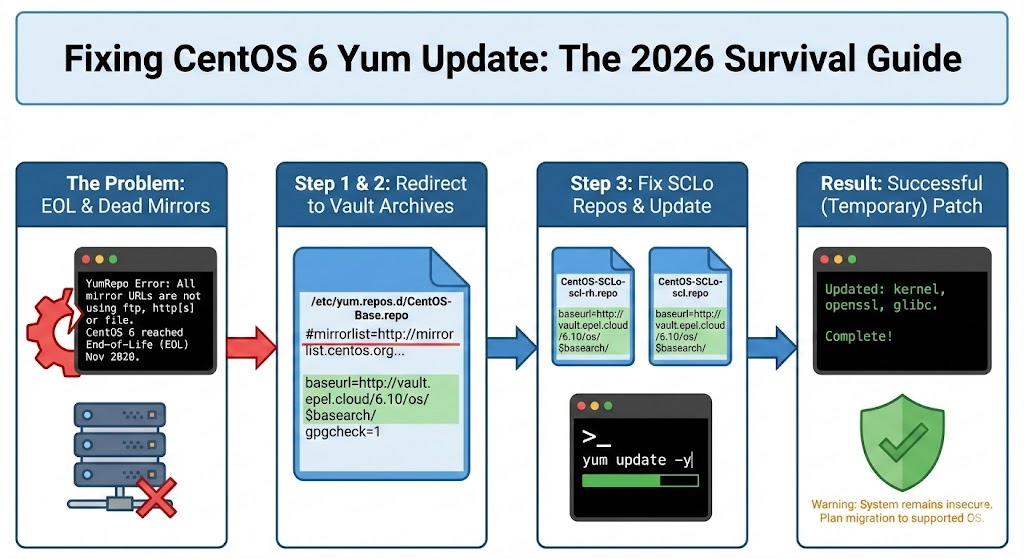
Step 4: Execute the Update
Once the files are saved, clear your old cache and run the update.
yum clean all
yum update -yThis will update your CentOS 6
Updated:
  ORBit2.x86_64 0:2.14.17-7.el6
  abrt.x86_64 0:2.0.8-44.el6.centos
  abrt-addon-ccpp.x86_64 0:2.0.8-44.el6.centos
  abrt-addon-kerneloops.x86_64 0:2.0.8-44.el6.centos
  abrt-addon-python.x86_64 0:2.0.8-44.el6.centos
  abrt-cli.x86_64 0:2.0.8-44.el6.centos
  abrt-libs.x86_64 0:2.0.8-44.el6.centos
  abrt-python.x86_64 0:2.0.8-44.el6.centos
  abrt-tui.x86_64 0:2.0.8-44.el6.centos
  acl.x86_64 0:2.2.49-7.el6_9.1
  adcli.x86_64 0:0.8.1-3.el6_10
  autofs.x86_64 1:5.0.5-140.el6_10.1
  bind-libs.x86_64 32:9.8.2-0.68.rc1.el6_10.8
  bind-utils.x86_64 32:9.8.2-0.68.rc1.el6_10.8
  binutils.x86_64 0:2.20.51.0.2-5.48.el6_10.1
  ca-certificates.noarch 0:2020.2.41-65.1.el6_10
  centos-release.x86_64 0:6-10.el6.centos.12.3
  coreutils.x86_64 0:8.4-47.el6
  coreutils-libs.x86_64 0:8.4-47.el6
  crash.x86_64 0:7.1.0-8.el6
  cups.x86_64 1:1.4.2-81.el6_10
  cups-libs.x86_64 1:1.4.2-81.el6_10
  curl.x86_64 0:7.19.7-54.el6_10
  dbus.x86_64 1:1.2.24-11.el6_10
  dbus-libs.x86_64 1:1.2.24-11.el6_10
  device-mapper.x86_64 0:1.02.117-12.el6_9.1
  device-mapper-event.x86_64 0:1.02.117-12.el6_9.1
  device-mapper-event-libs.x86_64 0:1.02.117-12.el6_9.1
  device-mapper-libs.x86_64 0:1.02.117-12.el6_9.1
  device-mapper-persistent-data.x86_64 0:0.6.2-0.2.rc7.el6
  dhclient.x86_64 12:4.1.1-63.P1.el6.centos
  dhcp-common.x86_64 12:4.1.1-63.P1.el6.centos
  dracut.noarch 0:004-411.el6
  dracut-kernel.noarch 0:004-411.el6
  dstat.noarch 0:0.7.0-3.el6_9.1
  e2fsprogs.x86_64 0:1.41.12-24.el6
  e2fsprogs-libs.x86_64 0:1.41.12-24.el6
  freetype.x86_64 0:2.3.11-19.el6_10
  ghostscript.x86_64 0:8.70-24.el6_10.2
  glib2.x86_64 0:2.28.8-10.el6
  glibc.x86_64 0:2.12-1.212.el6_10.3
  glibc-common.x86_64 0:2.12-1.212.el6_10.3
  glibc-devel.x86_64 0:2.12-1.212.el6_10.3
  glibc-headers.x86_64 0:2.12-1.212.el6_10.3
  gmp.x86_64 0:4.3.1-13.el6
  gnupg2.x86_64 0:2.0.14-9.el6_10
  gnutls.x86_64 0:2.12.23-22.el6
  hwdata.noarch 0:0.233-20.1.el6
  initscripts.x86_64 0:9.03.61-1.el6.centos
  iproute.x86_64 0:2.6.32-57.el6
  iptables.x86_64 0:1.4.7-19.el6
  iptables-ipv6.x86_64 0:1.4.7-19.el6
  irqbalance.x86_64 2:1.0.7-9.el6
  jasper-libs.x86_64 0:1.900.1-22.el6
  java-1.7.0-openjdk.x86_64 1:1.7.0.261-2.6.22.1.el6_10
  kernel-firmware.noarch 0:2.6.32-754.35.1.el6
  kernel-headers.x86_64 0:2.6.32-754.35.1.el6
  kexec-tools.x86_64 0:2.0.0-310.el6
  kpartx.x86_64 0:0.4.9-106.el6_10.1
  libX11.x86_64 0:1.6.4-4.el6_10
  libX11-common.noarch 0:1.6.4-4.el6_10
  libacl.x86_64 0:2.2.49-7.el6_9.1
  libbasicobjects.x86_64 0:0.1.1-13.el6
  libblkid.x86_64 0:2.17.2-12.28.el6_9.2
  libcgroup.x86_64 0:0.40.rc1-27.el6_10
  libcollection.x86_64 0:0.6.2-13.el6
  libcom_err.x86_64 0:1.41.12-24.el6
  libcurl.x86_64 0:7.19.7-54.el6_10
  libdhash.x86_64 0:0.4.3-13.el6
  libgcc.x86_64 0:4.4.7-23.el6
  libgfortran.x86_64 0:4.4.7-23.el6
  libgomp.x86_64 0:4.4.7-23.el6
  libgudev1.x86_64 0:147-2.74.el6_10
  libini_config.x86_64 0:1.1.0-13.el6
  libipa_hbac.x86_64 0:1.13.3-60.el6_10.2
  libnih.x86_64 0:1.0.1-8.el6
  libpath_utils.x86_64 0:0.2.1-13.el6
  libref_array.x86_64 0:0.1.4-13.el6
  libreport.x86_64 0:2.0.9-34.el6.centos
  libreport-cli.x86_64 0:2.0.9-34.el6.centos
  libreport-compat.x86_64 0:2.0.9-34.el6.centos
  libreport-filesystem.x86_64 0:2.0.9-34.el6.centos
  libreport-plugin-kerneloops.x86_64 0:2.0.9-34.el6.centos
  libreport-plugin-logger.x86_64 0:2.0.9-34.el6.centos
  libreport-plugin-mailx.x86_64 0:2.0.9-34.el6.centos
  libreport-plugin-reportuploader.x86_64 0:2.0.9-34.el6.centos
  libreport-plugin-rhtsupport.x86_64 0:2.0.9-34.el6.centos
  libreport-plugin-ureport.x86_64 0:2.0.9-34.el6.centos
  libreport-python.x86_64 0:2.0.9-34.el6.centos
  libss.x86_64 0:1.41.12-24.el6
  libssh2.x86_64 0:1.4.2-3.el6_10.1
  libsss_idmap.x86_64 0:1.13.3-60.el6_10.2
  libstdc++.x86_64 0:4.4.7-23.el6
  libtirpc.x86_64 0:0.2.1-15.el6
  libudev.x86_64 0:147-2.74.el6_10
  libuuid.x86_64 0:2.17.2-12.28.el6_9.2
  libvorbis.x86_64 1:1.2.3-5.el6_9.1
  lvm2.x86_64 0:2.02.143-12.el6_9.1
  lvm2-libs.x86_64 0:2.02.143-12.el6_9.1
  mailx.x86_64 0:12.4-10.el6_10
  man-pages-overrides.noarch 0:6.10.0-1.el6
  microcode_ctl.x86_64 2:1.17-33.31.el6_10
  nfs-utils.x86_64 1:1.2.3-78.el6_10.2
  nspr.x86_64 0:4.21.0-1.el6_10
  nss.x86_64 0:3.44.0-7.el6_10
  nss-softokn.x86_64 0:3.44.0-6.el6_10
  nss-softokn-freebl.x86_64 0:3.44.0-6.el6_10
  nss-sysinit.x86_64 0:3.44.0-7.el6_10
  nss-tools.x86_64 0:3.44.0-7.el6_10
  nss-util.x86_64 0:3.44.0-1.el6_10
  ntp.x86_64 0:4.2.6p5-15.el6.centos
  ntpdate.x86_64 0:4.2.6p5-15.el6.centos
  openssh.x86_64 0:5.3p1-124.el6_10
  openssh-clients.x86_64 0:5.3p1-124.el6_10
  openssh-server.x86_64 0:5.3p1-124.el6_10
  openssl.x86_64 0:1.0.1e-58.el6_10
  patch.x86_64 0:2.6-8.el6_9
  perf.x86_64 0:2.6.32-754.35.1.el6
  polkit.x86_64 0:0.96-11.el6_10.1
  poppler.x86_64 0:0.12.4-12.el6_10.1
  poppler-utils.x86_64 0:0.12.4-12.el6_10.1
  procps.x86_64 0:3.2.8-45.el6_9.3
  python.x86_64 0:2.6.6-68.el6_10
  python-dmidecode.x86_64 0:3.10.15-2.el6
  python-libipa_hbac.x86_64 0:1.13.3-60.el6_10.2
  python-libs.x86_64 0:2.6.6-68.el6_10
  python-paramiko.noarch 0:1.7.5-5.el6_10
  python-setuptools.noarch 0:0.6.10-4.el6_9
  python-sss-murmur.x86_64 0:1.13.3-60.el6_10.2
  python-sssdconfig.noarch 0:1.13.3-60.el6_10.2
  rpcbind.x86_64 0:0.2.0-16.el6
  rpm.x86_64 0:4.8.0-59.el6
  rpm-libs.x86_64 0:4.8.0-59.el6
  rpm-python.x86_64 0:4.8.0-59.el6
  rsyslog.x86_64 0:5.8.10-12.el6
  samba-client.x86_64 0:3.6.23-53.el6_10
  samba-common.x86_64 0:3.6.23-53.el6_10
  samba-winbind.x86_64 0:3.6.23-53.el6_10
  samba-winbind-clients.x86_64 0:3.6.23-53.el6_10
  samba4-libs.x86_64 0:4.2.10-15.el6
  scl-utils.x86_64 0:20120927-29.el6_9
  selinux-policy.noarch 0:3.7.19-312.el6
  selinux-policy-targeted.noarch 0:3.7.19-312.el6
  sg3_utils-libs.x86_64 0:1.28-13.el6
  sos.noarch 0:3.2-63.el6.centos.4
  sssd.x86_64 0:1.13.3-60.el6_10.2
  sssd-ad.x86_64 0:1.13.3-60.el6_10.2
  sssd-client.x86_64 0:1.13.3-60.el6_10.2
  sssd-common.x86_64 0:1.13.3-60.el6_10.2
  sssd-common-pac.x86_64 0:1.13.3-60.el6_10.2
  sssd-ipa.x86_64 0:1.13.3-60.el6_10.2
  sssd-krb5.x86_64 0:1.13.3-60.el6_10.2
  sssd-krb5-common.x86_64 0:1.13.3-60.el6_10.2
  sssd-ldap.x86_64 0:1.13.3-60.el6_10.2
  sssd-proxy.x86_64 0:1.13.3-60.el6_10.2
  sudo.x86_64 0:1.8.6p3-29.el6_10.3
  sysstat.x86_64 0:9.0.4-33.el6_9.1
  systemtap-runtime.x86_64 0:2.9-9.el6
  tzdata.noarch 0:2020d-1.el6
  tzdata-java.noarch 0:2020d-1.el6
  udev.x86_64 0:147-2.74.el6_10
  upstart.x86_64 0:0.6.5-17.el6
  util-linux-ng.x86_64 0:2.17.2-12.28.el6_9.2
  vim-common.x86_64 2:7.4.629-5.el6_10.2
  vim-enhanced.x86_64 2:7.4.629-5.el6_10.2
  vim-filesystem.x86_64 2:7.4.629-5.el6_10.2
  vim-minimal.x86_64 2:7.4.629-5.el6_10.2
  xorg-x11-drv-ati-firmware.noarch 0:7.6.1-4.el6
  yum.noarch 0:3.2.29-81.el6.centos.0.1
  yum-plugin-fastestmirror.noarch 0:1.1.30-42.el6_10
  yum-plugin-security.noarch 0:1.1.30-42.el6_10
  yum-utils.noarch 0:1.1.30-42.el6_10
Thats it, you now have an updated CentOS or RHEL6 system.
CentOS 6/RHEL 6 Upgrade Survival Guide: Q&A
Let’s be real, it’s 2025. Stuck with CentOS 6 or RHEL 6? You’re not alone! Many inherited legacy systems need a lifeline. A fresh CentOS 6/RHEL 6 install throws errors because it’s reached its end-of-life.
Q: Why am I getting “YumRepo Error” and “Cannot retrieve repository metadata” when trying to update CentOS 6/RHEL 6?
A: CentOS 6 and RHEL 6 have reached their end-of-life. The default repositories are no longer active, causing these errors. You need to point your system to archived repositories.
Q: Is it safe to update a system that’s so old?
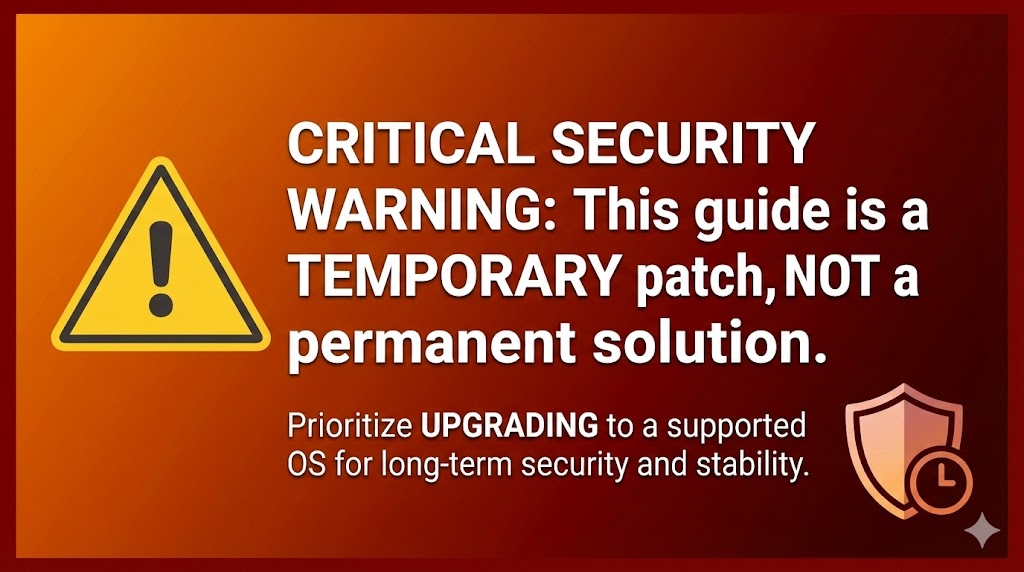
A: While this guide allows you to install updates, it’s crucial to understand the risks. Running an outdated OS poses security vulnerabilities. This process is a temporary solution, ideally used to facilitate migration to a newer, supported system.
Upgrading to a modern OS is highly recommended.
Q: What are the key steps to fix the Yum update issue?
A: The process involves:
- Creating new repository files (
CentOS-Base.repo,CentOS-SCLo-scl-rh.repo, andCentOS-SCLo-scl.repo). - Populating these files with URLs pointing to archived CentOS 6 repositories.
- Running
yum update -y.
Q: What are these repository files I’m creating?
A: These files tell your system where to find the software packages it needs for updates. The default repos are gone, so we’re creating new ones pointing to archived versions.
Q: What is the significance of the different repository sections (e.g., [C6.10-base], [C6.10-updates])?
A: These sections define different categories of packages (base OS, updates, extras, etc.). Separating them helps organize the repository information.
Q: Why are there two sets of SCLo repositories (rh and sclo)?
A: SCLo (Software Collections) allows you to install newer versions of software alongside the older system libraries. The “rh” repos are for Red Hat provided collections and “sclo” are for community collections. They are needed for gcc and c++ updates.
Q: What is gpgcheck=1 and gpgkey=file:///etc/pki/rpm-gpg/RPM-GPG-KEY-CentOS-6 in the repo files?
A: These lines ensure the downloaded packages are authentic and haven’t been tampered with. GPG (GNU Privacy Guard) keys are used to verify the digital signatures of the packages.
Q: What does metadata_expire=never mean?
A: This setting prevents Yum from checking for updated repository metadata, which is useful since these are archived repos and won’t change.
Q: I’m not comfortable using vi. Can I use another text editor?
A: Absolutely! You can use any text editor you prefer (e.g., nano, emacs). Just replace vi with your editor of choice in the commands.
Q: After running yum update -y, I see a massive list of updated packages. Is this normal?
A: Yes, this is expected. It shows all the packages that were updated to their latest available versions within the CentOS 6 lifecycle.
Q: What should I do after updating CentOS 6/RHEL 6?
A: The most important step is to plan your migration to a supported operating system. CentOS 6/RHEL 6 are no longer receiving security updates, making your system vulnerable. This update process is a temporary measure to give you time to migrate.
Q: I have a specific question not answered here. Where can I get help?
A: Feel free to leave a comment below! I’ll do my best to assist you. Please provide as much detail as possible about your issue.
Thanks for taking the time to read this article. if you have any questions or feedback, please write in the comment section below.
Verification
Sanity-check the change actually worked:
dnf check-update— lists updates without applying.dnf history— full audit log of every transaction.needs-restarting -r— explicit yes/no on whether a reboot is needed.
Troubleshooting
“Failed to download metadata for repo” — Either network problem or the repo URL is invalid. cat /etc/yum.repos.d/*.repo to inspect; for CentOS 7 EOL, point at vault.centos.org as the offline mirror.
Conflicting requests / dependency errors — dnf upgrade --allowerasing can resolve, but read the diff carefully — it may erase packages you wanted to keep.
Kernel updated but old kernel still booting — grub2-set-default 0 + reboot; or check grub2-editenv list for the saved entry.
Authoritative sources
References: DNF documentation, CentOS lifecycle.


Leave a Reply