
TL;DR
- The problem — AI coding tools create five new leakage points for secrets you never had before
- Pre-commit hooks — Install gitleaks or detect-secrets to catch credentials before they reach your repository
- Vault integration — Reference secrets by name, never by value, using HashiCorp Vault or AWS Secrets Manager
- CI/CD scanning — Enable GitHub Secret Scanning and GitGuardian as a safety net for anything that slips through
- Rotation policy — Automate key rotation so a leaked credential is useless within hours, not months
New here? This article is part of our AI development series. If you are setting up AI-assisted coding for the first time, start with our guide to getting started with Claude Code and then come back here to lock down your secrets.
| Topic | When to Use | Key Tool |
|---|---|---|
| Pre-commit scanning | Every repository, from day one | gitleaks |
| .env templates | Any project with environment variables | .env.example |
| Vault integration | Production and staging environments | HashiCorp Vault / AWS SM |
| CI/CD scanning | All repositories with CI pipelines | GitHub Secret Scanning |
| Key rotation | All long-lived credentials | Vault auto-rotate |
Why AI Tools Make Secrets Leaks Worse
AI coding assistants are brilliant at generating boilerplate, refactoring functions, and writing tests. They are also brilliant at leaking your secrets. Not out of malice — out of pattern matching. When an AI tool sees a database connection string in your context window, it will happily reproduce that pattern in the code it generates. When it writes a Terraform module, it may hardcode the API key it found in your environment rather than referencing a variable.
The traditional secrets hygiene advice — “do not commit credentials” — still applies, but it is no longer sufficient. AI-assisted development introduces entirely new attack surfaces that most .gitignore files and code review processes were never designed to catch.
GitGuardian’s State of Secrets Sprawl 2025 report found 23.8 million secrets leaked on public GitHub repositories in 2024, a 25% year-over-year increase, with 70% of leaked secrets still active two years later. The follow-up State of Secrets Sprawl 2026 report jumped that figure to 29 million new secrets exposed in 2025, the largest single-year jump ever recorded — and AI-service credentials were the fastest-growing category, up 81%. With AI tools now generating a significant portion of committed code, that trajectory is accelerating. The good news: every one of these leakage points has a practical defence. Let us walk through them.
The Five Leakage Points
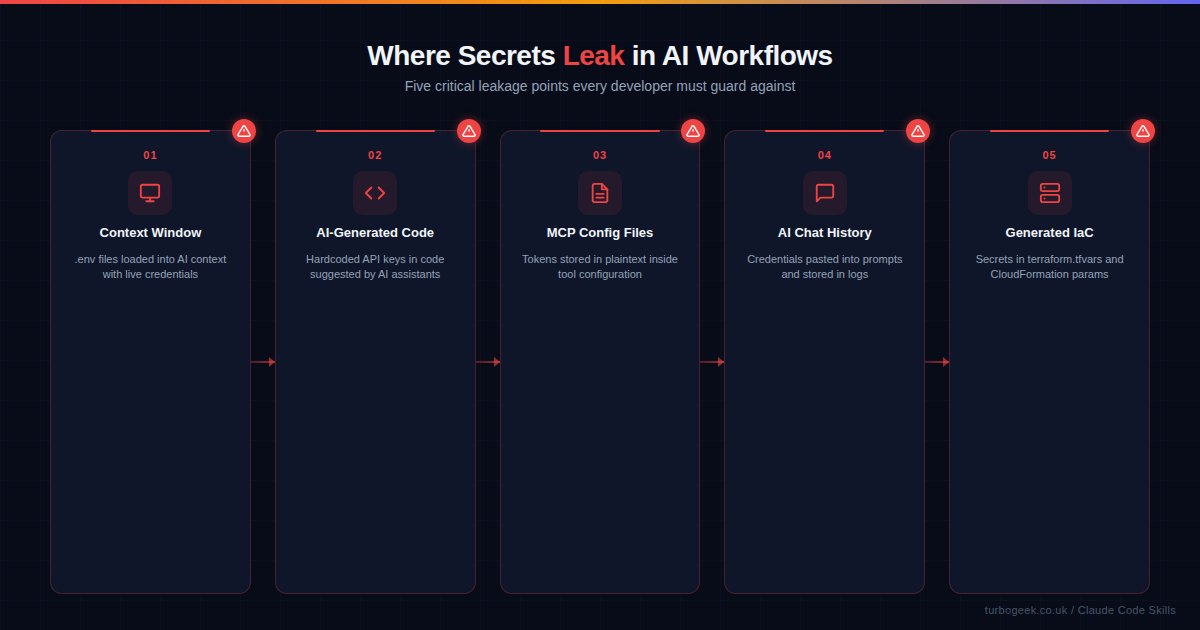
Understanding where secrets leak is the first step to stopping them. Here are the five most common leakage points in AI-assisted development workflows:
1. Context window ingestion. Tools like Claude Code, GitHub Copilot, and Cursor read your project files to understand context. If your .env file contains live credentials and is not excluded from the AI’s context, those credentials become part of the model’s working memory. From there, they can appear in generated code, logs, or suggestions.
2. AI-generated code. When an AI assistant writes a new integration — say, connecting to Stripe or AWS — it may generate code with hardcoded API keys rather than environment variable references. This is especially common when the AI has seen real keys in the context window and reproduces the pattern.
3. MCP configuration files. The Model Context Protocol (MCP) lets AI tools connect to external services. These configuration files often contain OAuth tokens, API keys, and database connection strings in plaintext. They frequently end up in version control because developers treat them like any other config file.
4. AI chat history. Developers paste credentials into AI chat prompts when debugging. “Why is this API key not working?” followed by the actual key. These conversations are logged, sometimes synced to cloud services, and rarely treated with the same security posture as production systems.
5. Generated infrastructure as code. AI tools generating Terraform, CloudFormation, or Pulumi templates may embed secrets directly in terraform.tfvars, parameter files, or resource definitions. Unlike application code, IaC files often bypass the usual code review scrutiny.
Layer 1: Pre-commit Hooks
The single most effective defence against secrets leaks is a pre-commit hook that scans every commit before it reaches your repository. If a credential slips into your staging area, the hook blocks the commit and tells you exactly where the problem is.
Setting up gitleaks takes about two minutes. Install it, create a configuration file, and wire it into your pre-commit hook:
# Install gitleaks
brew install gitleaks    # macOS
sudo apt install gitleaks # Debian/Ubuntu

# Or download the binary directly
curl -sSfL https://github.com/gitleaks/gitleaks/releases/latest/download/gitleaks_8.24.0_linux_x64.tar.gz | tar xzNext, create a .pre-commit-config.yaml in your repository root:
# .pre-commit-config.yaml
repos:
  - repo: https://github.com/gitleaks/gitleaks
    rev: v8.24.0
    hooks:
- id: gitleaksInstall the hook and test it:
# Install the pre-commit framework
pip install pre-commit
pre-commit install

# Test against your existing commits
gitleaks detect --source . --verboseFor teams using Claude Code specifically, add rules to your CLAUDE.md file to instruct the AI never to read or output the contents of .env files:
# CLAUDE.md -- Secrets policy
- NEVER read, output, or reference values from .env files
- ALWAYS use environment variable references (process.env.KEY)
- NEVER hardcode API keys, tokens, or connection strings
- Use .env.example with placeholder values for documentationLayer 2: .gitignore and Environment Templates
A properly configured .gitignore is your second line of defence. It should exclude every file that could contain secrets:
# .gitignore -- Secrets exclusions
.env
.env.local
.env.production
.dev.vars
*.pem
*.key
credentials.json
service-account.json
terraform.tfvars
*.tfvars
.mcp-config.jsonAlongside your .gitignore, always provide a .env.example file with placeholder values. This documents what environment variables your application needs without exposing actual credentials:
# .env.example
DATABASE_URL=postgresql://user:password@localhost:5432/mydb
STRIPE_SECRET_KEY=sk_test_replace_me
AWS_ACCESS_KEY_ID=your-access-key-here
AWS_SECRET_ACCESS_KEY=your-secret-key-here
SENDGRID_API_KEY=SG.replace-with-real-keyLayer 3: Vault Integration
For production environments, environment variables alone are not enough. A secrets vault provides centralised management, access control, audit logging, and automatic rotation. The two most common options are HashiCorp Vault and AWS Secrets Manager.
With AWS Secrets Manager, you reference secrets by name rather than storing values in your deployment configuration:
import boto3
import json

def get_secret(secret_name: str, region: str = "eu-west-2") -> dict:
    """Retrieve a secret from AWS Secrets Manager."""
    client = boto3.client("secretsmanager", region_name=region)
    response = client.get_secret_value(SecretId=secret_name)
    return json.loads(response["SecretString"])

# Usage -- no credentials in code
db_creds = get_secret("prod/database/postgres")
connection_string = f"postgresql://{db_creds['username']}:{db_creds['password']}@{db_creds['host']}:5432/{db_creds['dbname']}"The critical principle: your code references a secret name, never a secret value. Even if the AI generates this code and it ends up in a public repository, the secret name alone is useless without access to your AWS account.
Layer 4: CI/CD Scanning
Even with pre-commit hooks, mistakes happen. A developer might bypass the hook with --no-verify, or a credential might be in a format that the local scanner does not recognise. CI/CD-level scanning provides a server-side safety net.
GitHub Secret Scanning is free for public repositories and available with GitHub Advanced Security for private ones. It scans every push for known secret patterns from over 200 service providers and can automatically revoke detected tokens with supported partners.
For a broader approach, add a gitleaks step to your CI pipeline:
# .github/workflows/security.yml
name: Security Scan
on: [push, pull_request]

jobs:
  gitleaks:
    runs-on: ubuntu-latest
    steps:
      - uses: actions/checkout@v4
        with:
          fetch-depth: 0
      - uses: gitleaks/gitleaks-action@v2
        env:
GITHUB_TOKEN: ${{ secrets.GITHUB_TOKEN }}This runs on every push and pull request, scanning the full git history for secrets. If it finds anything, the workflow fails and the PR cannot be merged.
Layer 5: Rotation Policy and Monitoring
The final layer acknowledges reality: despite your best efforts, a secret will eventually leak. The question is not if but when — and when it happens, how quickly does the leaked credential become useless?
Automatic rotation means that even if a key is exposed, it expires before an attacker can exploit it. AWS Secrets Manager supports automatic rotation for RDS databases, Redshift clusters, and other AWS services. For third-party API keys, you can write a Lambda function that rotates the key on a schedule:
# Enable automatic rotation (every 30 days)
aws secretsmanager rotate-secret \
  --secret-id prod/api/stripe \
  --rotation-lambda-arn arn:aws:lambda:eu-west-2:123456789:function:rotate-stripe-key \
--rotation-rules AutomaticallyAfterDays=30Combine rotation with monitoring. Set up alerts for:
- Unusual API key usage patterns — spikes in requests from unfamiliar IP addresses
- Secret access from unexpected services — if your web server’s secret is being read by an unknown Lambda
- Failed authentication attempts — someone trying old, rotated credentials
- GitGuardian or GitHub alerts — immediate notification when a secret appears in a commit
Putting It All Together
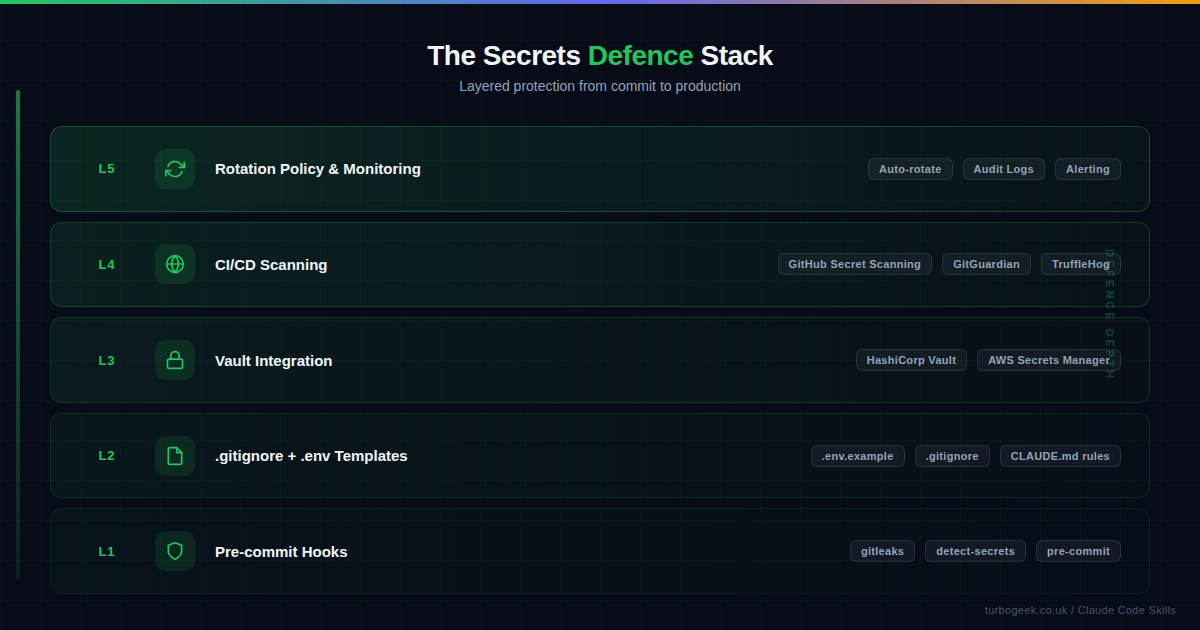
Secrets management for AI-assisted development is not a single tool — it is a stack. Each layer catches what the previous one missed:
- Pre-commit hooks catch secrets before they enter your repository
- .gitignore and templates prevent secrets files from being tracked in the first place
- Vault integration removes the need to store secrets in code or config files
- CI/CD scanning provides a server-side safety net for anything that bypasses local checks
- Rotation and monitoring limit the blast radius when a leak does occur
Start with Layer 1 today. It takes two minutes to install gitleaks and will catch the majority of accidental leaks. Then work your way up the stack as your project matures. The goal is not perfection — it is defence in depth, so that no single failure leads to a breach.
If you are using Claude Code, the most impactful step you can take right now is adding a secrets policy to your CLAUDE.md file. Four lines of instruction can prevent the AI from ever reading or reproducing your credentials. Combine that with a pre-commit hook and you have eliminated the two most common leakage vectors in under five minutes.
Related: For more on configuring Claude Code’s behaviour through CLAUDE.md, see our guide to mastering CLAUDE.md for project-wide AI development. For a broader look at AI development security, read secure AI coding with Claude Code.
Leave a Reply