
An AWS AccessDenied in GitHub Actions can happen before the job obtains a role or after it has valid role credentials. Those failures need different fixes. Adding S3 permissions cannot repair a role trust-policy mismatch; changing trust cannot authorise an operation the assumed role is forbidden to perform.
TL;DR
- Check token issuance, role assumption and service authorisation separately.
- Grant id-token: write only to the job that needs federation.
- Match the actual audience and subject, including immutable repository IDs where used.
- Verify the assumed identity before attempting deployment.
| Symptom | Check first | Next step |
|---|---|---|
| Cannot request an OIDC token | Job permissions | Check id-token: write |
| AssumeRoleWithWebIdentity denied | Role trust and issued claims | Compare exact audience and subject |
| Assumption works; service call denied | Role/service policy | Inspect the denied action and resource |
| Branch works; environment fails | Environment subject | Match the protected environment context |
Start here: identify which of the three boundaries failed. The examples below are diagnostic templates, not permission to change a production role.
Documentation reviewed 8 September 2026. The dedicated repository/account lab, positive identity run and expected-denial runs remain outstanding. These examples have not been presented as a successful live deployment.
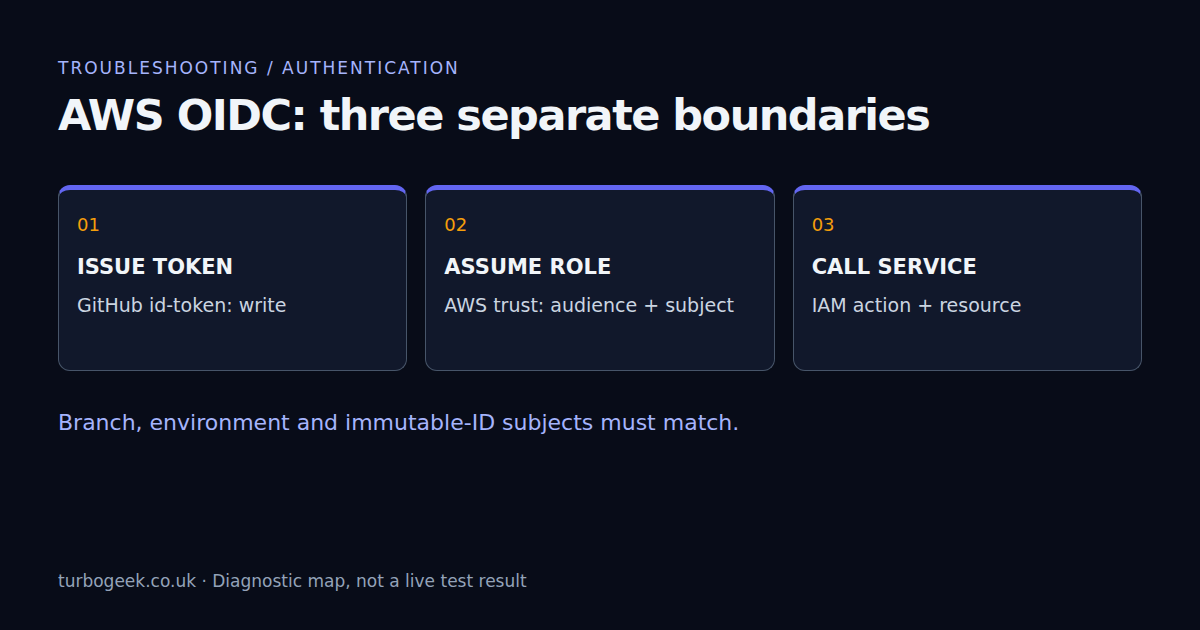
Three boundaries: issue, assume, act
GitHub issues the job an OIDC token. AWS STS evaluates that token against an IAM role’s trust policy and, if accepted, supplies temporary role credentials. The target AWS service then evaluates the requested action. Keep the first failing step visible in the job log; a later cleanup failure can otherwise distract from the original authentication error.
The OIDC permission controls whether a job can obtain an identity token. It does not grant GitHub repository writes or AWS service writes. Give that permission to a narrow deployment or identity-check job, not every scanner and pull-request job in the repository.
Use an identity-only workflow before a deployment
In an authorised test repository, substitute your reviewed role ARN and region. This example deliberately has no checkout and no resource-changing command. The action is pinned to the verified upstream v6.2.4 release commit; inspect its source and release notes before adopting it.
name: aws-identity-check
on:
  workflow_dispatch:
permissions: {}
jobs:
  identity:
    runs-on: ubuntu-24.04
    permissions:
      id-token: write
    steps:
      - name: Obtain temporary AWS credentials
        uses: aws-actions/configure-aws-credentials@cbe3b392738ccf3f987d68400dafcf4b0624a56c # v6.2.4
        with:
          role-to-assume: arn:aws:iam::123456789012:role/github-readonly-test
          aws-region: eu-west-1
          role-session-name: github-${{ github.run_id }}
          mask-aws-account-id: true
      - name: Verify the expected identity privately
run: aws sts get-caller-identity --no-cli-pagerThe account number above is a placeholder. Review identity output in access-controlled logs and redact it before sharing. The action’s account masking setting helps with the account ID; it is not a blanket guarantee that all organisational identifiers are hidden. Restrict the test role to the intended subject and do not grant deployment rights just to make the identity test useful.
Compare the trust policy with the token actually issued
Start with the role ARN used by the action. A correct policy on a similarly named role in another account will not help. Check the configured federated provider, sts:AssumeRoleWithWebIdentity action and condition values. For the ordinary AWS partition, the official action normally uses audience sts.amazonaws.com; other partitions or explicit overrides require their own matching configuration.
{
  "Condition": {
    "StringEquals": {
      "token.actions.githubusercontent.com:aud": "sts.amazonaws.com",
      "token.actions.githubusercontent.com:sub": "repo:example-org/example-repo:ref:refs/heads/main"
    }
  }
}This is only a condition fragment, not a complete trust policy. It illustrates the older name-based branch subject. Do not copy it into a newly created repository without checking the current claim format. GitHub’s AWS OIDC guide documents the provider and audience setup.
New repositories can include immutable IDs in the subject
GitHub documents immutable owner and repository IDs in the subject for repositories created after 15 July 2026, and repositories that opt in. The feature is not available on GitHub Enterprise Server. A trust policy written for the older name-only format can therefore reject an otherwise correctly configured new repository.
Name-based branch example:
repo:example-org/example-repo:ref:refs/heads/main

Immutable-ID branch example:
repo:example-org@123456/example-repo@456789:ref:refs/heads/mainThese IDs are illustrative, not values to copy. Compare your repository’s actual subject format with the trust condition. Custom subject templates are another reason not to infer the whole value from a repository URL. Inspect only the necessary claims through an approved diagnostic procedure; never print the complete bearer token. See the OIDC reference for claim construction and encoding.
An environment changes the subject context
A job that declares environment: production uses an environment context in its subject rather than the ordinary branch suffix. A name-based example is repo:example-org/example-repo:environment:production. Immutable-ID or customised prefixes still need to match the repository’s actual format. Do not keep a branch-only trust condition and assume the environment declaration adds a second independent match.
Protect the environment with the deployment-branch restrictions and review rules your workflow needs. Otherwise, trusting an environment name alone may authorise a broader set of runs than intended. Environment secrets and variables are related configuration, not the IAM trust policy; the environment configuration guide covers that separate layer.
After assumption, diagnose service permissions
If the identity step returns the expected role but the next command is denied, preserve that evidence and move to the service layer. Check the requested action, resource, region, identity policy and applicable organisation or resource policy. A permissions boundary or session restriction can limit access even when a policy contains an allow.
Do not replace a precise subject condition with a repository wildcard to fix a service denial. It changes who may obtain the role, not what the role can do. Likewise, a successful Terraform plan does not authorise every possible apply; inspect the plan output and approve changes separately.
Validate both success and refusal
A useful authorised lab has at least three results: the intended branch or environment can obtain the expected identity; a different subject is refused; and a service operation outside the role’s policy remains refused. Capture the run IDs and redacted errors. Then remove the test configuration through the agreed cleanup process.
The negative tests matter because a broad trust policy can make a happy-path run look healthy while admitting unintended jobs. Keep scanning jobs separate from deployment authentication; my practical DevSecOps rollout explains the scanning and release-artifact side. Completing those scans does not prove the deployment role is correctly scoped.
Leave a Reply