
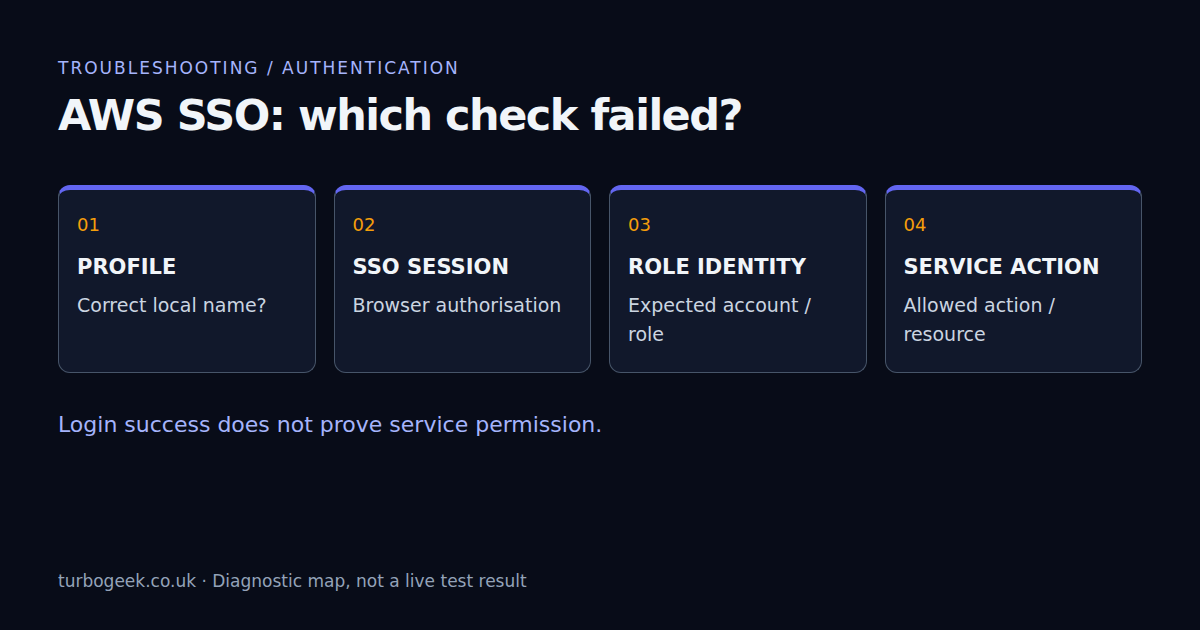
When aws sso login succeeds but your next command fails, do not start by asking for administrator access. Browser authentication, profile selection and permission to call an AWS service are different checks. A successful login proves only part of the route.
TL;DR
- Identify the failing command and its exact error before changing configuration.
- Use one named profile consistently for login and the identity check.
- Check for inherited credential variables without printing their values.
- A successful STS identity check does not prove permission to deploy.
| Symptom | Check first | Next step |
|---|---|---|
| SSO token expired | Named SSO session | Sign in to the intended profile |
| Wrong account or role | Credential source and profile | Compare identity locally |
| AccessDenied after identity succeeds | Service action and resource | Review the specific denied permission |
| Works in a terminal, fails in an agent | Process environment | Relaunch with the intended environment |
Start here: follow the error check using the same terminal that runs the failing command. This guide concerns AWS CLI access through IAM Identity Center, not a Claude subscription login or API key.
Documentation reviewed 8 September 2026. Commands use AWS CLI v2 and a POSIX shell (Linux, macOS or WSL). A dedicated live-account login/expiry lab has not yet been completed for this draft; no successful account access is claimed.
1. Keep the exact error and the command together
“SSO is broken” is too broad to diagnose. Note whether the failure happens while opening the browser, obtaining role credentials, calling STS, or calling your target service. Keep the timestamp and selected profile. Share a redacted error, not your SSO cache or a complete debug log.
aws --version
aws configure list-profilesThe second command lists locally configured names; it does not prove that an assignment is still available. If the intended profile is missing, use your organisation’s approved setup process. The aws configure sso wizard creates configuration, so do not run it over an existing profile merely to see whether it helps. See the AWS CLI installation guide if you have the wrong executable or CLI generation.
2. Sign in to the profile you actually intend to use
aws sso login --profile investigation-readonly
aws sts get-caller-identity --profile investigation-readonly --no-cli-pagerReplace investigation-readonly with your real profile name. Inspect the returned account and assumed-role ARN locally and compare them with the approved task. Do not paste account identifiers or organisation-specific role names into a public issue. A profile called “readonly” is only a name; the role’s policies determine its access.
Modern sso-session configuration supports refreshing credentials while the SSO session remains valid. Once interactive authorisation is needed again, repeat the named login. Repeatedly deleting every cache file is a poor first response: it disrupts unrelated sessions and discards useful diagnostic context.
For an SSH or WSL session where the browser must run elsewhere, the AWS CLI supports device authorisation:
aws sso login --profile investigation-readonly --use-device-code --no-browserOpen the displayed verification URL yourself and enter the code only on the trusted AWS page. Treat the code as temporary authentication material. Do not put it in a ticket. AWS documents the supported configuration and login flows in its IAM Identity Center CLI guide.
3. Check credential precedence without exposing secrets
Setting AWS_PROFILE does not clean the rest of a shell’s environment. Existing access-key variables can cause an ordinary CLI invocation to use another credential source. Explicit --profile selection also matters; do not treat every SDK and shell wrapper as identical. Start by finding which relevant variables exist, without showing their values:
python3 - <<'PY'
import os
for name in sorted(os.environ):
    if name.startswith('AWS_'):
        print(f'{name}=<set>')
PYNames such as AWS_ACCESS_KEY_ID, AWS_SECRET_ACCESS_KEY and AWS_SESSION_TOKEN deserve attention. So do AWS_CONFIG_FILE and AWS_SHARED_CREDENTIALS_FILE, which can redirect configuration to a different file. Endpoint and region overrides can send an otherwise correct command somewhere unexpected. Never print the whole environment to troubleshoot this.
For a narrow comparison, remove inherited static-credential variables for one command only. This does not alter your parent shell:
env -u AWS_ACCESS_KEY_ID -u AWS_SECRET_ACCESS_KEY -u AWS_SESSION_TOKEN \
aws sts get-caller-identity --profile investigation-readonly --no-cli-pagerIf this changes the result, correct the environment source: a shell startup file, terminal session, IDE task or credential wrapper. Do not delete a credentials file that may support unrelated work. AWS describes the relevant overrides in its environment-variable reference.
4. Separate the SSO region from the service region
The sso_region locates IAM Identity Center. The profile’s region, or a command’s --region, selects the AWS service region. They can legitimately differ. A successful SSO login therefore does not establish that an EC2 instance, secret or Bedrock model exists in the region your next command uses.
aws configure get region --profile investigation-readonly
aws configure get sso_session --profile investigation-readonlyA blank sso_session result can mean a legacy inline SSO profile; it is not, on its own, evidence of corruption. Check the documented configuration structure. If AWS no longer lists the account or permission set assigned to you, ask the Identity Center administrator to verify the assignment rather than inventing a role name locally.
5. A valid identity can still receive AccessDenied
Once STS returns the expected identity, rerun only the original authorised operation. If it receives a service-specific denial, inspect the action, resource ARN and policy context. Identity policies, resource policies, session restrictions and organisation controls may all be relevant. Logging in again does not add a missing permission.
Do not use a destructive operation as a permission test. Even a read-only identity check cannot establish that a later deployment is safe or permitted. Give the administrator a redacted request ID, timestamp, action, region and expected role; ask for the smallest justified correction, not a broad administrator policy.
Bedrock adds another distinction: an AWS identity can be valid while model invocation is unavailable for that role, model, region or account. Confirm the model path and its required permissions separately. Likewise, selecting AWS credentials for tool commands is not the same as configuring the coding assistant’s own model provider.
6. Compare the agent process with the working shell
A running editor or coding agent does not acquire environment changes made later in another terminal. Verify the intended identity before launching it, then start a new session with the relevant profile. For a clean static-credential comparison in a POSIX shell:
env -u AWS_ACCESS_KEY_ID -u AWS_SECRET_ACCESS_KEY -u AWS_SESSION_TOKEN \
AWS_PROFILE=investigation-readonly claudeThis chooses a default; it is not a security sandbox. An agent that can read other configuration and caches may be able to select another profile. For a hard boundary, use an approved isolated execution context with only the intended access available. My aws-sso-login workflow explains that distinction.
Verify the fix and stop at the right boundary
The useful end state is specific: the named login completes, STS returns the expected identity, and the original authorised command works in the environment that needs it. Record the cause—expiry, wrong profile, inherited credentials, region or policy—so the next person does not have to repeat the whole investigation. If an assignment or policy still needs changing, stop there and hand over the evidence.
If a CLI update is part of the diagnosis, follow the AWS CLI update guide and record the version before and after. Do not report “fixed by reinstalling” when a new shell actually removed the conflicting environment.
Leave a Reply