
AI agents are no longer experimental curiosities. In 2026, autonomous AI agents are writing code, deploying infrastructure, managing databases, and interacting with production systems via tool protocols such as MCP. But most organizations are running these agents with the same controls they would give an intern with a sticky note — which is to say, almost none at all.
This guide covers the operational reality of running AI agents in professional environments: how to give them proper identities, scope their access, audit their actions, and build governance frameworks that scale.
TL;DR
- The Problem — AI agents inherit human credentials and operate without meaningful access controls
- Attack Surface — Six new threat vectors from identity spoofing to unaudited autonomous actions
- IAM for Agents — Unique service accounts, scoped permissions, and tool-level allowlists
- Governance Framework — Four layers: identity, access control, audit, and operational boundaries
- Practical Setup — Real configurations for Claude Code and MCP server permissions
New to AI agent security? Start with the Is Claude Code Safe to Use? article for foundational context, then come back here for the operational framework.
| Topic | When to Apply | Key Action |
|---|---|---|
| Agent Identity | Before granting any agent access | Create dedicated service accounts per agent |
| Access Scoping | When configuring MCP servers | Define tool allowlists and permission boundaries |
| Audit Logging | Every agent session | Log all tool calls, decisions, and costs |
| Approval Gates | Destructive or high-cost operations | Require human confirmation before execution |
| Rate Limits | Production agent deployments | Set spend caps and request limits per session |
What “Agentic AI” Actually Means for Ops Teams
The term “agentic AI” gets thrown around loosely, but operationally it means one specific thing: an AI system that can take actions on your infrastructure without waiting for human approval at every step. When you run Claude Code with MCP servers connected to your database, your cloud provider, your CI/CD pipeline, and your monitoring stack, you have an autonomous agent.
This is fundamentally different from a chatbot that suggests code for you to copy and paste. An agentic system can read your files, execute shell commands, call APIs, modify databases, and deploy changes. The operational question is not whether to use these tools — that ship has sailed — but how to run them without creating a security and governance nightmare.
The uncomfortable truth is that most teams today are running AI agents with their own personal credentials. The agent inherits whatever access the developer has, which in many organizations means broad access to production systems. There is no separate identity, no scoped permissions, and no audit trail beyond “Richard ran Claude Code at 3 pm.”
The New Attack Surface
Traditional security models assume that the entity performing actions is either a human user or a well-defined service. AI agents break both assumptions. They act with the authority of a human but the speed and scope of a service, and they can be influenced by their inputs in ways that neither humans nor traditional services can.
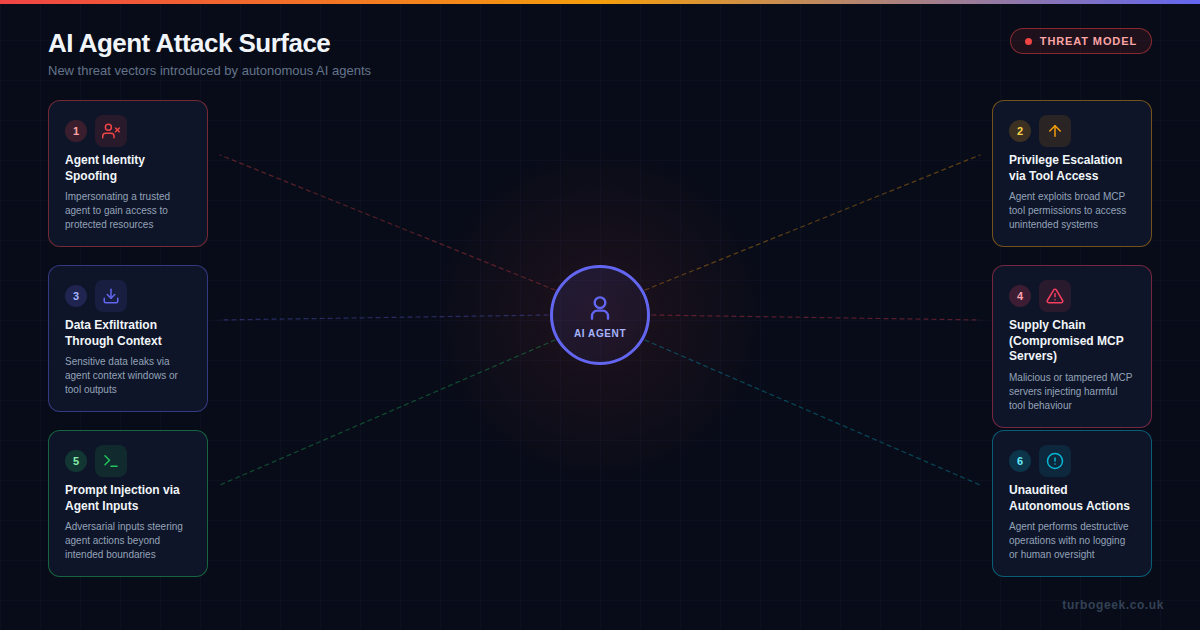
Six threat vectors are particularly relevant for AI agent deployments:
- Agent identity spoofing — Without unique agent identities, a compromised or malicious process can impersonate a trusted agent. If your agents all share your personal API key, there is no way to distinguish legitimate agent activity from abuse.
- Privilege escalation via tool access — MCP servers can expose powerful capabilities. An agent configured with a database MCP server might be able to drop tables, not just query them. Broad tool access is the agent equivalent of running everything as root.
- Data exfiltration through context — Agents consume context to do their work. Sensitive data that enters an agent’s context window — credentials, customer records, internal configurations — can leak through tool outputs, logs, or the model provider’s API.
- Supply chain attacks on MCP servers — MCP servers are software dependencies. A compromised or malicious MCP server can inject harmful behavior into every agent session. This is the npm supply chain problem applied to agent tool access.
- Prompt injection via agent inputs — When agents read files, web pages, or API responses, adversarial content in those inputs can redirect agent behavior. A malicious README in a repository could instruct an agent to exfiltrate environment variables.
- Unaudited autonomous actions — An agent that performs destructive operations — deleting resources, force-pushing to main, sending emails — without logging or human oversight creates accountability gaps that are invisible until something breaks.
IAM for AI Agents
The first operational principle is straightforward: every AI agent should have its own identity. This is not a novel concept — we have been creating service accounts for automated processes for decades. But most teams skip this step with AI agents because the agent “is just me, but faster.”
A proper agent identity strategy includes:
- Dedicated service accounts — Create a distinct identity for each agent or agent class. In AWS, this means dedicated IAM roles. In GitHub, this means bot accounts or fine-grained PATs scoped to specific repositories.
- No shared credentials — Never let an agent use your personal credentials. If the agent needs database access, create a read-only database user for it. If it needs to push to Git, create a deploy key with limited permissions.
- Credential rotation — Agent credentials should be short-lived where possible. Use temporary session tokens rather than long-lived API keys. If your MCP server configuration contains hardcoded credentials, you have already lost.
- Provenance tracking — Every action an agent takes should be attributable. This means agent-specific commit signatures, API request headers that identify the agent, and log entries that distinguish agent actions from human actions.
In practice, this means your Claude Code configuration should reference environment variables that point to agent-specific credentials, not your personal ones:
# Agent-specific environment variables
export AGENT_DB_USER="claude-agent-readonly"
export AGENT_DB_PASSWORD=$(aws secretsmanager get-secret-value \
  --secret-id agent/db-readonly --query SecretString --output text)
export AGENT_GITHUB_TOKEN=$(gh auth token --scoped repo:read,issues:write)

# MCP server config referencing agent credentials
# NOT your personal credentialsAccess Control: Scoping What Agents Can Do
Giving an agent an identity is necessary but not sufficient. The next layer is ensuring that identity has the minimum permissions required. This is least privilege applied to AI agents, and it requires thinking about tool access differently than traditional role-based access control.
With MCP-based tool access, you have fine-grained control over what capabilities an agent can invoke. The key mechanisms are:
- Tool allowlists — Explicitly declare which MCP tools an agent can use. Do not rely on the agent to self-limit. If your database MCP server exposes both
queryandexecutetools, your agent’s configuration should only allowlistqueryunless it genuinely needs write access. - Scoped MCP server connections — Run separate MCP server instances with different permission levels. A read-only database MCP server and a write-capable one, connected to different agent profiles, is more robust than one server with all permissions.
- Resource boundaries — Limit which resources an agent can access through each tool. A GitHub MCP server scoped to a single repository is far safer than one with organisation-wide access.
- Action classification — Categorise agent actions as read, write, or destructive. Read actions can proceed autonomously. Write actions should be logged. Destructive actions (delete, force-push, production deploy) should require explicit human approval.
Claude Code already provides some of these controls through its permission system and CLAUDE.md configuration. For example, you can instruct agents never to run destructive Git commands without confirmation:
# CLAUDE.md — Agent access boundaries

## Forbidden Actions (require human approval)
- git push --force
- git reset --hard
- DROP TABLE / DELETE FROM without WHERE
- Any production deployment
- Creating or modifying IAM policies

## Allowed Autonomously
- Read files and search code
- Run tests
- Create commits on feature branches
- Query non-production databasesRelated: For a deep dive into configuring agent instruction files, see How to Write the Perfect AGENTS.md File.
The Governance Framework
Identity and access control are the first two layers, but a complete governance framework for AI agents also requires audit capabilities and operational boundaries. Think of it as defense in depth for autonomous systems.
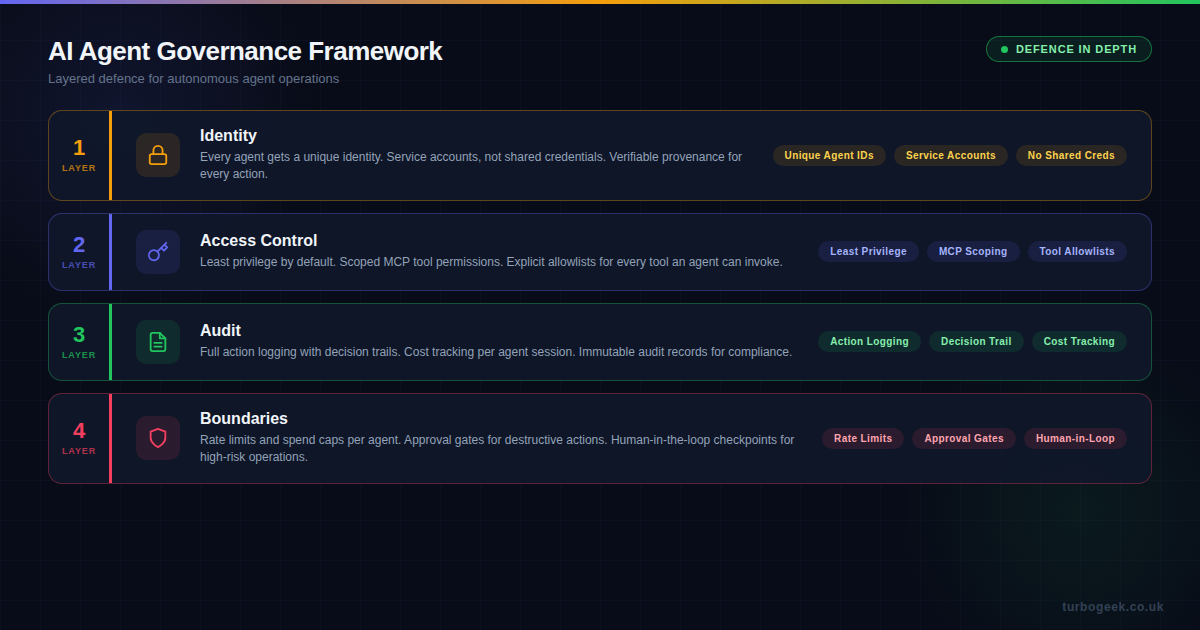
Layer 1: Identity
As covered above: unique agent IDs, dedicated service accounts, no shared credentials. This is the foundation that everything else depends on. Without distinct identities, you cannot scope permissions or attribute actions.
Layer 2: Access Control
Least privilege is enforced through the MCP tool scoping, resource boundaries, and explicit allowlists. The goal is that an agent can only do what it has been explicitly permitted to do, nothing more.
Layer 3: Audit
Every tool call, every decision, every cost. A proper audit trail for AI agents should capture:
- Action logs — Which tools were called, with what parameters, and what was returned
- Decision trails — Why the agent chose a particular approach (many agent frameworks can output reasoning)
- Cost tracking — Token usage, API calls made, compute time consumed per session
- Outcome records — What changed as a result of the agent’s actions (diffs, state changes, deployments)
For Claude Code specifically, the session transcript provides much of this automatically. But for production agent deployments, you should ship these logs to your observability platform and set up alerts for anomalous patterns.
Layer 4: Operational Boundaries
The final layer is the set of hard limits that prevent agents from causing unbounded damage, even if the other layers fail:
- Rate limits — Cap the number of tool calls, API requests, or commands an agent can execute per session or per hour
- Spend caps — Set maximum token or cost budgets per agent session. If an agent is burning through tokens unexpectedly, it should stop and alert, not continue
- Approval gates — Require explicit human confirmation before any destructive, irreversible, or high-cost action
- Human-in-the-loop checkpoints — For long-running agent tasks, insert periodic review points where a human validates the agent’s progress before it continues
- Kill switches — The ability to immediately terminate an agent session and roll back its actions
Practical Setup: Claude Code and MCP
Here is how these principles map to a real Claude Code setup. This is not a theoretical exercise — this is what a properly governed agent configuration looks like:
// .mcp.json — Scoped MCP server configuration
{
  "mcpServers": {
    "database-readonly": {
      "command": "npx",
      "args": ["@mcp/postgres", "--readonly"],
      "env": {
        "DB_HOST": "staging.db.internal",
        "DB_USER": "agent_readonly",
        "DB_PASSWORD_SECRET": "agent/db-readonly"
      }
    },
    "github-scoped": {
      "command": "npx",
      "args": ["@mcp/github"],
      "env": {
        "GITHUB_TOKEN_SECRET": "agent/github-pat",
        "ALLOWED_REPOS": "myorg/frontend,myorg/api",
        "ALLOWED_ACTIONS": "read,create_pr,comment"
      }
    }
  }
}Key points in this configuration:
- The database connection is explicitly read-only, using an agent-specific database user
- Credentials are referenced by secret name, not hardcoded
- GitHub access is scoped to specific repositories and specific actions
- There is no general-purpose shell access or broad filesystem MCP server
Combine this with a well-structured CLAUDE.md that defines behavioral boundaries, and you have a reasonably well-governed agent setup that does not rely on hoping the AI will be sensible.
What This Means for Your Team
If you are running AI agents in any capacity — even just using Claude Code for local development — these principles apply at some level. The full governance framework matters most for production agent deployments, but even individual developers should consider agent identity and access scoping.
Start with these three actions:
- Audit your current agent access — What credentials are your AI agents using right now? Are they your personal tokens? Do they have broader access than they need?
- Create agent-specific service accounts—even if it is just a GitHub PAT with read-only scope —separating agent identity from human identity is the single highest-value change you can make.
- Define your boundaries — Write down what your agents are and are not allowed to do. Put it in your
CLAUDE.mdor an equivalent configuration. Make it explicit, not assumed.
The organizations that get agentic AI operations right will be the ones that treat AI agents as first-class participants in their security and governance models — not as extensions of the developers who run them.
Related reading: Mastering .cursorrules: A DevSecOps Guide to Secure AI Coding covers similar security principles for Cursor-based agent workflows.
Leave a Reply