
Claude Pro is $20/month (£20). Claude Max is $100/month (£90) — or $200 (£180) for the 20× tier. That’s a big jump. Is it worth it? For developers using Claude Code all day, the answer is probably yes. Here’s the honest breakdown.
TL;DR
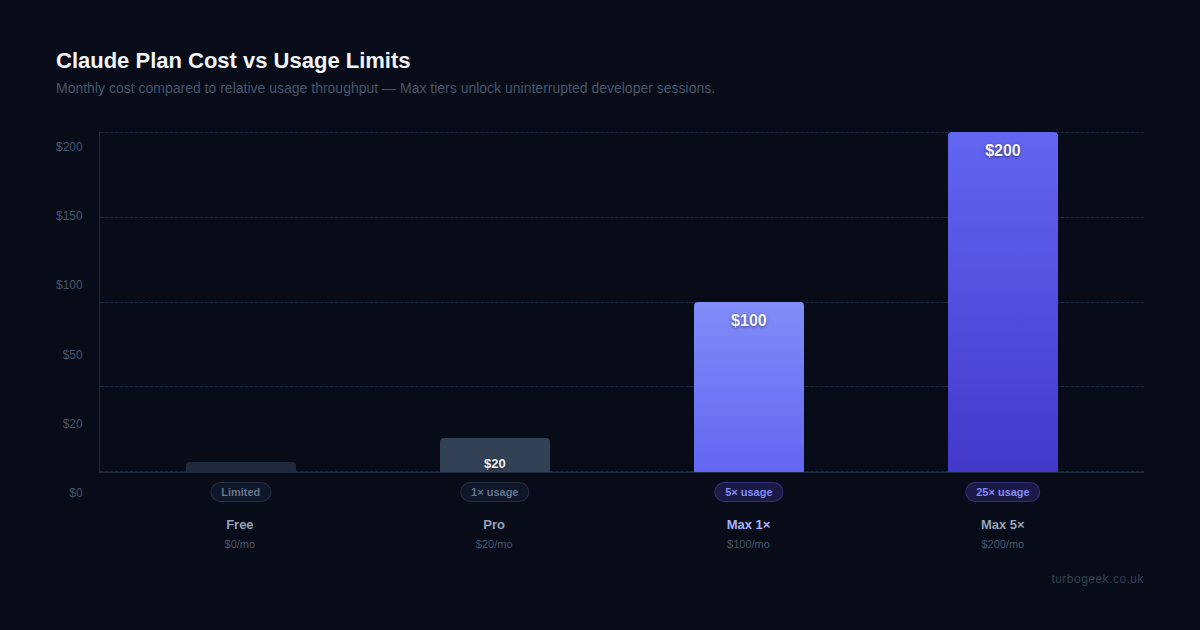
- Claude Max (1×) costs $100/month — 5× the usage throughput of Pro ($20)
- Claude Max (5×) costs $200/month — 25× Pro throughput, for power users
- Both Max tiers include Opus 4.8 access and priority during peak times
- Claude Code uses your account subscription, not a separate API key
- Heavy Claude Code users (3+ hours daily) regularly hit Pro limits — Max removes that friction
- For professional developers: the $80/month premium pays for itself in uninterrupted workflow
| Plan | Price/month | Usage | Best for |
|---|---|---|---|
| Claude Free | $0 | Limited | Occasional use |
| Claude Pro | $20 / £20 | Standard (1×) | Regular users |
| Claude Max (5×) | $100 / £90 | 5× Pro | Heavy daily use |
| Claude Max (20×) | $200 / £180 | 20× Pro | Professional / power users |
| API (pay-as-you-go) | Variable | Unlimited | Developers with predictable usage |
New to Claude plans? Start with What the Claude Max Plan Actually Is — it explains what “usage limits” actually means in practice.
What the Claude Max Plan Actually Is
Claude Max isn’t a different product — it’s the same Claude, with the same models and interface. What you’re buying is more throughput. Specifically: 5× the usage capacity of Claude Pro on the $100 / £90 tier, or 20× on the $200 / £180 tier.
Anthropic doesn’t publish a hard message limit. Instead, they use a throttling system. With Claude Pro, intensive sessions — the kind where you’re running long multi-file refactors with Claude Code, or asking it to write, test, and revise complex code in rapid succession — will eventually stop. You’ll see a message along the lines of “you’ve reached your usage limit, try again in a few hours.”
With Max, that throttle is pushed back significantly. It’s not infinite — but for most developer workloads, 5× Pro capacity means you effectively never hit the wall during a normal working day. The 20× tier at $200 / £180 is for the genuine power user: someone running multiple Claude Code sessions continuously across multiple projects for most of their working hours.
Both Max tiers also get priority access during peak times. In practice, this means faster responses when Anthropic’s infrastructure is under heavy load — which matters for flow state when you’re deep in a coding session.
What You Get vs Pro
Let me be direct about what changes and what doesn’t when you upgrade from Pro to Max:
| Feature | Claude Pro | Claude Max (5×) |
|---|---|---|
| Monthly price | $20 / £20 | $100 / £90 |
| Usage throughput | Standard | 5× Pro |
| Model access | Opus 4.8, Sonnet, Haiku | Opus 4.8, Sonnet, Haiku |
| Claude Code sessions | Throttled in heavy use | Sustained without limits |
| Priority access | No | Yes — peak times |
| API credits included | No | No (API is separate) |
The model access point is worth pausing on: both tiers get Opus 4.8. You’re not unlocking a more capable model with Max — you’re unlocking the ability to use that model more. The API is also separate from both plans; if you need API access to build applications, you’ll still pay for it independently, regardless of your subscription tier.
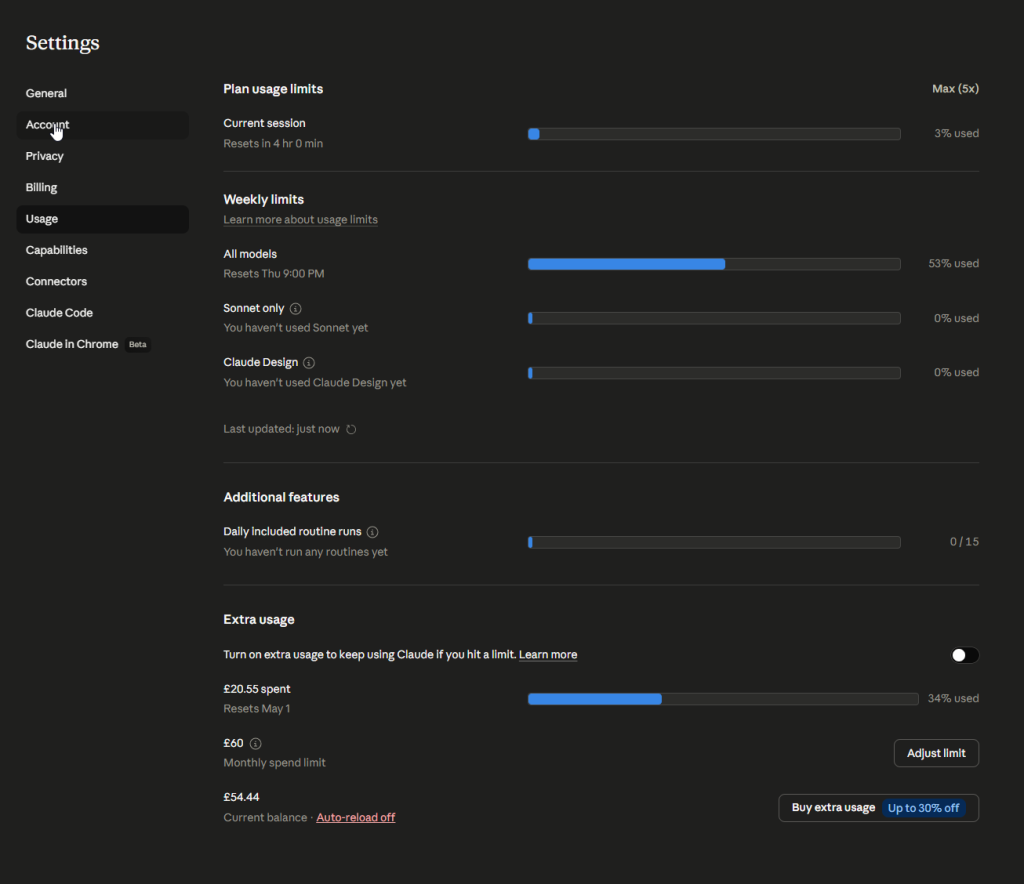
Here’s what a realistic day looks like for a developer on each plan. On Pro: morning goes fine, you’re into a complex refactor by 11 am, Claude Code is running multiple tool calls per prompt, and by early afternoon, you’re hitting limits. On Max: that refactor runs uninterrupted, you finish the feature, start a new one, write tests, and end the day without ever seeing a throttle message.
The Developer’s Honest Calculation
The question isn’t “is $100 / £90 a month a lot?” — it’s “does removing rate limit friction save more than $80/month in developer time?”
For a professional developer billing at any reasonable rate, the answer is almost certainly yes. A single interrupted afternoon — waiting for limits to reset, context-switching away from a problem, losing flow state — costs more than $80 in lost productivity. And if you’re hitting limits regularly (which heavy Claude Code users on Pro absolutely do), you’re losing that multiple times per week.
The math gets even clearer when you think about what Claude Code actually does in heavy use: it’s running tool calls, reading files, making edits, running tests, and iterating on feedback. Each of those interactions burns usage capacity. A 4-hour deep-coding session with Claude Code is easily 10× the value of a light conversation session. That’s why Pro users hit limits, and Max users don’t.
My personal threshold: if you use Claude Code as your primary development tool for 3 or more hours a day, Max pays for itself. If you’re using it for occasional queries or light assistance, Pro is fine, and Free might even be enough.
When Max Makes Sense (and When It Doesn’t)
Max makes sense if you:
- Use Claude Code as your primary development tool for 3+ hours daily
- Regularly run long multi-file refactors, code reviews, or test generation sessions
- Hit Pro limits consistently — especially in the afternoons when usage is heavier
- Work professionally and value uninterrupted flow over saving $80/month
Max doesn’t make sense if you:
- Use Claude occasionally — a few queries per day, not sustained sessions
- Primarily use the API rather than the web or Claude Code interfaces
- Are still evaluating whether AI-assisted development is part of your workflow
- Use Claude Code alongside other tools like Cursor and split your AI usage across them
Speaking of Cursor — I use both. Cursor’s AI IDE handles in-editor autocomplete and quick inline edits. Claude Code (via Max) handles the heavy lifting: architectural work, large refactors, writing test suites, and anything that requires sustained context across many files. If you’re running both, Claude Max at $100 / £90 and Cursor Pro at $20 / £20 get you $120/month for a complete, unthrottled AI development environment.
I also run OpenClaw locally for quick offline queries—it’s free and useful for tasks that don’t require the full power of Opus. That combination means Max stays reserved for the work that genuinely needs it.
The Verdict
Start with Pro. Use it seriously for a week or two. If you hit limits — and if you’re using Claude Code properly, you will — that’s your signal to upgrade to Max.
The 5× Max tier ($100) covers almost all professional developer workloads. The 20× tier ($200) is overkill for most people, but if you’re building with Claude Code for 6+ hours a day across multiple parallel sessions, it’s there.
The question “is it worth it?” has a simple answer for developers who’ve already made Claude Code part of their workflow: the rate limits on Pro are the main friction point, and Max removes them. At professional developer rates, that friction costs more than $80/month.
Frequently Asked Questions
Is Claude Max worth it for developers?
For developers using Claude Code as their primary tool for 3+ hours daily, yes. The $100/month plan removes the rate-limit friction that interrupts workflow on the Pro plan. At professional developer billing rates, a single interrupted afternoon costs more than the $80/month premium over Pro.
What’s the difference between Claude Pro and Max?
Max gives 5× (or 20× on the $200 tier) the Pro usage throughput. Both plans access the same models, including Opus 4.8. The difference is how often you hit throttling during heavy sessions — Pro users hit limits regularly in intensive Claude Code use, Max users typically don’t.
Can I use Claude Max with Claude Code?
Yes. Claude Max is the recommended plan for heavy Claude Code users. Claude Code uses your account subscription directly—not a separate API key—so upgrading to Max immediately gives it the additional usage headroom. No configuration changes needed.
For a complete picture of AI tooling for developers in 2026, also see our Cursor AI IDE review and our OpenClaw guide for local AI alternatives.
Leave a Reply