
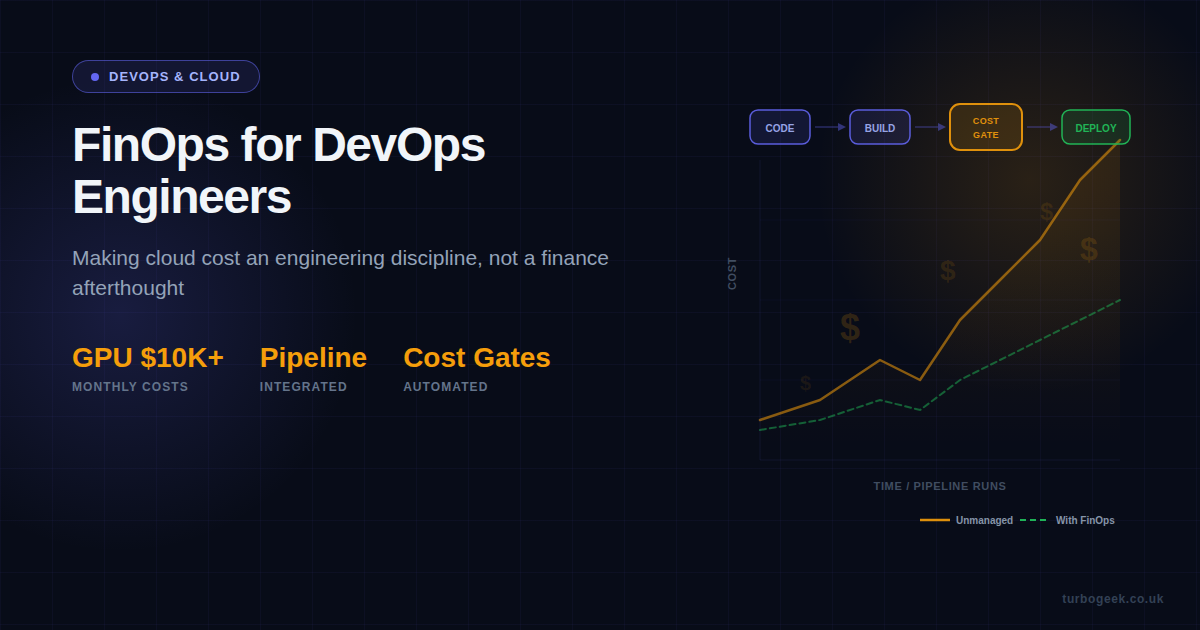
Cloud bills have a habit of arriving like a plot twist nobody asked for. A single GPU-backed workload can burn through $10,000 a month before anyone notices. AI inference pipelines, sprawling Kubernetes clusters, and “temporary” dev environments left running over weekends all contribute to a cost curve that climbs faster than your deployment frequency. FinOps exists to fix that — not by adding bureaucracy, but by embedding cost awareness directly into the engineering workflow you already run every day.
This guide covers the practical side: how to bolt cost gates onto your CI/CD pipeline, build a tagging strategy that actually works, and progress through the FinOps maturity model without needing a finance degree.
TL;DR
- Why now — GPU and AI infrastructure costs make cloud spend a board-level concern in 2026
- Maturity model — Inform (visibility), Optimise (efficiency), Operate (automation)
- Pipeline cost gates — Infracost in CI/CD blocks deployments that exceed budget thresholds
- Tagging strategy — Enforce team, environment, and service tags via policy-as-code
- Reserved capacity — Savings Plans and spot fleets for predictable and burst workloads
- Anomaly detection — Automated alerts catch runaway spend before the monthly bill does
New to cloud cost management? Start with the FinOps Maturity Model section to understand where your team sits today, then jump to Pipeline Cost Gates for the most impactful quick win.
| Topic | When to Use | Key Tool / Command |
|---|---|---|
| Cost estimation | Every PR with IaC changes | infracost diff --path . |
| Budget gates | CI/CD pipeline stage | infracost diff --compare-to |
| Tag enforcement | Pre-deploy validation | AWS Config / OPA policies |
| Right-sizing | Monthly review cycle | AWS Compute Optimizer |
| Anomaly alerts | Continuous monitoring | AWS Cost Anomaly Detection |
Why FinOps Matters Now
Cloud spending in 2026 is not the same beast it was three years ago. Two forces have changed the game entirely. First, GPU and AI infrastructure costs have exploded. A single p5.48xlarge instance on AWS costs over $98 per hour. Training runs, inference endpoints, and vector databases can accumulate five-figure bills in days rather than months. Second, multi-cloud adoption means cost data is scattered across AWS, Azure, GCP, and increasingly specialised providers like CoreWeave or Lambda Labs.
The traditional approach — finance reviews the bill at month-end, sends a stern email, engineers shrug — does not scale. FinOps flips this by making cost a first-class engineering metric, treated with the same rigour as uptime, latency, or test coverage. The FinOps Foundation defines three core principles: teams need to collaborate, decisions should be driven by business value, and everyone takes ownership of their cloud usage.
For DevOps engineers, this means your pipeline is no longer just about shipping code. It is about shipping code at the right cost.
The FinOps Maturity Model
The FinOps Foundation’s maturity model breaks the journey into three stages. Most engineering teams discover they are somewhere between Stage 1 and Stage 2 when they first assess honestly.
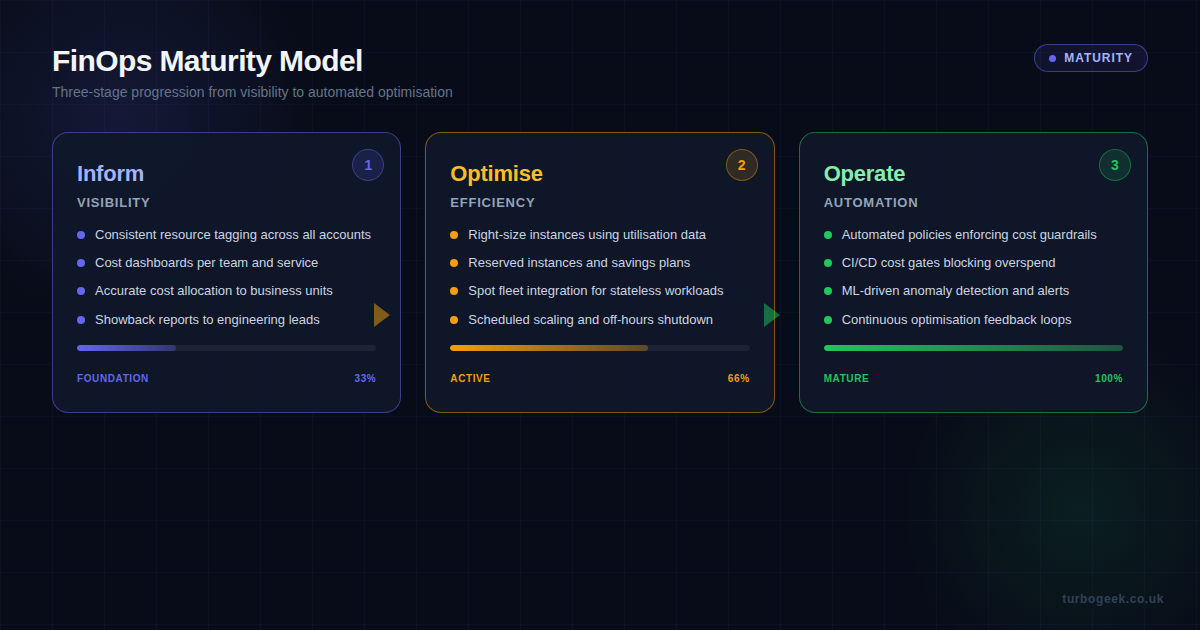
Stage 1: Inform. This is the visibility stage. You cannot optimise what you cannot see. The goal here is accurate cost allocation — knowing exactly which team, service, and environment is responsible for every pound spent. This requires consistent resource tagging (more on that below), cost dashboards accessible to engineering teams (not just finance), and showback reports that connect infrastructure spend to business outcomes.
Stage 2: Optimise. With visibility in place, you move to active cost reduction. This means right-sizing instances based on actual utilisation data rather than guesswork, purchasing Reserved Instances or Savings Plans for predictable workloads, integrating spot instances for fault-tolerant jobs, and implementing scheduled scaling that shuts down non-production environments outside working hours.
Stage 3: Operate. The mature stage is where cost management becomes automated. CI/CD pipelines include cost gates that block overspend before it reaches production. Policy-as-code enforces guardrails. Machine learning detects anomalous spending patterns and raises alerts before humans would notice. The feedback loop between deploy and cost is continuous, not monthly.
Try it: Infracost on every pull request
The fastest way to make cloud cost a real engineering signal is to comment on every pull request with the cost diff against the target branch. The workflow below does that with Infracost in about thirty lines:
Tagging is the other half. A perfect cost gate is useless if you cannot attribute the spend. Enforce required tags with policy-as-code rather than wishful thinking — here is a Rego rule that fails any new AWS resource missing your standard tag set:
Run the policy via conftest test plan.json --policy ./policy/ in your existing Terraform pipeline. Combined with Infracost on PRs, you get visibility before merge and attribution after deploy — the two halves of practical FinOps for a DevOps team.
Pipeline Cost Gates with Infracost
The single most impactful thing a DevOps engineer can do for FinOps is add cost estimation to the CI/CD pipeline. Infracost is the tool that makes this practical — it analyses Terraform plans and returns a cost diff showing exactly how much a proposed change will add to (or subtract from) the monthly bill.
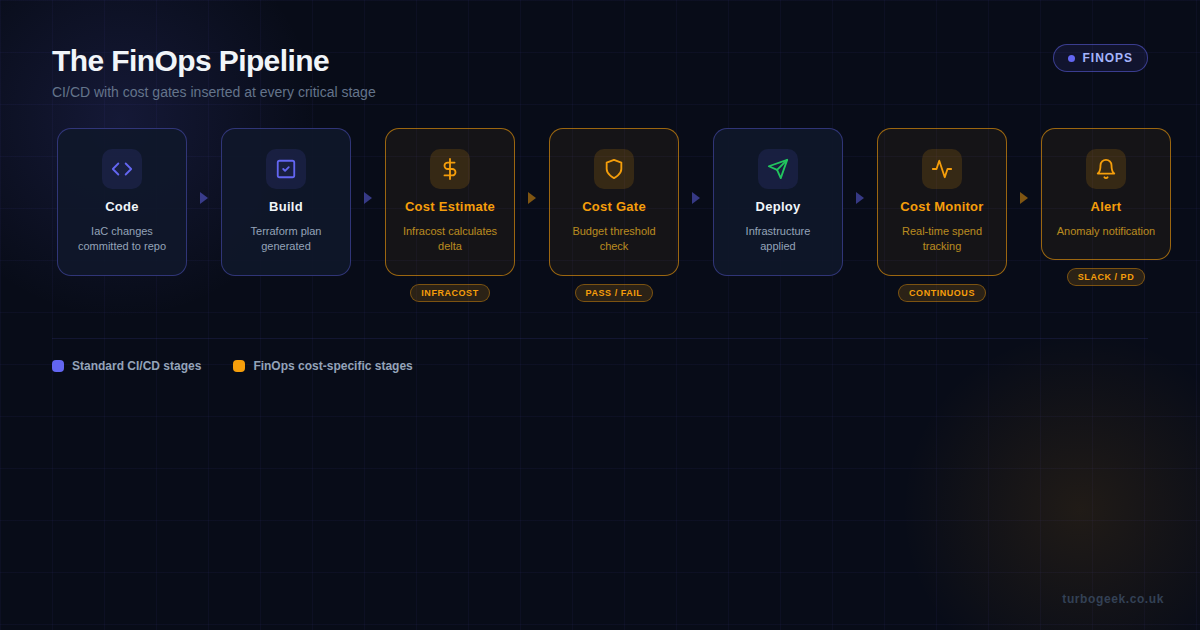
Here is how to wire Infracost into a GitHub Actions workflow as a cost gate:
This workflow runs on every pull request that touches Terraform files. It generates a cost diff, checks whether the monthly increase exceeds your threshold (here set at $500), and blocks the merge if it does. The PR comment gives the developer immediate visibility into the cost impact of their change — no guessing, no waiting for the bill.
The threshold is configurable per environment. You might allow $500 increases for production infrastructure but only $50 for development environments. Teams with GPU workloads often set separate, higher thresholds for ML pipelines.
Tagging Strategy That Actually Works
Every FinOps guide mentions tagging. Few explain how to make it stick. The problem is never technical — it is organisational. Tags rot the moment enforcement stops. Here is a practical approach that survives contact with reality.
Define a mandatory tag schema with exactly four required tags:
- team — the owning engineering team (e.g.,
platform,data-eng,ml-ops) - environment —
production,staging,development,sandbox - service — the application or microservice name
- cost-centre — maps to the business unit for financial allocation
Enforce these tags at two levels. First, in Terraform modules using variable validation:
Second, enforce at the AWS account level using AWS Organizations tag policies or Service Control Policies (SCPs) that deny resource creation without the required tags. This catches anything deployed outside your Terraform pipeline — manual console changes, CLI one-liners, and that CloudFormation stack someone created “just to test something.”
Reserved Capacity Planning
On-demand pricing is the default, and it is also the most expensive option. For workloads with predictable usage patterns, Reserved Instances (RIs) and Savings Plans offer 30-60% discounts. The trick is knowing which workloads qualify.
Good candidates for reserved capacity: production databases (RDS, ElastiCache), baseline compute that runs 24/7, NAT Gateways, and long-running EKS node groups. These workloads have consistent, predictable utilisation.
Poor candidates: CI/CD runners, batch processing jobs, development environments, and any workload with variable demand. These are better served by spot instances (up to 90% discount) or scheduled scaling.
A practical approach is the 70/20/10 split: cover 70% of your baseline with Savings Plans (flexible across instance families), 20% with spot instances for burst capacity, and leave 10% on-demand as headroom for unexpected spikes. Review this allocation quarterly using AWS Cost Explorer’s reservation utilisation reports.
Anomaly Detection and Alerting
Cost anomalies are the cloud equivalent of a memory leak — they start small and compound until someone gets a nasty surprise. AWS Cost Anomaly Detection uses machine learning to establish spending baselines per service and alerts when actual spend deviates significantly.
Set up anomaly detection with Terraform:
Wire the SNS topic to a Slack channel or PagerDuty service. The threshold here triggers on any anomaly with an absolute impact of $100 or more — adjust this based on your typical daily spend. Teams running GPU workloads may want a higher threshold to avoid alert fatigue from expected variance in training job costs.
Complement AWS-native anomaly detection with custom CloudWatch alarms on your AWS billing metrics. Set a daily budget alarm at 80% of your expected daily spend so you get an early warning rather than a post-mortem.
Quick Wins You Can Ship This Week
Not every FinOps improvement needs a quarter-long initiative. Here are five changes you can deploy this week that will have measurable impact:
- Schedule non-production shutdowns. Use AWS Instance Scheduler or a simple Lambda function to stop development and staging instances outside working hours. This alone can cut non-production compute costs by 65%.
- Enable S3 Intelligent-Tiering. For any bucket where access patterns are unpredictable, this automatically moves objects between access tiers with no retrieval fees. Set it and forget it.
- Delete unattached EBS volumes. Run
aws ec2 describe-volumes --filters Name=status,Values=availableand clean up the orphans. These accumulate silently after instance terminations. - Review NAT Gateway data processing. NAT Gateways charge per GB processed. If your private subnets are routing large data transfers through NAT, consider VPC endpoints for S3 and DynamoDB — they are free and faster.
- Set up AWS Budgets. Create a budget per AWS account with alerts at 50%, 80%, and 100% of expected monthly spend. This takes five minutes and provides a safety net while you build more sophisticated controls.
Making It Stick
The hardest part of FinOps is not the tooling — it is the cultural shift. Cost needs to be visible in the same places engineers already look: pull request comments, deployment dashboards, and sprint retrospectives. When a developer sees that their PR adds $340/month to the bill, they make different design decisions. That feedback loop is the entire point.
Start with the pipeline cost gate. It is the single change that creates the most leverage because it operates at the point of decision — before code ships, not after the bill arrives. Layer in tagging enforcement next, then reserved capacity planning. By the time you reach automated anomaly detection, you will have built a cost-aware engineering culture that treats cloud spend as seriously as it treats uptime.
Cloud cost is an engineering problem. It deserves an engineering solution.
Leave a Reply