
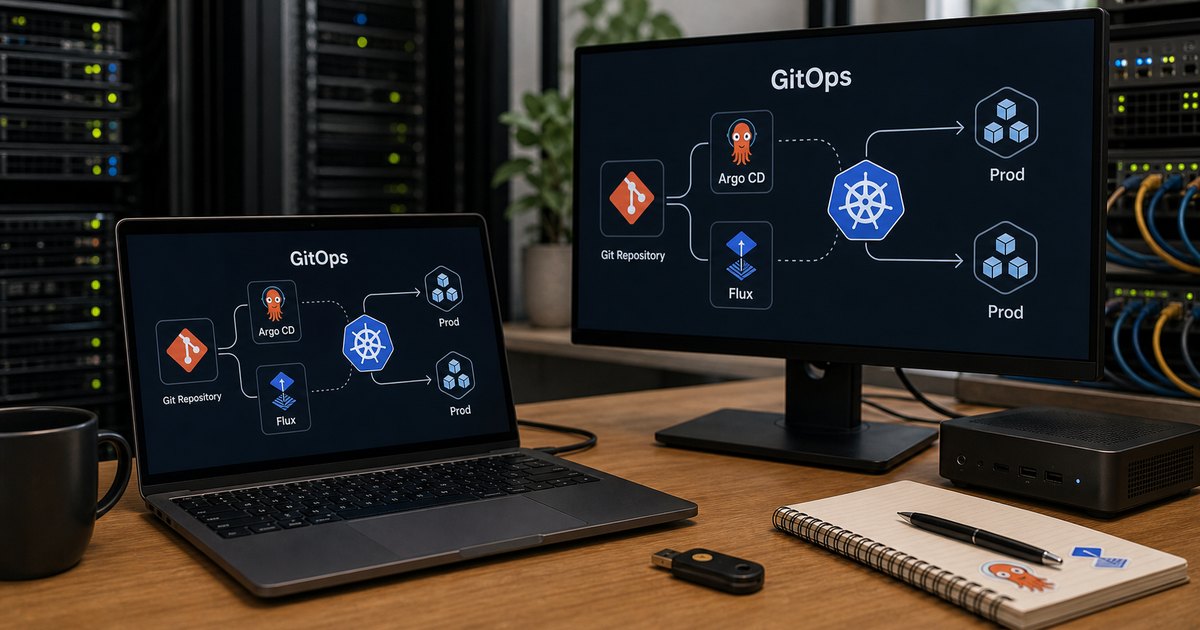
The short answer
Choose Argo CD if your team wants a built-in dashboard, broad ecosystem support and the easiest onboarding for engineers new to GitOps. Choose Flux if you prefer a composable, Kubernetes-native toolkit with built-in image automation and deep Kustomize integration. Both are CNCF Graduated and battle-tested in production — there is no wrong answer, so trial both against a non-critical workload before you commit.
TL;DR
- GitOps is the default — both Argo CD and Flux are CNCF Graduated projects powering production Kubernetes worldwide.
- Argo CD — choose for its built-in dashboard, broad adoption, and easier onboarding for platform teams.
- Flux — choose for its composable architecture, native image automation, and deep Kustomize integration.
- The right answer — depends on your team size, operational maturity, and whether you need a UI or prefer pure CLI/API workflows.
If you are running Kubernetes in production, you have almost certainly heard the term GitOps. By 2026 it has moved from a promising pattern to the default delivery model for most serious Kubernetes deployments. The question is no longer whether to adopt GitOps, but which tool to use.
This article compares the two dominant open-source GitOps controllers — Argo CD and Flux — across the dimensions that matter in production: usability, extensibility, multi-tenancy, and operational overhead.
New to GitOps? Start with the What Is GitOps? section below, then jump to the comparison table.
What Is GitOps?
GitOps is an operational model where Git is the single source of truth for your desired infrastructure and application state. A controller running inside the cluster continuously compares the live state against the declared state in Git. When it detects drift, it reconciles — pulling the cluster back into alignment automatically.
The core loop is simple: you commit a change to a Git repository, the controller detects that commit, and it applies the delta to the cluster. No manual kubectl apply, no CI pipeline pushing credentials into clusters, no imperative scripts. Everything is declarative, auditable, and reversible.
Both Argo CD and Flux implement this model, but they approach it differently. Understanding those differences is key to choosing the right tool for your team.
Why GitOps Won
Before diving into the comparison, it is worth understanding why GitOps has become the standard rather than just another deployment strategy. Three factors drove adoption:
- Auditability. Every change is a Git commit with an author, timestamp, and diff. Compliance teams love this. Security teams love it even more.
- Rollback simplicity. Reverting a bad deployment is a
git revert. The controller picks up the revert commit and rolls the cluster back to the previous known-good state. No emergency SSH sessions. - Drift elimination. Manual changes to a cluster are detected and overwritten. This prevents the slow configuration rot that plagues long-lived environments.
The CNCF’s graduation of both Argo CD and Flux validated GitOps as a production-grade pattern. Most managed Kubernetes providers now include GitOps integrations out of the box, and major enterprises have standardised on one of these two tools across their fleets.
The GitOps Delivery Flow
Regardless of which tool you choose, the GitOps delivery flow follows the same circular pattern. Understanding this loop is essential before comparing implementations.
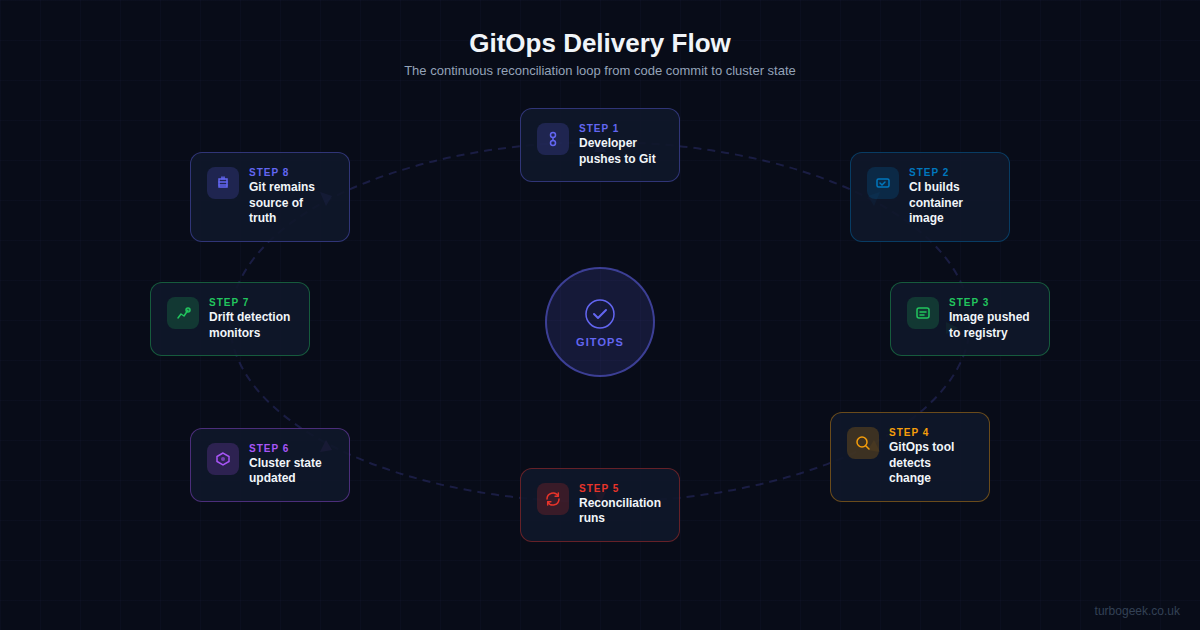
A developer pushes code to Git. The CI system builds a container image and pushes it to a registry. The GitOps controller detects the change — either by polling the Git repository or by receiving a webhook notification. It then runs a reconciliation, comparing desired state against live state and applying any differences. Drift detection continues monitoring after the deployment, ensuring the cluster stays aligned with Git.
Argo CD: The Dashboard-First Controller
Argo CD was created by Intuit and donated to the CNCF. It reached Graduated status in December 2022, and as of 2026 it remains the most widely adopted GitOps controller by install count. Its defining feature is the built-in web dashboard — a rich, real-time visualisation of application state across clusters.
Strengths
- Web UI. Argo CD ships with a full dashboard that shows application sync status, resource trees, logs, and diff views. For teams transitioning from traditional CI/CD, this visual feedback is invaluable.
- ApplicationSets. The ApplicationSet controller allows you to template and generate Applications dynamically — perfect for multi-cluster, multi-tenant deployments at scale.
- Ecosystem. Argo CD has a massive community. Plugins, integrations with Crossplane, Terraform, and Vault are well-documented. Finding answers to problems is rarely difficult.
- RBAC. Fine-grained access control through AppProjects lets you restrict which repositories, clusters, and namespaces each team can deploy to.
- SSO integration. Out-of-the-box support for OIDC, SAML, LDAP, and GitHub/GitLab SSO makes enterprise adoption straightforward.
Trade-offs
- Image automation is separate. Argo CD does not natively detect new container image tags. You need the Argo CD Image Updater, a companion project that is still maturing.
- Notification handling. Alerting on sync failures or drift requires the Argo CD Notifications controller or webhook configuration — it is not built into the core.
- Resource footprint. Running the full Argo CD stack (API server, repo server, application controller, Redis, Dex) consumes more cluster resources than Flux.
Flux: The Composable Toolkit
Flux was originally created by Weaveworks and is now maintained by the CNCF community following Weaveworks’ closure in 2024. It reached Graduated status in November 2022. Flux takes a fundamentally different architectural approach: instead of a monolithic application, it is a set of composable controllers that you can adopt incrementally.
Strengths
- Composable architecture. Flux is built from independent controllers — source-controller, kustomize-controller, helm-controller, notification-controller, and image-automation-controller. You install only what you need.
- Native image automation. Flux’s image-reflector and image-automation controllers scan registries for new tags and automatically commit updated image references back to Git. This is a first-class feature, not a bolt-on.
- Built-in notifications. The notification-controller ships with Flux and supports Slack, Microsoft Teams, Discord, webhooks, and more without additional setup.
- Multi-tenancy model. Flux’s tenancy model uses Kubernetes namespaces and service accounts for isolation. Each tenant gets their own source, kustomization, and RBAC — enforced at the Kubernetes level.
- Lightweight footprint. Flux’s controllers are lean. For small to medium clusters, the resource overhead is noticeably lower than Argo CD.
Trade-offs
- No built-in UI. Flux is CLI and API-first. There is no official dashboard. Third-party options like the Weave GitOps dashboard exist, but they require separate installation and maintenance.
- Steeper learning curve. The composable design means more CRDs to understand. Teams need to grasp how GitRepository, Kustomization, HelmRelease, and ImagePolicy objects interact.
- Community transition. Following the Weaveworks closure, Flux’s community governance has stabilised under the CNCF, but enterprise support options are less mature than Argo CD’s ecosystem.
Feature Comparison
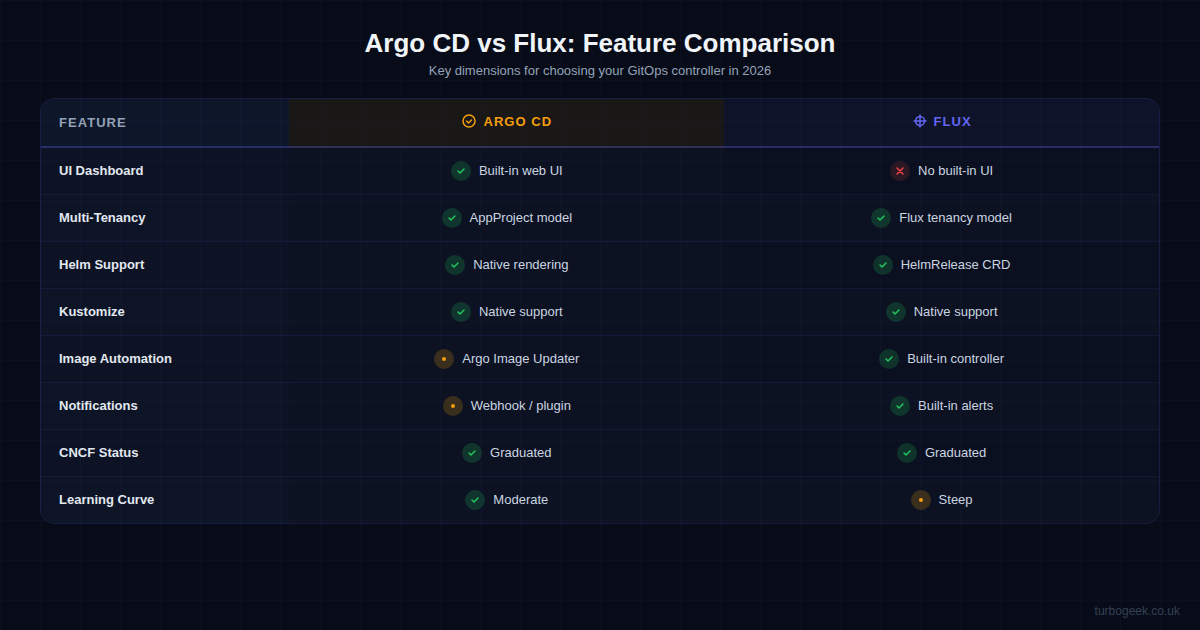
The table below summarises the key differences across the dimensions that matter most in production. Both tools handle the fundamentals — Git reconciliation, Helm, Kustomize — but they diverge on UI, automation, and operational model.
| Dimension | Argo CD | Flux |
|---|---|---|
| UI Dashboard | Built-in web UI with sync status, resource trees, logs | No built-in UI; third-party options available |
| Multi-Tenancy | AppProject RBAC model | Namespace-based tenancy with service accounts |
| Helm | Native rendering | HelmRelease CRD with dependency ordering |
| Kustomize | Native support | Native support with deep integration |
| Image Automation | Separate Image Updater project | Built-in image-reflector and image-automation |
| Notifications | Separate Notifications controller | Built-in notification-controller |
| CNCF Status | Graduated (Dec 2022) | Graduated (Nov 2022) |
| Learning Curve | Moderate — UI helps onboarding | Steep — many CRDs, CLI-first |
Try them yourself: 60-second quickstarts
Both controllers are easier to evaluate hands-on than from a comparison page. The two blocks below are the minimal “install plus first application” path for each. Run them against a throwaway cluster (kind, k3d, minikube or a real one) before betting on either.
Argo CD: install + register one app
Flux: bootstrap + first source & kustomization
Both are CNCF Graduated and both will take a sensible commit and reconcile it. The flavour difference shows up in how you operate them, not in whether they work. Pick the one whose feedback loop you prefer.
When to Choose Argo CD
Argo CD is the stronger choice when:
- Your team is new to GitOps. The dashboard provides immediate visibility and reduces the learning curve. Developers can see sync status, view diffs, and trigger manual syncs without touching the CLI.
- You need multi-cluster management from a single pane. Argo CD excels at managing dozens of clusters from one control plane. ApplicationSets make it straightforward to deploy the same application across development, staging, and production.
- Enterprise SSO and RBAC are requirements. Argo CD’s AppProject model with built-in SSO support integrates cleanly with corporate identity providers.
- You want the largest community. More tutorials, more Stack Overflow answers, more battle-tested configurations in the wild.
When to Choose Flux
Flux is the stronger choice when:
- You want image automation out of the box. If your workflow involves automatically promoting new container images through environments, Flux’s built-in image automation is significantly more mature than Argo CD’s equivalent.
- You prefer a lightweight, composable architecture. Flux lets you install only the controllers you need. For resource-constrained edge clusters or cost-sensitive environments, this matters.
- Your team is experienced with Kubernetes. Flux’s CRD-based model feels natural to teams already comfortable with the Kubernetes operator pattern. Everything is a Custom Resource; everything is
kubectl-native. - You need built-in notifications. Flux’s notification-controller ships with the core install and requires zero additional setup for Slack, Teams, or webhook alerts.
Practical Setup Considerations
Whichever tool you choose, the following practical considerations apply to both:
Repository Structure
Both tools work best with a monorepo or repo-per-environment pattern. The monorepo approach keeps all environment configurations in one place with Kustomize overlays. The repo-per-environment approach gives each environment its own Git repository, which simplifies access control but increases operational overhead.
# Monorepo structure (recommended for most teams)
infra-repo/
  base/
    deployment.yaml
    service.yaml
    kustomization.yaml
  overlays/
    dev/
      kustomization.yaml
    staging/
      kustomization.yaml
    production/
kustomization.yamlSecrets Management
Neither tool solves secrets natively. Both integrate with external secret managers through projects like External Secrets Operator or Sealed Secrets. Plan your secret management strategy before deploying either tool — it is the most common source of friction in GitOps adoption.
Progressive Delivery
For canary deployments and blue-green releases, both tools integrate with Flagger (a CNCF project originally built by Weaveworks). Flagger works natively with both Argo CD and Flux, so progressive delivery is not a differentiator between them.
Monitoring and Observability
Both tools expose Prometheus metrics. Set up dashboards for reconciliation duration, sync failure rates, and drift detection counts. In production, these metrics are your early warning system for GitOps controller health.
The Verdict
There is no wrong answer between Argo CD and Flux in 2026. Both are CNCF Graduated, both are battle-tested in production at scale, and both implement the GitOps model faithfully.
Choose Argo CD if you value a visual dashboard, need broad ecosystem support, and want the most accessible onboarding experience for teams new to GitOps. Choose Flux if you value composability, need built-in image automation, and prefer a lightweight, Kubernetes-native toolkit.
The best approach is to trial both against a non-critical workload. Spin up a test cluster, deploy the same application with each tool, and see which operational model fits your team’s workflow. The GitOps pattern is what matters — the tool is an implementation detail.
Quick Reference
| Topic | When | Command / Resource |
|---|---|---|
| Install Argo CD | First setup | kubectl create namespace argocd && kubectl apply -n argocd -f https://raw.githubusercontent.com/argoproj/argo-cd/stable/manifests/install.yaml |
| Install Flux | First setup | flux bootstrap github --owner=your-org --repository=fleet-infra --path=clusters/my-cluster |
| Check sync status (Argo) | Monitoring | argocd app list |
| Check sync status (Flux) | Monitoring | flux get kustomizations |
| Force reconcile (Argo) | Troubleshooting | argocd app sync <app-name> |
| Force reconcile (Flux) | Troubleshooting | flux reconcile kustomization <name> |
| View diff (Argo) | Pre-deploy check | argocd app diff <app-name> |
| Suspend reconciliation (Flux) | Maintenance | flux suspend kustomization <name> |
Frequently asked questions
Is Argo CD or Flux better for beginners?
Argo CD. Its built-in web dashboard gives teams new to GitOps a visual model of what is deployed, what is out of sync and what changed, which makes onboarding noticeably easier than Flux’s CLI-and-CRD-first approach.
Are Argo CD and Flux both production-ready?
Yes. Both are CNCF Graduated projects running production Kubernetes workloads at scale worldwide. The choice is about operational fit, not maturity.
Which tool handles image update automation better?
Flux has image automation built in — it can watch a container registry and commit image tag updates back to Git natively. With Argo CD this workflow typically requires additional tooling.
What is GitOps in one sentence?
GitOps means Git is the single source of truth for your cluster state: you declare the desired state in a repository, and a controller such as Argo CD or Flux continuously reconciles the cluster to match it.
Leave a Reply